






LuckPerms is a plugin that lets you make ranks, such as Helper and Moderator, and decide which commands each rank may use. Install it, create a group with lp creategroup, give the group permissions, and add players to it with lp user <name> parent add <group>.
LuckPerms runs on a plugin server such as Paper or Purpur. It does not run on a plain vanilla server.
Install it in the ArthOS panel
- Open your server and the Add-ons tab, then choose the Plugins button (1).
- Under “Find plugins”, pick a source such as Modrinth (2) and search for
LuckPerms(3). - Choose Install on the LuckPerms result. A dialog lists the builds, newest first; choose Install there too.
- The panel says “Installed LuckPerms” with the version, and asks you to restart the server to load it. Choose Restart now.
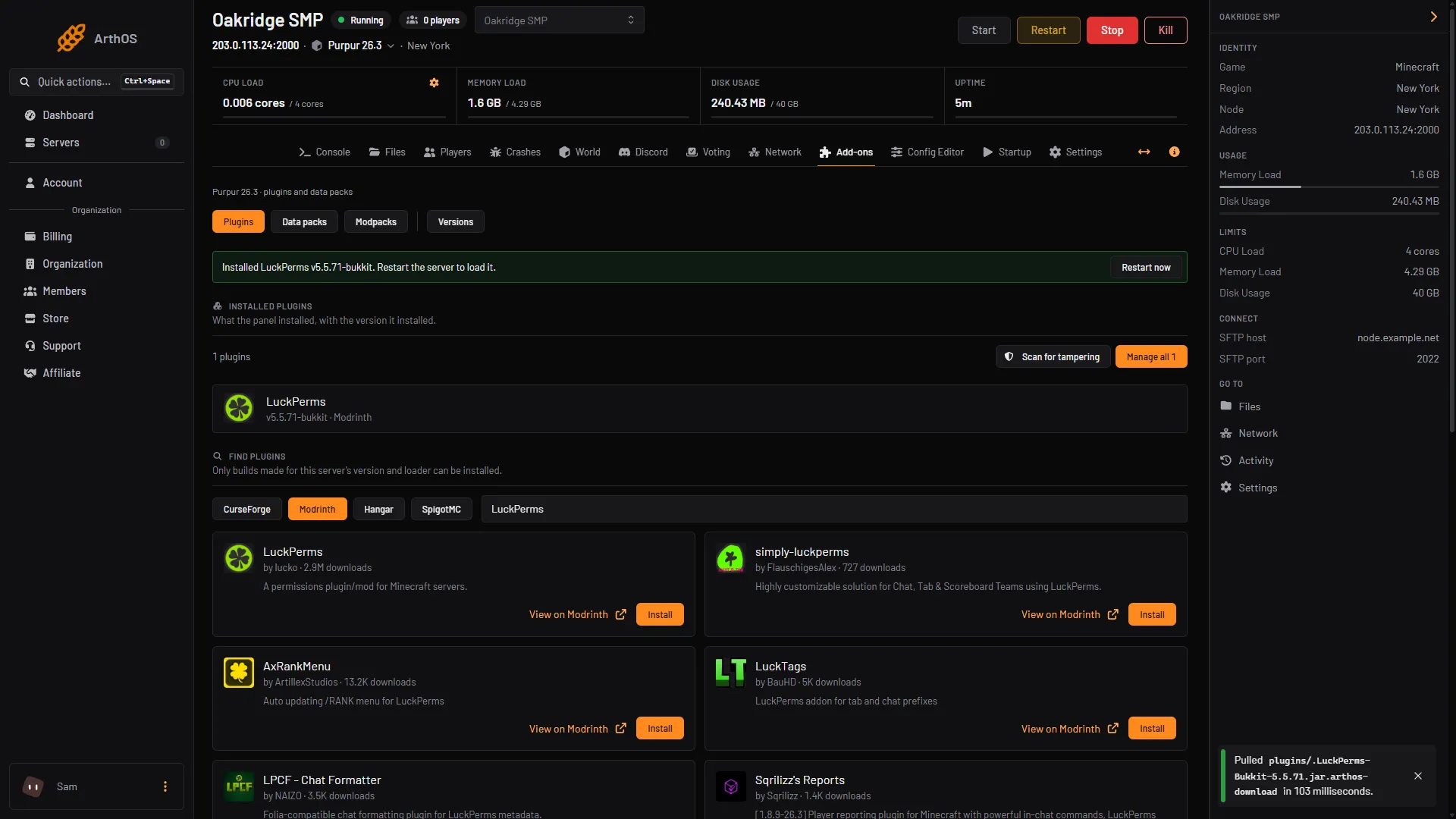
- Plugins button
- Pick a source
- Search for LuckPerms
Only builds made for your server’s version and loader can be installed. If the panel offers only data packs, your server has no plugin loader. Switch to Paper or Purpur first, in the Versions tab. See change the server version.
When the server is back, type lp in the Console tab. If LuckPerms printed its version, it is working.
Install it by hand
- Download the jar for your server from the LuckPerms download page.
- Upload the jar to the
pluginsfolder. The server must have started at least once. If you had an older LuckPerms jar there, delete it. - Fully restart the server and watch the console to check LuckPerms enables.
The settings are in plugins/LuckPerms/config.yml. By default LuckPerms keeps its data in a file database inside that folder. Do not delete it. Only change the storage to MySQL if several servers need to share ranks.
Get access to the commands
When LuckPerms is new, nobody can use lp commands. Operators on a Paper or Spigot server can by default. For everyone else, give yourself access once from the server console. Type this with no slash, using your own name:
lp user Alex permission set luckperms.* trueFrom now on you can type commands in game with a slash, or in the console without one.
Make a rank
- Create the groups:
lp creategroup helper
lp creategroup moderator- Make Moderator inherit everything Helper has:
lp group moderator parent add helper- Give a group a permission. A permission is a text like
minecraft.command.ban, the one for thebancommand:
lp group moderator permission set minecraft.command.ban trueSet it to false to deny it. To remove the setting, use lp group moderator permission unset minecraft.command.ban.
- Put a player in the group, or take them out:
lp user Alex parent add moderator
lp user Alex parent remove moderator- Check the result with
lp user Alex info. It shows the player’s groups.
If a player is in several groups, lp group moderator setweight 50 sets the weight of a group.
Find the permission for a command
Your plugins list their permissions in their own documentation. You can also ask LuckPerms:
- Type
lp verbose record Alex, where Alex is the player who will run the command. - Ask them to run the command.
- Type
lp verbose paste. It turns verbose mode off and makes a report of every permission that was checked.
Use the web editor
- Type
lp editor. LuckPerms prints a link. - Open the link. The editor opens in your browser with your groups and players.
- Change what you need, and save. The editor shows a command.
- Copy that command and run it in the server console or in game. It applies the changes.
Bring your ranks from another server
- On the old server, run
lp export ranks. LuckPerms writes the fileranks.json.gzin its plugin folder. - Upload that file to
plugins/LuckPermson the new server, in Files. - On the new server, run
lp import ranks.json.gz. Add--replaceto overwrite the ranks already there; without it, the two are merged.
The file must come from LuckPerms version 5. lp export also takes --without-users to export only the groups.
If it does not work
lpanswers only with the version. You do not have access yet. Run theluckperms.*command above in the console.- A permission does not work. A permission that is not set usually acts as false. Set it to
truefor the group, and check the player is in the group withlp user Alex info. - You are not sure which permission a command needs. Use
lp verbose recordas shown above. - The panel says no build is made for this server. The plugin has no version for your Minecraft version and loader. Check your version in the Versions tab. A build made for an older version may still work but can cause bugs or lag; see when a plugin has no build for your version.
- Changes from the web editor did not apply. You must run the command the editor gives you after you save.
More on the game: Minecraft servers. To manage who is an operator instead, see op and deop.
Sources: github.com: Wiki, api.modrinth.com: Luckperms, luckperms.net: Command Usage