






Players on phones, tablets and Windows Bedrock can join your Java server on the same address, but Xbox, PlayStation and Nintendo Switch cannot add a server by address. Two plugins make this work. Geyser translates the Bedrock game into Java for your server, and Floodgate lets Bedrock players join without owning Java Edition. In the ArthOS panel it is one switch on the Settings page. On a 26.3 server, turning it on first moves the server to Minecraft 26.2, so take a backup first.
What you need to know first
- It runs on a plugin server. Your server needs Paper or Purpur. Fabric, Forge and NeoForge servers with mods cannot be used by Bedrock players, so the panel refuses to turn it on there.
- Geyser supports one Java version. Geyser currently supports Minecraft Bedrock 26.30 to 26.52 and Minecraft Java 26.2. A server on a newer Java version, such as 26.3, has to go back to 26.2 first. The panel does that for you after a backup, and warns you if your world was saved by a newer version, because newer worlds can fail to load on an older one.
- It uses the same address. Java uses TCP and Bedrock uses UDP, so Bedrock players use your server’s address and the same port number. Nothing extra to open.
- Bedrock names start with a dot. A Bedrock player called Steve shows as
.Steveon your server. This keeps their name from clashing with a Java player. - Bedrock players join from the Bedrock app on phones, tablets, consoles and Windows. Xbox, PlayStation and Nintendo Switch have no screen for adding a server by address; they reach featured servers and Realms. Workarounds exist from other projects, but Loafhosts does not run or support them.
In the ArthOS panel
- Open your server and choose Settings.
- Find the Bedrock players card (1). It reads “Let players on phones, tablets, consoles and Windows join this Java server on the same address. The panel adds Geyser and Floodgate and sets them up.” Press Let Bedrock players join (2).
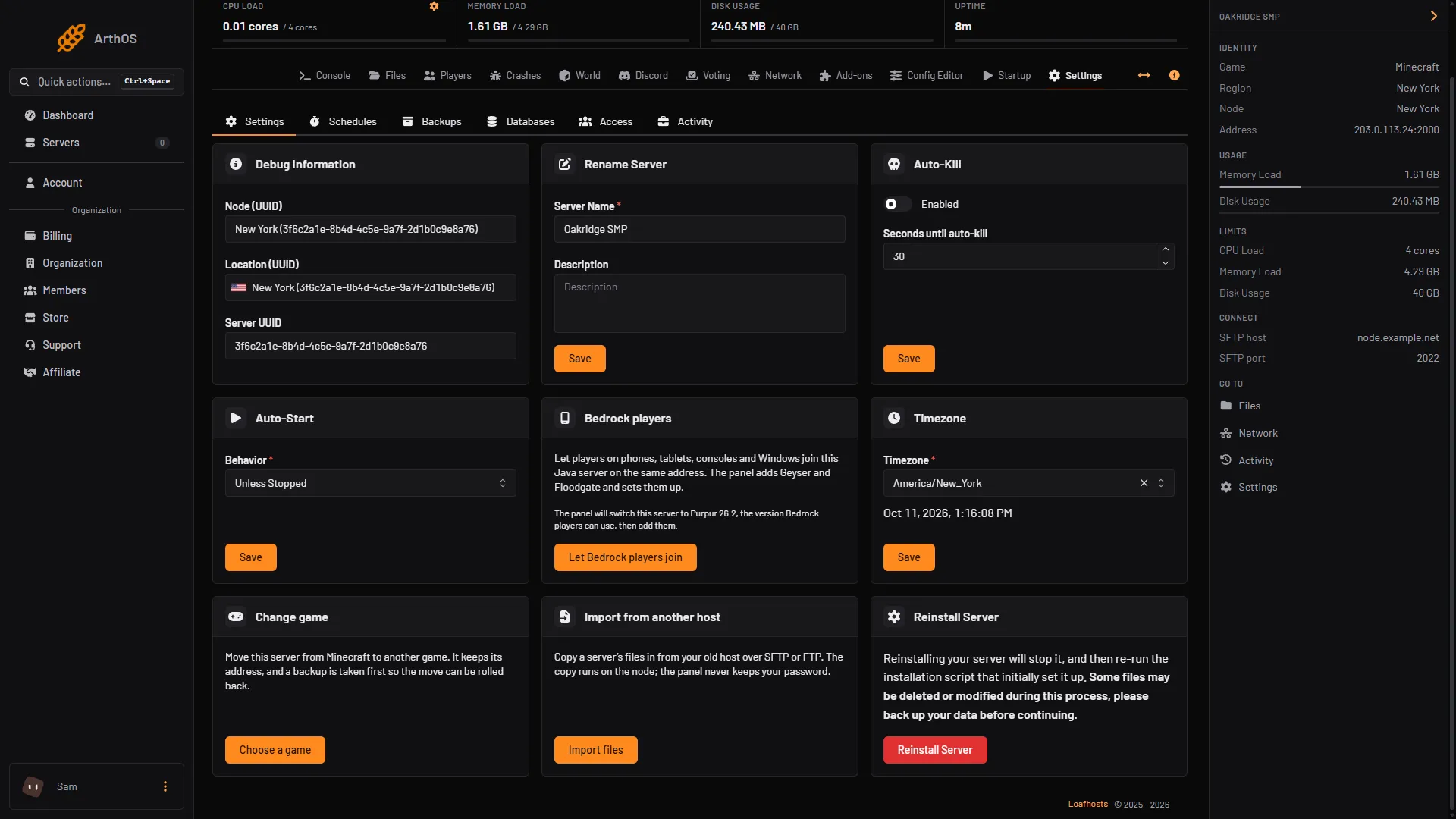
- Find the Bedrock players card
- Let Bedrock players join
- On a 26.3 server the card adds: “The panel will switch this server to Purpur 26.2, the version Bedrock players can use, then add them.” If the server needs a change first, the panel lists it. The panel takes a backup first when it can; if it cannot, the dialog says why. Your world, settings and plugins stay. Read the list, then confirm.
- The panel adds Geyser and Floodgate from GeyserMC’s own download site, checks each file against its checksum, and writes Geyser’s settings for you. Restart the server when the panel asks.
- The card then shows the address Bedrock players use, with the Geyser and Floodgate versions.
Ordering a new server? On the order page, set Edition to Java + Bedrock. The panel builds it on the right Java version from the start. Plugins work on it, but modpacks do not. You can change it later in the server settings.
Tell Bedrock players how to join
Players add the server in Bedrock Edition’s server list with your server address and the port. Bedrock does not read domain SRV records, so they type the port even if you set up a domain.
Turn it off
Use the turn-off button on the same card. The panel removes the two jars and keeps their settings, so turning it on again is quick.
By hand
For your own host. You need Java 21 or newer for Geyser, and Paper on 1.20.5 or newer.
- Download
Geyser-Spigot.jarandFloodgate-Spigot.jarfrom the GeyserMC downloads. Put both inpluginsand restart the server once. - Open
plugins/Geyser-Spigot/config.ymland find thebedrocksection. Setaddress: 0.0.0.0, theportto the UDP port Bedrock players will use, andclone-remote-port: trueif you want it to follow the Java port. - In the
javasection, setauth-type: floodgate. - Restart the server. In the console, run
geyser connectiontest <ip> <port>to test the connection. - Open the UDP port in your router and firewall. The default is 19132.
Never share Floodgate’s key.pem. Anyone holding it can skip Java sign-in.
A server on Java older than 26.2 also needs the ViaVersion plugin so Geyser’s 26.2 client can join. If the server is newer than 26.2, Geyser must support that version before it works.
If it does not work
- The panel says the query port uses the game port. Turn off
enable-queryin the Config Editor first. Geyser and query cannot share a port. - The panel says the server runs Fabric, Forge or NeoForge. Bedrock players cannot use mods. Use a Paper or Purpur server instead.
- The panel says Geyser or Floodgate is already in
plugins. You added your own copy. Remove it from Files and try again. - “Try again in a moment”. GeyserMC’s download site could not be read. Wait a minute and press Try again.
- Bedrock players cannot connect after turning it on. Restart the server, then check they typed the address and port, and that their Bedrock app is a version Geyser supports. Older Bedrock versions are not supported.
- A command cannot find a Bedrock player. Use the name with the dot, for example
.Steve. - Some things are different for Bedrock players. Clickable links in chat and tab complete in the chat box do not work for them. Geyser lists the full set on its current limitations page.
Host your server on the Minecraft page.
Sources: geysermc.org: Geyser, geysermc.org: Setup, geysermc.org: Supported versions, geysermc.org: Current limitations, geysermc.org: Using geyser with consoles, geysermc.org: Floodgate, geysermc.org: Setup, geysermc.org: Faq