
















Conan Exiles uses a lot of memory. When the server reaches the memory its plan gives it, the machine ends it at once. The fastest fix is to leave the Isle of Siptah out of the world. If nobody plays there, that roughly halves what the server needs.
How you know
Open the Crashes page. Each start of the server is a row. A start that ran out of memory shows Crashed (“The game stopped without being asked to.”) and one of two findings:
- The server used all its memory and was stopped. The machine ended the game when it reached its memory limit. The game had no time to save or to write why, so its own log stops mid-way. The exit code is 137.
- The server ran out of memory. The game itself reported that it could not get more memory.
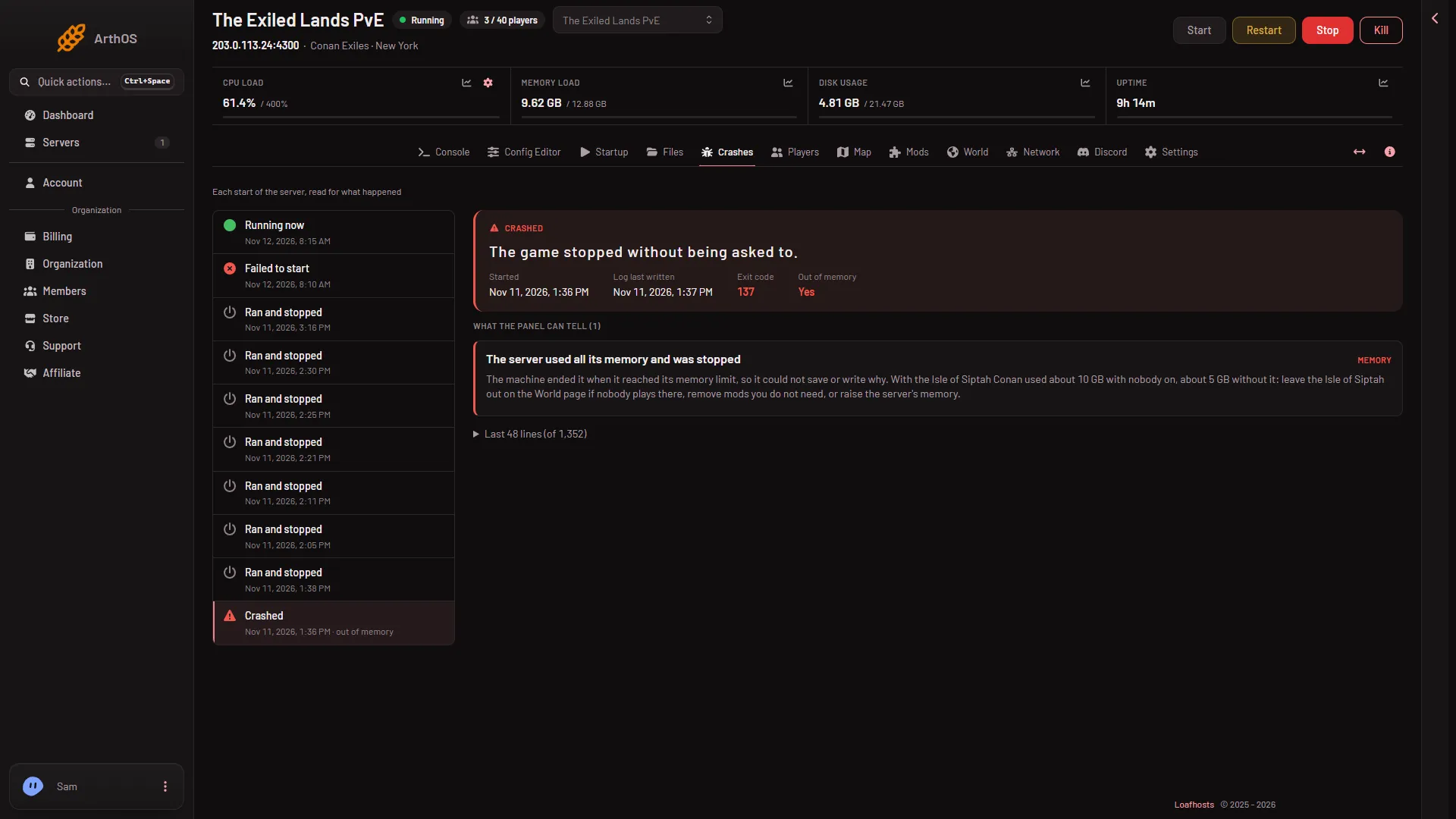
- Out of memory
- Crashed
The row (2) and its Out of memory field (1) tell you the start was ended for memory.
Exit code 137 means the game was killed. The usual reason is memory. The other reason is a stop that took too long. If the row says memory, treat it as memory.
How much memory Conan needs
With nobody on, Conan used about 10 GB with the Isle of Siptah loaded and about 5 GB without it. A server with 8 GB was killed for memory while it loaded with the Isle of Siptah. That is why the smallest Conan Exiles plan on Loafhosts has 12 GB.
A world that people have played in, with bases and mods, needs more than an empty one. These numbers are a floor, not a promise.
Fix 1: leave the Isle of Siptah out
Do this only if nobody plays on the island. The game keeps both lands in one world, and a left-out land cannot be reached. Not checked on Enhanced, server build 25792439 as of 13 November 2026: where a character or a base that is on the island ends up. Ask players to leave the island first, and take a backup before you switch it off (Settings, Backups, Create).
- Stop the server. The game keeps its world open while it runs, so the switch works only on a stopped server.
- Open the World page.
- In the Isle of Siptah card, turn off Load the Isle of Siptah.
- Start the server.
The page confirms with “The Isle of Siptah is left out from the next start.” Nobody can sail to the island after that, and the server uses less memory. Turn the switch on again later to bring it back. Funcom says the same about leaving out a region: it “can help lower RAM usage on dedicated servers”.
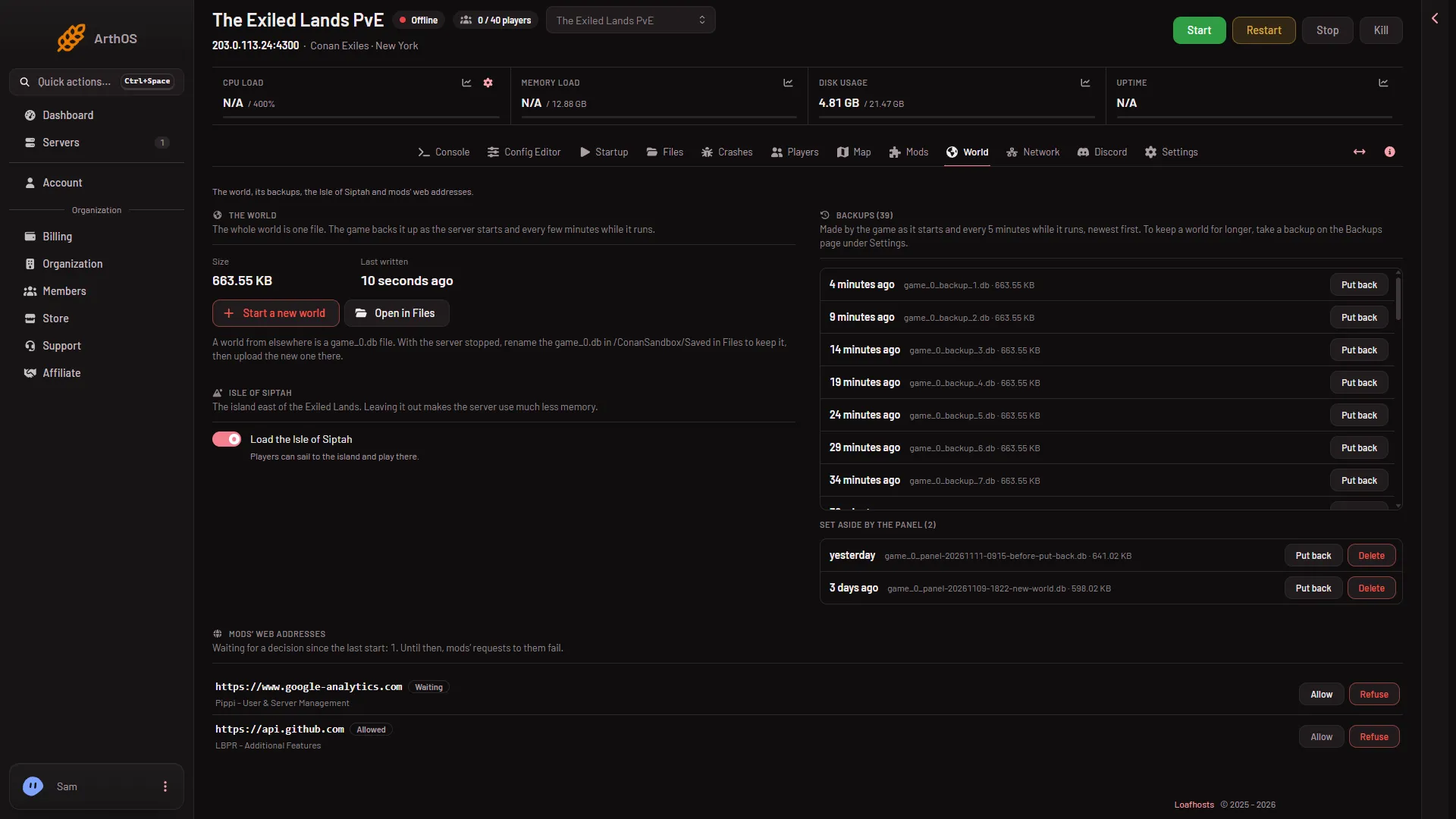
- Load the Isle of Siptah
Turn the switch (1) off, then start the server.
Fix 2: remove mods you do not need
Every mod adds to the memory the server uses, and big bases add to it too.
- Open the Mods page.
- Take off the mods nobody needs. Each row has a button named “Take (the mod’s name) off the list”.
- Choose Apply if the server is stopped, as it usually is after a memory kill. On a running server the button reads Apply and restart: it stops the server, applies the list and starts it again, and everyone on it is dropped. Warn them first with Restart with a warning on Players, which works only while the game answers the panel.
Players need the same mods as the server, so tell them what changed.
Fix 3: a bigger plan
If the server runs out of memory with Siptah left out and few mods, the plan is too small for the world. Move to a bigger plan from your account’s billing pages. Memory is the part that matters here.
If it does not work
- It keeps being killed at the same moment. Note when it happens. A loading world, a restart or a busy base are common times. Take the newest mod off the list first.
- The server starts and stops again and again. If Auto-Start on Settings is set to start it again, the server may start over after a kill. Each kill is a row on Crashes. Fix the cause before you keep starting it.
- Nothing in the log. That is normal for a memory kill: the game could not write anything. The finding on the Crashes page is the evidence.
- Auto-Kill. A Conan stop can take minutes while it saves. Do not lower Seconds until auto-kill to fix memory: a kill does not save, and a Conan stop can take up to 3 minutes 43 seconds on a new world.
More about the game: Conan Exiles servers.