
















Guides / Conan Exiles
Conan Exiles server guides.
One task per guide: how to do it in the ArthOS panel, and by hand where there is a way.
Basics
21 guides-
 Basics
Change the Conan Exiles player limit
Change how many players can be on your Conan Exiles server at once: set Players on the Startup page, 1 to 70. It applies at the next start, not at once. - Basics
Change your Conan Exiles server name
Change the name players see in the Conan Exiles server list: set Server name on the Startup page, up to 60 characters, and restart so the game writes it. - Basics
Conan Exiles join password: set, change or remove it
Set, change or remove the join password on a Conan Exiles server: use Passwords in the Config Editor. Empty means open to all. It applies at the next start. - Basics
Conan Exiles server hosting setup: the first hour
Start a Conan Exiles server on Loafhosts, wait for the first start, join with Direct Connect, then become admin with the Admin password and Make Me Admin. - Basics
Conan Exiles server memory requirements: why 12 GB
A Conan Exiles server used about 10 GB with nobody on and the Isle of Siptah loaded, about 5.3 GB without it. See why Loafhosts plans start at 12 GB. - Basics
Conan Exiles server passwords: join, admin, console
A Conan Exiles server has three passwords: Join, Admin and Remote console. See who uses each, where to change them, the rules, and when a change applies. -
Conan Exiles server ports: game, query and RCON
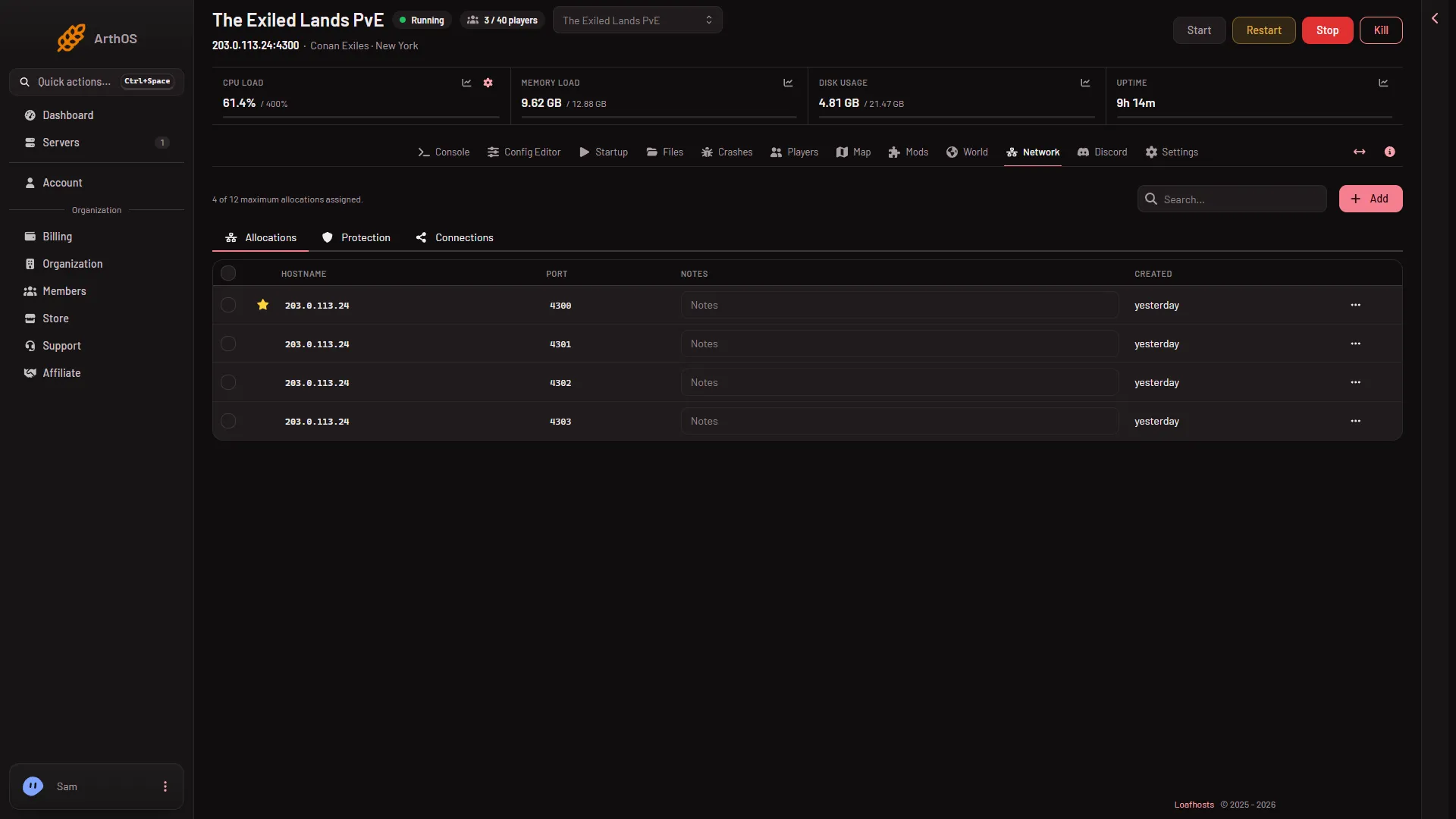
A Conan Exiles server on Loafhosts uses four ports: two UDP game ports, a UDP Steam query port and a TCP RCON port. See where to read them. - Basics
Conan Exiles Update on start: why players cannot join
Update on start checks Steam for a new Conan Exiles server build at every start. Keep it on, or players who updated their game cannot join the server. -
Find your Conan Exiles server address and port
Your Conan Exiles server address is on the Players page, in the Joining card. The Network page lists the hostname and every port the server uses. - Basics
How to join a Conan Exiles server
Join a Conan Exiles Enhanced server with Direct Connect and the server's address, or search for its name, then type the join password if there is one. - Basics
How to make yourself admin on a Conan Exiles server
Find your Conan Exiles Admin password under Passwords in the Config Editor, then use Make Me Admin in the game's Server Settings and type it in. - Basics
Change the Conan Exiles admin password
Change the Conan Exiles admin password under Passwords in the Config Editor: 6 to 64 letters, digits, dash or underscore, never empty. Applies at next start. - Basics
Conan Exiles Auto-Kill: how long a stop can take
Auto-Kill kills a Conan Exiles server that has not stopped in time. A Conan stop can take minutes while it saves, so read the number on the card first. - Basics
Conan Exiles Enhanced vs Legacy server: which one runs
Loafhosts runs Conan Exiles Enhanced only. The old Legacy server is a different build, and mods made for the old game never load on Enhanced. -
Conan Exiles server console: what it shows and hides
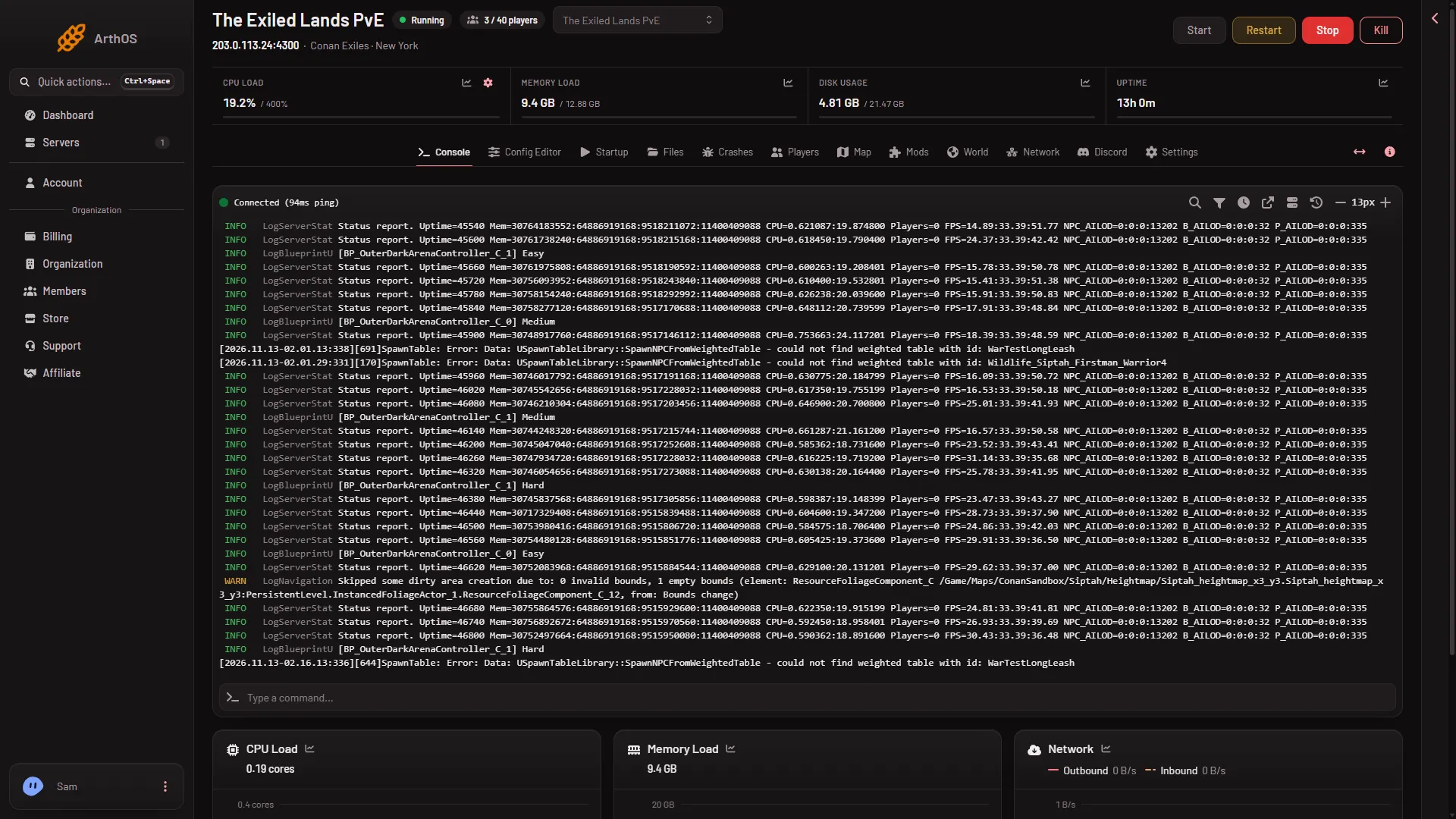
The Console tab shows the game's live output, with some noise lines hidden. The full log is in Files. Players, bans and messages are on the Players page. - Basics
Conan Exiles server files and folders: where things are
Where a Conan Exiles server keeps its world, settings, logs, mod list and Workshop mods in Files, and which files the panel rewrites at every start. - Basics
Conan Exiles server start and stop times
A Conan Exiles server is ready 16 to 25 seconds after its files load, and a stop saves the world first: about 40 seconds played, up to 3 min 43 s on a new one. - Basics
Conan Exiles server: give a friend access
Let a friend help run your Conan Exiles server without your login. Make a role on the organization page, give it the server, then give the role to your friend. - Basics
Conan Exiles standby and wake link: stop an empty server
Standby stops a Conan Exiles server nobody plays on and saves the world. A wake link lets your players start it again without an account. Nothing is deleted. - Basics
Conan Exiles Startup page: every setting explained
What each control on the Conan Exiles Startup page does: Start line, Docker image, name, players, updates, ports, and why passwords moved to the Config Editor. - Basics
Move a Conan Exiles server from another host
Copy a Conan Exiles server's files to Loafhosts over SFTP or FTP with Import from another host. The form, replace or merge, and the lower case world file name.
Players, clans and the map
20 guides- Players, clans and the map
Ban a player on your Conan Exiles server
Ban a player on your Conan Exiles server from the Players page with a reason. The server must be running, and a ban of someone who is not on can be refused. - Players, clans and the map
Conan Exiles Players page: a tour of every card
What each card on the Conan Exiles Players page does: who is on, characters, clans, whitelist, bans, add by id, message of the day, and what needs it running. - Players, clans and the map
Conan Exiles server map: players, obelisks, last known
The Map page draws your Conan Exiles server's lands with players, obelisks and vaults, read every 10 seconds. Learn the land switch and last known places. - Players, clans and the map
Conan Exiles whitelist: add, remove and turn it on
Use the Conan Exiles whitelist: add players, remove them and turn on Only whitelisted players. It works offline too, and the game reads it at start. - Players, clans and the map
Conan Exiles whitelist: let only chosen players join
Turn on Only whitelisted players on the Players page and everyone off the list is kept out. Add yourself and your players before you switch it on. - Players, clans and the map
Kick a player from your Conan Exiles server
Kick a player off your Conan Exiles server from the Players page: open the row menu, choose Kick, give a reason. The server must run. They can join again. - Players, clans and the map
Restart a Conan Exiles server with a warning to players
Restart the Conan Exiles server with a countdown. Players are warned in game at 10, 5 and 1 minutes and at 10 seconds. You can stop the countdown. - Players, clans and the map
See who is online on your Conan Exiles server
The On now list on the Conan Exiles Players page shows who is on, as the game lists them. What a row and its tag mean, and why the list can be missing. - Players, clans and the map
Unban a player on a Conan Exiles server
Lift a Conan Exiles ban from the Bans list with Lift. The server must be running, because the game takes the change only while it runs. - Players, clans and the map
Add a player to the Conan Exiles whitelist by ID
Add a player to the whitelist by SteamID64 with Add a player by id, or from the On now list. See the whitelist.txt line the game keeps for them. - Players, clans and the map
Ban a Conan Exiles player by SteamID64 or user id
Ban a Conan Exiles player by id from Add a player by id: a SteamID64 or the user id the game lists. The server must run, and the game may refuse. - Players, clans and the map
Conan Exiles ban list and the blacklist.txt file
Where a Conan Exiles server keeps its bans: the Bans card on the Players page and the blacklist.txt file the game reads when the server starts. - Players, clans and the map
Conan Exiles character details: items, thralls, killer
Open a character on the Players page to see a Conan Exiles character's level, clan, items, thralls and pets, building pieces, last place and who killed them. - Players, clans and the map
Conan Exiles characters list: who has played
The Characters card on the Players page lists every character in your Conan Exiles world with level, clan, dead tag and last played, newest 200 first. - Players, clans and the map
Conan Exiles clans list: leaders and members
See every clan in your Conan Exiles world on the Players page, with its leader and member count. Clans appear under the characters once one exists. - Players, clans and the map
Conan Exiles map bases and offline players
Why your Conan Exiles map shows no bases or logged-out players: they need the private live map permission. How bases are counted and listed. - Players, clans and the map
Conan Exiles message of the day: set it or clear it
Set the Conan Exiles message of the day on the Players page. Players see it when they join. No double quotes allowed, and it can be saved offline. - Players, clans and the map
Conan Exiles: switch the map to the Isle of Siptah
Use the land switch on the Map page to flip between the Exiled Lands and the Isle of Siptah, and see who is on the other land. Siptah must be loaded. - Players, clans and the map
Find a Conan Exiles player's platform id
Find a Conan Exiles player's platform id: open their character on the Players page and read the line Platform id. Use it to ban or whitelist by id. - Players, clans and the map
Send a message to all players on a Conan Exiles server
Use Message everyone on the Players page to send a broadcast that every player on the Conan Exiles server sees in game. The server must be running.
World and backups
13 guides- World and backups
Conan Exiles World page: world, backups, Siptah, mods
A tour of the World page for a Conan Exiles server: the world file, the game's backups, the Isle of Siptah switch and the web addresses mods ask for. - World and backups
Conan Exiles: leave out the Isle of Siptah to save memory
The Isle of Siptah takes about 5 GB of a Conan Exiles server's memory, even empty. Leave it out on the World page if nobody sails there. - World and backups
Conan Exiles: put back a world backup
Put back an earlier Conan Exiles world from the game's own backups on the World page. Stop the server first. Your current world is set aside, so you can undo. - World and backups
Start a new world on a Conan Exiles server
Start a new Conan Exiles world from the World page. Stop the server first; the old world is set aside and can be put back. The first stop can take minutes. - World and backups
Turn the Isle of Siptah on or off, Conan Exiles
Switch the Isle of Siptah on a Conan Exiles server from the World page. Stop first; it applies at the next start. Leaving it out uses much less memory. - World and backups
Upload a world to a Conan Exiles server
Bring a world from elsewhere to your Conan Exiles server: stop it, rename game_0.db to keep it, upload the new game_0.db in lower case, then start. - World and backups
Conan Exiles daily restart schedule
Restart your Conan Exiles server every day at a set time with a schedule in Settings. It takes a minute or more to stop, and the time is server time. - World and backups
Conan Exiles game backups: when and how many
Conan Exiles copies its world at every start and every 5 minutes as game_0_backup files. See how they are named, what they cost in disk, and what they are not. - World and backups
Conan Exiles server backups and backup schedules
Keep a Conan Exiles world longer than the game's own backups: take a panel backup under Settings, Backups, and add a schedule to take them for you. - World and backups
Conan Exiles server takes a long time to stop: why
A Conan Exiles stop saves the world first. It takes about 40 seconds on a played world and up to 3 minutes 43 seconds on a new one. Do not kill it. - World and backups
Conan Exiles world file: game_0.db and where it is
The Conan Exiles world is one SQLite file, game_0.db, in ConanSandbox/Saved. See what the -wal and -shm files are, why the name is lower case, how to copy it. - World and backups
Conan Exiles: database disk image is malformed
Conan Exiles says the world file could not be read or written. Stop the server, put back one of the game's backups on the World page, and start again. - World and backups
Delete a set-aside world on a Conan Exiles server
Free disk by deleting worlds the panel set aside on the World page. Deleting is for good, and the game's own backups cannot be deleted there.
Mods
17 guides- Mods
Change the Conan Exiles mod load order
The Mods list is the load order, top first. Drag a row or type its number, then press Apply. Apply writes the new order into modlist.txt. - Mods
Conan Exiles Legacy mods do not load on Enhanced
A Workshop mod made for the old Conan Exiles never loads on an Enhanced server. The panel refuses it when you add it. Find an Enhanced version instead. - Mods
Conan Exiles mod web requests: allow a mod's address
Conan Exiles mods cannot reach the internet until you approve each address. Decide Waiting, Allowed or Refused on the World page. It applies at next start. - Mods
Conan Exiles Mods page: a tour
The Mods page lists the mods on your Conan Exiles server, finds more on the Steam Workshop, and applies changes in one step. Here is what each part does. -
Conan Exiles: a mod is not loading on the server
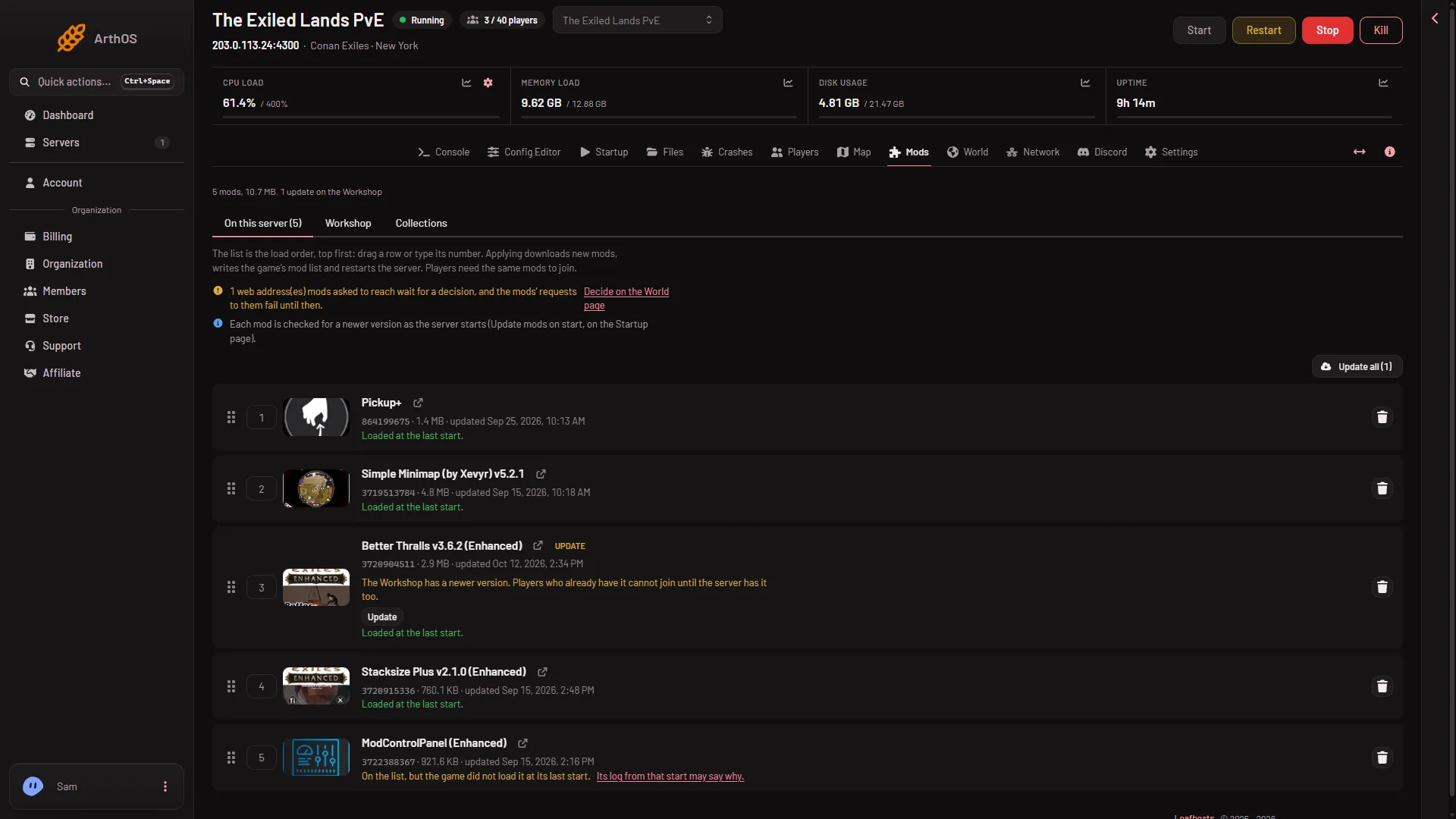
Find out why a Conan Exiles mod does not load: read the row note on the Mods page, check the Crashes finding, and take off mods made for the old game. - Mods
Conan Exiles: remove a mod from your server
Take a mod off a Conan Exiles server: press its remove button on the Mods page, then Apply. The server restarts and stops loading the mod. - Mods
Conan Exiles: update the mods on your server
Update Conan Exiles mods from the Mods page: look for the Update chip, press Update all, then Apply. Players on a newer mod cannot join an older server. - Mods
Find Conan Exiles mods on the Workshop
Search the Steam Workshop from your server's Mods page. Results are only mods made for Conan Exiles Enhanced. Sort the list and add a mod with one click. - Mods
Install Workshop mods on a Conan Exiles server
Add a Steam Workshop mod to your Conan Exiles Enhanced server on the Mods page, then press Apply. See what Apply does: stop, download, write the list, start. - Mods
Add a Conan Exiles mod by link or ID
Paste a Steam Workshop link, a mod ID or a collection link into Add by link or ID on the Mods page. A collection adds every mod in it. Then press Apply. - Mods
Conan Exiles mod collections: save and reuse a mod list
Save a Conan Exiles server's mod list as a collection, then add it or replace another server's list with it. Make it public or private, or delete it. - Mods
Conan Exiles mod limit and disk space for mods
A Conan Exiles server loads at most 150 mods, and Apply checks the disk before it downloads. What each refusal says and how to make room. - Mods
Conan Exiles modlist.txt: what it holds and who writes it
modlist.txt tells a Conan Exiles server which mod paks to load, one full path a line, top first. See where it is, what the panel writes, and hand-listed paks. - Mods
Conan Exiles: allow or refuse a mod address
Use Allow or Refuse on the World page to decide a Conan Exiles mod's web address, or write the ModHttp.ini line yourself. Quote it. Matching is exact. - Mods
Conan Exiles: do not rename mod pak files
A renamed Conan Exiles mod pak fails to load. Leave the name Steam gave it. See where the paks are, what the panel keeps, and how to undo a rename. - Mods
Conan Exiles: players need the same mods to join
Players need the mods and versions a Conan Exiles server lists. See what the server tells their game to download and what to do when a player is refused. - Mods
Conan Exiles: update mods on start
Update mods on start downloads a newer version of each mod before Conan Exiles starts. Where it is on the Startup page and how the Mods page shows it.
Server settings
22 guides- Server settings
Change XP and harvest rates on a Conan Exiles server
Raise or lower Conan Exiles XP and gathering with the Player XP multipliers and Harvest Amount Multiplier. All default to 1 and are saved to the running game. - Server settings
Conan Exiles building decay and abandonment settings
Turn building decay on or off on a Conan Exiles server with Disable Building Abandonment, then tune the decay timers. The switch needs a restart. - Server settings
Conan Exiles Config Editor: change server settings
A tour of the Conan Exiles Config Editor: Passwords, Server settings, Engine and Game, with search, groups, the Changed mark and Advanced. - Server settings
Conan Exiles day and night length settings
Change how long day, night, dawn and dusk last on a Conan Exiles server with four multipliers in the Config Editor. See the hours each covers and how they mix. - Server settings
Conan Exiles: change settings without a restart
Server settings you save while Conan Exiles runs are sent to the running game. Six need a restart. What the save messages mean. - Server settings
Turn on PvP on a Conan Exiles server
Turn on PVP Enabled in the Config Editor, then decide if players may also destroy each other's buildings. PVP Enabled needs a restart to apply. - Server settings
Allow PvP only at certain times in Conan Exiles
Switch on Time-Restrict PVP, then set which weekdays allow PvP and the start and end time for each, written as HHMM such as 1800 for 6 pm. - Server settings
Block countries and regions on a Conan Exiles server
Switch off whole regions or add two-letter country codes so players from there cannot join your Conan Exiles server. Where the rows are and when they apply. - Server settings
Conan Exiles AFK kick, login queue and family sharing
Find the AFK kick, Enable Login Queue, Disconnection Grace Time and Allow Family Shared Accounts rows in the Config Editor and change them while it runs. - Server settings
Conan Exiles chat and voice chat settings
Turn global chat off, set how far local chat carries, cap message length and change voice chat on a Conan Exiles server, from the Config Editor's Chat group. - Server settings
Conan Exiles clan size and clan map markers
Set the largest clan a Conan Exiles server allows and turn guild map markers on or off in the Config Editor. Neither is a setting Funcom flags for a restart. - Server settings
Conan Exiles crafting, fuel and spoilage settings
Change crafting speed, crafting cost, fuel burn time and food spoilage on a Conan Exiles server. Four rows in the Config Editor, saved to the running game. - Server settings
Conan Exiles damage, friendly fire and building damage
Set how hard players and NPCs hit, how much damage they take, friendly fire and building damage in the Conan Exiles Config Editor, no restart for most. - Server settings
Conan Exiles death and corpse settings
Choose what is dropped on death, who can loot a corpse, how many corpses stay, and whether logged out characters stay in the world. - Server settings
Conan Exiles Engine.ini and Game.ini on the panel
The Engine and Game files in the Conan Exiles Config Editor save only while the server is stopped. What they offer, what is locked, and the RCON command limit. - Server settings
Conan Exiles land claim and building rules
Change land claim radius, build near points of interest, stability loss and the storage reach for crafting and building in the Config Editor. - Server settings
Conan Exiles maelstrom and Elder Things settings
Turn the Isle of Siptah maelstrom off, change how long it lasts and how often it comes, and set Elder Things, siege Elder Things and building damage. - Server settings
Conan Exiles PvE-Conflict mode setting
Where to find the PvE-C switch in the Config Editor, how to set it to 1, and what Funcom says about it. It relies on PVP Enabled. - Server settings
Conan Exiles raid hours and building damage settings
Limit when players can destroy bases in Conan Exiles: building damage hours per weekday, damage only while owners are online, and no building during raid hours. - Server settings
Conan Exiles settings that need a restart
Six Conan Exiles server settings are read only at start, such as PVP Enabled and No Ownership. How to spot them and how to apply a change. - Server settings
Conan Exiles thrall and pet settings
Cap thralls and pets, turn thrall decay on or off, set how hard thralls hit players and NPCs, and switch Down but Not Out in the Config Editor. - Server settings
Turn the Conan Exiles sandstorm on or off
Switch the Exiled Lands sandstorm off or on for a Conan Exiles server with one row in the Config Editor. The panel saves it to the running game.
Fixes
16 guides- Fixes
Conan Exiles Make Me Admin not working: fix
Make Me Admin fails on your Conan Exiles server? Use the Admin password under Passwords, not the join password, and restart the server after a change. - Fixes
Conan Exiles Players page: the game is not answering
The Players page says the game is not answering the panel yet. Wait half a minute after the start. If it stays, check the password and the command limit. - Fixes
Conan Exiles server ran out of memory: how to fix it
The Conan Exiles server was stopped for memory or exit code 137. Leave the Isle of Siptah out, remove mods or move to a bigger plan, then start again. - Fixes
Conan Exiles server will not start: read Crashes
Read the Crashes page of a Conan Exiles server: what Failed to start and Crashed mean, the line that proves it is up, and the fix for each finding. - Fixes
Conan Exiles server: players cannot connect
Players cannot join your Conan Exiles server? Check the server is up, the address, the join password, a full server, the game version, mods and the whitelist. - Fixes
Conan Exiles settings not saving: why and how to fix
A Conan Exiles setting will not save in the Config Editor? Engine and Game need a stopped server, and Server settings needs a server that has finished starting. - Fixes
How to read the Conan Exiles crash log
Read the Crashes page for a Conan Exiles server: each start, how it ended, the game version, the findings, the last lines and the engine crash report. - Fixes
Conan Exiles locked out by the RCON command limit
The game refuses the panel's commands for a few minutes after too many in a row. Wait, keep fewer pages open, and leave RCON command limit at 60. - Fixes
Conan Exiles map shows nobody on: what to check
The Conan Exiles map says Nobody is on when the server is offline, still loading, on the other land, or really empty. Check each cause in turn. - Fixes
Conan Exiles remote console password refused
The panel says the game refused its RCON password. A new Remote console password applies at the next start, so restart the server to use it. - Fixes
Conan Exiles server not in the server list
Your Conan Exiles server is not in the list? Check it is running, the Steam query port is UDP, and the name. Or join with Direct Connect at once. - Fixes
Conan Exiles server out of disk space: what to delete
Crashes says The server ran out of disk space? Delete worlds the panel set aside, the game's old backups and mods you do not use, then start the server again. - Fixes
Conan Exiles server takes minutes to stop
A slow Conan Exiles stop is the game saving its world. Wait for it. Auto-Kill ends a stop that runs out of time, and a kill can lose progress. - Fixes
Conan Exiles version mismatch: players cannot join
Players updated Conan Exiles and cannot join your server? Check that Update on start is on in the Startup page and restart so the server gets the newest build. - Fixes
Conan Exiles world will not load after a restore or upload
A Conan Exiles world that will not load or starts empty after Put back or an upload: check the game_0.db name, leftover WAL files and the set-aside copy. - Fixes
Conan Exiles: a mod asked to reach the internet
Crashes says a Conan Exiles mod asked to reach the internet and was refused. It is not a crash: allow or refuse each address on the World page, then restart.
- Ban a player on your Conan Exiles server Ban a player on your Conan Exiles server from the Players page with a reason. The server must be running, and a ban of someone who is not on can be refused.
- Change the Conan Exiles mod load order The Mods list is the load order, top first. Drag a row or type its number, then press Apply. Apply writes the new order into modlist.txt.
- Change the Conan Exiles player limit Change how many players can be on your Conan Exiles server at once: set Players on the Startup page, 1 to 70. It applies at the next start, not at once.
- Change XP and harvest rates on a Conan Exiles server Raise or lower Conan Exiles XP and gathering with the Player XP multipliers and Harvest Amount Multiplier. All default to 1 and are saved to the running game.
- Change your Conan Exiles server name Change the name players see in the Conan Exiles server list: set Server name on the Startup page, up to 60 characters, and restart so the game writes it.
- Conan Exiles building decay and abandonment settings Turn building decay on or off on a Conan Exiles server with Disable Building Abandonment, then tune the decay timers. The switch needs a restart.
- Conan Exiles Config Editor: change server settings A tour of the Conan Exiles Config Editor: Passwords, Server settings, Engine and Game, with search, groups, the Changed mark and Advanced.
- Conan Exiles day and night length settings Change how long day, night, dawn and dusk last on a Conan Exiles server with four multipliers in the Config Editor. See the hours each covers and how they mix.
- Conan Exiles join password: set, change or remove it Set, change or remove the join password on a Conan Exiles server: use Passwords in the Config Editor. Empty means open to all. It applies at the next start.
- Conan Exiles Legacy mods do not load on Enhanced A Workshop mod made for the old Conan Exiles never loads on an Enhanced server. The panel refuses it when you add it. Find an Enhanced version instead.
- Conan Exiles Make Me Admin not working: fix Make Me Admin fails on your Conan Exiles server? Use the Admin password under Passwords, not the join password, and restart the server after a change.
- Conan Exiles mod web requests: allow a mod's address Conan Exiles mods cannot reach the internet until you approve each address. Decide Waiting, Allowed or Refused on the World page. It applies at next start.
- Conan Exiles Mods page: a tour The Mods page lists the mods on your Conan Exiles server, finds more on the Steam Workshop, and applies changes in one step. Here is what each part does.
- Conan Exiles Players page: a tour of every card What each card on the Conan Exiles Players page does: who is on, characters, clans, whitelist, bans, add by id, message of the day, and what needs it running.
- Conan Exiles Players page: the game is not answering The Players page says the game is not answering the panel yet. Wait half a minute after the start. If it stays, check the password and the command limit.
- Conan Exiles server hosting setup: the first hour Start a Conan Exiles server on Loafhosts, wait for the first start, join with Direct Connect, then become admin with the Admin password and Make Me Admin.
- Conan Exiles server map: players, obelisks, last known The Map page draws your Conan Exiles server's lands with players, obelisks and vaults, read every 10 seconds. Learn the land switch and last known places.
- Conan Exiles server memory requirements: why 12 GB A Conan Exiles server used about 10 GB with nobody on and the Isle of Siptah loaded, about 5.3 GB without it. See why Loafhosts plans start at 12 GB.
- Conan Exiles server passwords: join, admin, console A Conan Exiles server has three passwords: Join, Admin and Remote console. See who uses each, where to change them, the rules, and when a change applies.
- Conan Exiles server ports: game, query and RCON A Conan Exiles server on Loafhosts uses four ports: two UDP game ports, a UDP Steam query port and a TCP RCON port. See where to read them.
- Conan Exiles server ran out of memory: how to fix it The Conan Exiles server was stopped for memory or exit code 137. Leave the Isle of Siptah out, remove mods or move to a bigger plan, then start again.
- Conan Exiles server will not start: read Crashes Read the Crashes page of a Conan Exiles server: what Failed to start and Crashed mean, the line that proves it is up, and the fix for each finding.
- Conan Exiles server: players cannot connect Players cannot join your Conan Exiles server? Check the server is up, the address, the join password, a full server, the game version, mods and the whitelist.
- Conan Exiles settings not saving: why and how to fix A Conan Exiles setting will not save in the Config Editor? Engine and Game need a stopped server, and Server settings needs a server that has finished starting.
- Conan Exiles Update on start: why players cannot join Update on start checks Steam for a new Conan Exiles server build at every start. Keep it on, or players who updated their game cannot join the server.
- Conan Exiles whitelist: add, remove and turn it on Use the Conan Exiles whitelist: add players, remove them and turn on Only whitelisted players. It works offline too, and the game reads it at start.
- Conan Exiles whitelist: let only chosen players join Turn on Only whitelisted players on the Players page and everyone off the list is kept out. Add yourself and your players before you switch it on.
- Conan Exiles World page: world, backups, Siptah, mods A tour of the World page for a Conan Exiles server: the world file, the game's backups, the Isle of Siptah switch and the web addresses mods ask for.
- Conan Exiles: a mod is not loading on the server Find out why a Conan Exiles mod does not load: read the row note on the Mods page, check the Crashes finding, and take off mods made for the old game.
- Conan Exiles: change settings without a restart Server settings you save while Conan Exiles runs are sent to the running game. Six need a restart. What the save messages mean.
- Conan Exiles: leave out the Isle of Siptah to save memory The Isle of Siptah takes about 5 GB of a Conan Exiles server's memory, even empty. Leave it out on the World page if nobody sails there.
- Conan Exiles: put back a world backup Put back an earlier Conan Exiles world from the game's own backups on the World page. Stop the server first. Your current world is set aside, so you can undo.
- Conan Exiles: remove a mod from your server Take a mod off a Conan Exiles server: press its remove button on the Mods page, then Apply. The server restarts and stops loading the mod.
- Conan Exiles: update the mods on your server Update Conan Exiles mods from the Mods page: look for the Update chip, press Update all, then Apply. Players on a newer mod cannot join an older server.
- Find Conan Exiles mods on the Workshop Search the Steam Workshop from your server's Mods page. Results are only mods made for Conan Exiles Enhanced. Sort the list and add a mod with one click.
- Find your Conan Exiles server address and port Your Conan Exiles server address is on the Players page, in the Joining card. The Network page lists the hostname and every port the server uses.
- How to join a Conan Exiles server Join a Conan Exiles Enhanced server with Direct Connect and the server's address, or search for its name, then type the join password if there is one.
- How to make yourself admin on a Conan Exiles server Find your Conan Exiles Admin password under Passwords in the Config Editor, then use Make Me Admin in the game's Server Settings and type it in.
- How to read the Conan Exiles crash log Read the Crashes page for a Conan Exiles server: each start, how it ended, the game version, the findings, the last lines and the engine crash report.
- Install Workshop mods on a Conan Exiles server Add a Steam Workshop mod to your Conan Exiles Enhanced server on the Mods page, then press Apply. See what Apply does: stop, download, write the list, start.
- Kick a player from your Conan Exiles server Kick a player off your Conan Exiles server from the Players page: open the row menu, choose Kick, give a reason. The server must run. They can join again.
- Restart a Conan Exiles server with a warning to players Restart the Conan Exiles server with a countdown. Players are warned in game at 10, 5 and 1 minutes and at 10 seconds. You can stop the countdown.
- See who is online on your Conan Exiles server The On now list on the Conan Exiles Players page shows who is on, as the game lists them. What a row and its tag mean, and why the list can be missing.
- Start a new world on a Conan Exiles server Start a new Conan Exiles world from the World page. Stop the server first; the old world is set aside and can be put back. The first stop can take minutes.
- Turn on PvP on a Conan Exiles server Turn on PVP Enabled in the Config Editor, then decide if players may also destroy each other's buildings. PVP Enabled needs a restart to apply.
- Turn the Isle of Siptah on or off, Conan Exiles Switch the Isle of Siptah on a Conan Exiles server from the World page. Stop first; it applies at the next start. Leaving it out uses much less memory.
- Unban a player on a Conan Exiles server Lift a Conan Exiles ban from the Bans list with Lift. The server must be running, because the game takes the change only while it runs.
- Upload a world to a Conan Exiles server Bring a world from elsewhere to your Conan Exiles server: stop it, rename game_0.db to keep it, upload the new game_0.db in lower case, then start.
- Add a Conan Exiles mod by link or ID Paste a Steam Workshop link, a mod ID or a collection link into Add by link or ID on the Mods page. A collection adds every mod in it. Then press Apply.
- Add a player to the Conan Exiles whitelist by ID Add a player to the whitelist by SteamID64 with Add a player by id, or from the On now list. See the whitelist.txt line the game keeps for them.
- Allow PvP only at certain times in Conan Exiles Switch on Time-Restrict PVP, then set which weekdays allow PvP and the start and end time for each, written as HHMM such as 1800 for 6 pm.
- Ban a Conan Exiles player by SteamID64 or user id Ban a Conan Exiles player by id from Add a player by id: a SteamID64 or the user id the game lists. The server must run, and the game may refuse.
- Block countries and regions on a Conan Exiles server Switch off whole regions or add two-letter country codes so players from there cannot join your Conan Exiles server. Where the rows are and when they apply.
- Change the Conan Exiles admin password Change the Conan Exiles admin password under Passwords in the Config Editor: 6 to 64 letters, digits, dash or underscore, never empty. Applies at next start.
- Conan Exiles AFK kick, login queue and family sharing Find the AFK kick, Enable Login Queue, Disconnection Grace Time and Allow Family Shared Accounts rows in the Config Editor and change them while it runs.
- Conan Exiles Auto-Kill: how long a stop can take Auto-Kill kills a Conan Exiles server that has not stopped in time. A Conan stop can take minutes while it saves, so read the number on the card first.
- Conan Exiles ban list and the blacklist.txt file Where a Conan Exiles server keeps its bans: the Bans card on the Players page and the blacklist.txt file the game reads when the server starts.
- Conan Exiles character details: items, thralls, killer Open a character on the Players page to see a Conan Exiles character's level, clan, items, thralls and pets, building pieces, last place and who killed them.
- Conan Exiles characters list: who has played The Characters card on the Players page lists every character in your Conan Exiles world with level, clan, dead tag and last played, newest 200 first.
- Conan Exiles chat and voice chat settings Turn global chat off, set how far local chat carries, cap message length and change voice chat on a Conan Exiles server, from the Config Editor's Chat group.
- Conan Exiles clan size and clan map markers Set the largest clan a Conan Exiles server allows and turn guild map markers on or off in the Config Editor. Neither is a setting Funcom flags for a restart.
- Conan Exiles clans list: leaders and members See every clan in your Conan Exiles world on the Players page, with its leader and member count. Clans appear under the characters once one exists.
- Conan Exiles crafting, fuel and spoilage settings Change crafting speed, crafting cost, fuel burn time and food spoilage on a Conan Exiles server. Four rows in the Config Editor, saved to the running game.
- Conan Exiles daily restart schedule Restart your Conan Exiles server every day at a set time with a schedule in Settings. It takes a minute or more to stop, and the time is server time.
- Conan Exiles damage, friendly fire and building damage Set how hard players and NPCs hit, how much damage they take, friendly fire and building damage in the Conan Exiles Config Editor, no restart for most.
- Conan Exiles death and corpse settings Choose what is dropped on death, who can loot a corpse, how many corpses stay, and whether logged out characters stay in the world.
- Conan Exiles Engine.ini and Game.ini on the panel The Engine and Game files in the Conan Exiles Config Editor save only while the server is stopped. What they offer, what is locked, and the RCON command limit.
- Conan Exiles Enhanced vs Legacy server: which one runs Loafhosts runs Conan Exiles Enhanced only. The old Legacy server is a different build, and mods made for the old game never load on Enhanced.
- Conan Exiles game backups: when and how many Conan Exiles copies its world at every start and every 5 minutes as game_0_backup files. See how they are named, what they cost in disk, and what they are not.
- Conan Exiles land claim and building rules Change land claim radius, build near points of interest, stability loss and the storage reach for crafting and building in the Config Editor.
- Conan Exiles locked out by the RCON command limit The game refuses the panel's commands for a few minutes after too many in a row. Wait, keep fewer pages open, and leave RCON command limit at 60.
- Conan Exiles maelstrom and Elder Things settings Turn the Isle of Siptah maelstrom off, change how long it lasts and how often it comes, and set Elder Things, siege Elder Things and building damage.
- Conan Exiles map bases and offline players Why your Conan Exiles map shows no bases or logged-out players: they need the private live map permission. How bases are counted and listed.
- Conan Exiles map shows nobody on: what to check The Conan Exiles map says Nobody is on when the server is offline, still loading, on the other land, or really empty. Check each cause in turn.
- Conan Exiles message of the day: set it or clear it Set the Conan Exiles message of the day on the Players page. Players see it when they join. No double quotes allowed, and it can be saved offline.
- Conan Exiles mod collections: save and reuse a mod list Save a Conan Exiles server's mod list as a collection, then add it or replace another server's list with it. Make it public or private, or delete it.
- Conan Exiles mod limit and disk space for mods A Conan Exiles server loads at most 150 mods, and Apply checks the disk before it downloads. What each refusal says and how to make room.
- Conan Exiles modlist.txt: what it holds and who writes it modlist.txt tells a Conan Exiles server which mod paks to load, one full path a line, top first. See where it is, what the panel writes, and hand-listed paks.
- Conan Exiles PvE-Conflict mode setting Where to find the PvE-C switch in the Config Editor, how to set it to 1, and what Funcom says about it. It relies on PVP Enabled.
- Conan Exiles raid hours and building damage settings Limit when players can destroy bases in Conan Exiles: building damage hours per weekday, damage only while owners are online, and no building during raid hours.
- Conan Exiles remote console password refused The panel says the game refused its RCON password. A new Remote console password applies at the next start, so restart the server to use it.
- Conan Exiles server backups and backup schedules Keep a Conan Exiles world longer than the game's own backups: take a panel backup under Settings, Backups, and add a schedule to take them for you.
- Conan Exiles server console: what it shows and hides The Console tab shows the game's live output, with some noise lines hidden. The full log is in Files. Players, bans and messages are on the Players page.
- Conan Exiles server files and folders: where things are Where a Conan Exiles server keeps its world, settings, logs, mod list and Workshop mods in Files, and which files the panel rewrites at every start.
- Conan Exiles server not in the server list Your Conan Exiles server is not in the list? Check it is running, the Steam query port is UDP, and the name. Or join with Direct Connect at once.
- Conan Exiles server out of disk space: what to delete Crashes says The server ran out of disk space? Delete worlds the panel set aside, the game's old backups and mods you do not use, then start the server again.
- Conan Exiles server start and stop times A Conan Exiles server is ready 16 to 25 seconds after its files load, and a stop saves the world first: about 40 seconds played, up to 3 min 43 s on a new one.
- Conan Exiles server takes a long time to stop: why A Conan Exiles stop saves the world first. It takes about 40 seconds on a played world and up to 3 minutes 43 seconds on a new one. Do not kill it.
- Conan Exiles server takes minutes to stop A slow Conan Exiles stop is the game saving its world. Wait for it. Auto-Kill ends a stop that runs out of time, and a kill can lose progress.
- Conan Exiles server: give a friend access Let a friend help run your Conan Exiles server without your login. Make a role on the organization page, give it the server, then give the role to your friend.
- Conan Exiles settings that need a restart Six Conan Exiles server settings are read only at start, such as PVP Enabled and No Ownership. How to spot them and how to apply a change.
- Conan Exiles standby and wake link: stop an empty server Standby stops a Conan Exiles server nobody plays on and saves the world. A wake link lets your players start it again without an account. Nothing is deleted.
- Conan Exiles Startup page: every setting explained What each control on the Conan Exiles Startup page does: Start line, Docker image, name, players, updates, ports, and why passwords moved to the Config Editor.
- Conan Exiles thrall and pet settings Cap thralls and pets, turn thrall decay on or off, set how hard thralls hit players and NPCs, and switch Down but Not Out in the Config Editor.
- Conan Exiles version mismatch: players cannot join Players updated Conan Exiles and cannot join your server? Check that Update on start is on in the Startup page and restart so the server gets the newest build.
- Conan Exiles world file: game_0.db and where it is The Conan Exiles world is one SQLite file, game_0.db, in ConanSandbox/Saved. See what the -wal and -shm files are, why the name is lower case, how to copy it.
- Conan Exiles world will not load after a restore or upload A Conan Exiles world that will not load or starts empty after Put back or an upload: check the game_0.db name, leftover WAL files and the set-aside copy.
- Conan Exiles: a mod asked to reach the internet Crashes says a Conan Exiles mod asked to reach the internet and was refused. It is not a crash: allow or refuse each address on the World page, then restart.
- Conan Exiles: allow or refuse a mod address Use Allow or Refuse on the World page to decide a Conan Exiles mod's web address, or write the ModHttp.ini line yourself. Quote it. Matching is exact.
- Conan Exiles: database disk image is malformed Conan Exiles says the world file could not be read or written. Stop the server, put back one of the game's backups on the World page, and start again.
- Conan Exiles: do not rename mod pak files A renamed Conan Exiles mod pak fails to load. Leave the name Steam gave it. See where the paks are, what the panel keeps, and how to undo a rename.
- Conan Exiles: players need the same mods to join Players need the mods and versions a Conan Exiles server lists. See what the server tells their game to download and what to do when a player is refused.
- Conan Exiles: switch the map to the Isle of Siptah Use the land switch on the Map page to flip between the Exiled Lands and the Isle of Siptah, and see who is on the other land. Siptah must be loaded.
- Conan Exiles: update mods on start Update mods on start downloads a newer version of each mod before Conan Exiles starts. Where it is on the Startup page and how the Mods page shows it.
- Delete a set-aside world on a Conan Exiles server Free disk by deleting worlds the panel set aside on the World page. Deleting is for good, and the game's own backups cannot be deleted there.
- Find a Conan Exiles player's platform id Find a Conan Exiles player's platform id: open their character on the Players page and read the line Platform id. Use it to ban or whitelist by id.
- Move a Conan Exiles server from another host Copy a Conan Exiles server's files to Loafhosts over SFTP or FTP with Import from another host. The form, replace or merge, and the lower case world file name.
- Send a message to all players on a Conan Exiles server Use Message everyone on the Players page to send a broadcast that every player on the Conan Exiles server sees in game. The server must be running.
- Turn the Conan Exiles sandstorm on or off Switch the Exiled Lands sandstorm off or on for a Conan Exiles server with one row in the Config Editor. The panel saves it to the running game.