
















The Crashes page shows the finding The server ran out of disk space when the game’s log says there was no space left on the device. The fix, in the panel’s own words: free some space with old worlds the panel set aside, mods you do not use, and old backups, then start again.
1. Delete worlds the panel set aside
Start a new world and Put back on the World page each set the current world aside first, so you can return to it. Every one of them is a whole world file on the disk.
- Open World.
- Find the section Set aside by the panel (1).
- Choose Delete (2) on a world you will never need again. The page warns that it is deleted for good.
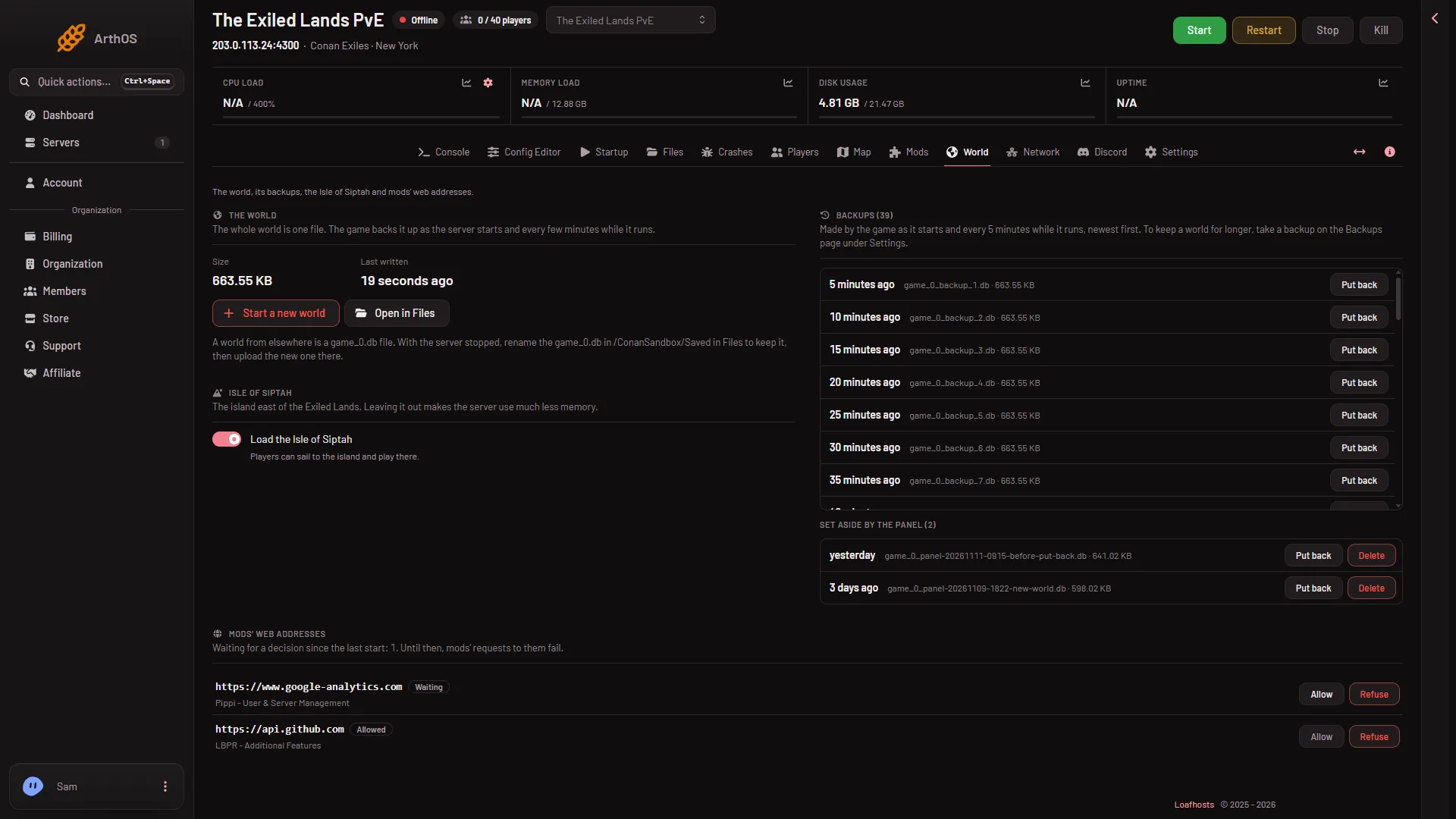
- Set aside by the panel
- Delete
This works while the server runs.
2. Delete the game’s old backups
The game makes its own copies of the world, game_0_backup_(n).db, as often as every 5 minutes, and nothing caps how many. They are a likely reason a disk fills. The World page lists them under The game’s backups (N) with a size each, but only with Put back, no delete.
- On the World page, find The game’s backups (N) and look at the sizes.
- Open Files and go to
ConanSandbox/Saved. - Delete the oldest
game_0_backup_(n).dbfiles. Keep the newest few: they are your restore points.
3. Take off mods you do not use
Mods are downloaded to the server and take disk. Taking a mod off the list does not delete its files.
- Open Mods.
- On On this server, take off each mod you do not use.
- Choose Apply. On a stopped server it stays stopped. On a running one the button reads Apply and restart, which stops the server, applies the list and starts again, and drops everyone who is on.
- Press Delete files on each mod folder under On the server, not loaded.
When a download needs more space than is free, Apply refuses and tells you how much it needs and how much is free.
4. Remove panel backups
Open Settings, then Backups. Open the menu on a backup you no longer need. A locked backup must be unlocked first. Which control removes a backup was not checked on Enhanced, server build 25792439 as of 13 November 2026.
5. Start the server again
Start the server after you free space. The Crashes page shows a new row for the start.
If it does not work
- It fills again soon. Free more than you think you need, or get a bigger plan, which has more disk.
- The finding is a different one. If Crashes says The world file could not be read or written, put back one of the game’s backups from the World page.
More about the game: Conan Exiles servers. For disk and mods, see mod limit and disk space.