






Two switches in the Config Editor stop players from damaging bases: Bases cannot be damaged and Containers cannot be damaged. For finer rules, such as where players may build, use the building section of cfggameplay.json. Checked on DayZ 1.29. Update 1.30 is due on 15 October 2026.
What the two switches protect
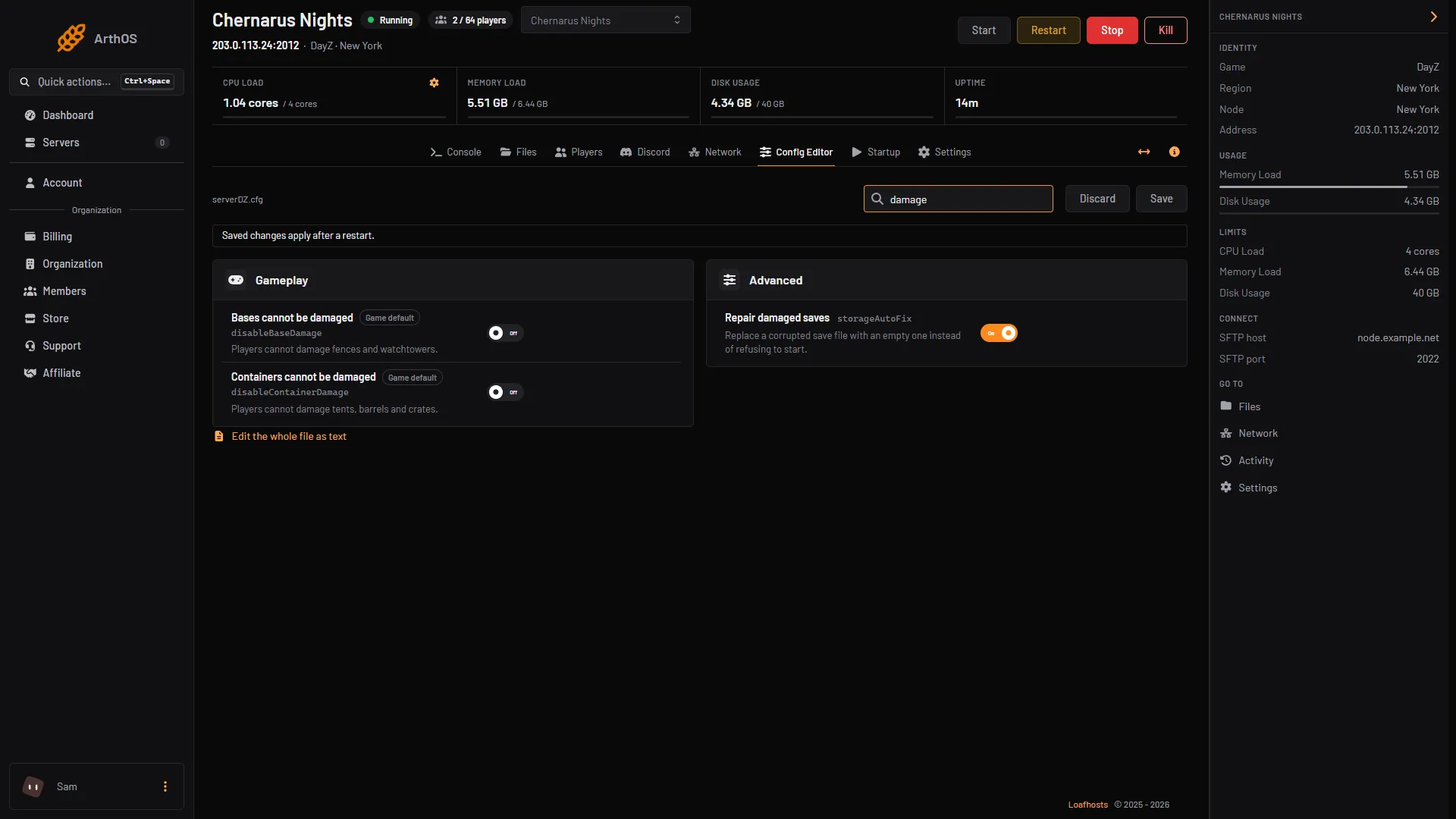
Both are in the Gameplay group of the Config Editor.
- Bases cannot be damaged (
disableBaseDamage): players cannot damage fences and watchtowers. - Containers cannot be damaged (
disableContainerDamage): players cannot damage tents, barrels and crates.
Both are off by default. Bohemia describes them for exactly those items. Other base parts are not named by Bohemia.
In the ArthOS panel
- Open the Config Editor tab and find the Gameplay group.
- Turn on Bases cannot be damaged, Containers cannot be damaged, or both.
- Choose Save. The editor shows “Saved changes apply after a restart.”
- Restart the server. The change applies when it starts.
- Bases cannot be damaged
- Containers cannot be damaged
Building and placement rules in cfggameplay.json
The file cfggameplay.json sits in your mission folder, for example mpmissions/dayzOffline.chernarusplus. The game reads it only when Use cfggameplay.json is on in the Config Editor. That row is enableCfgGameplayFile in serverDZ.cfg.
A new server already has cfggameplay.json in its Chernarus mission folder. If yours is missing, copy it from Bohemia’s DayZ Central Economy repository into the mission folder, then turn the row on.
The building rules are in the BaseBuildingData section. In Bohemia’s file they are all false, which means every check is on:
"BaseBuildingData":
{
	"HologramData":
	{
		"disableIsCollidingBBoxCheck": false,
		"disableIsCollidingPlayerCheck": false,
		"disableIsClippingRoofCheck": false,
		"disableIsBaseViableCheck": false,
		"disableIsCollidingGPlotCheck": false,
		"disableIsCollidingAngleCheck": false,
		"disableIsPlacementPermittedCheck": false,
		"disableHeightPlacementCheck": false,
		"disableIsUnderwaterCheck": false,
		"disableIsInTerrainCheck": false,
		"disableColdAreaBuildingCheck": false,
		"disallowedTypesInUnderground": ["FenceKit","TerritoryFlagKit","WatchtowerKit"]
	},
	"ConstructionData":
	{
		"disablePerformRoofCheck": false,
		"disableIsCollidingCheck": false,
		"disableDistanceCheck": false
	}
}
Setting a check to true turns that check off. Bohemia’s descriptions:
disableIsCollidingBBoxCheck: allows placing when the preview overlaps objects in the world.disableIsCollidingPlayerCheck: allows placing when the preview overlaps a player.disableIsClippingRoofCheck: allows placing where it would clip into a roof.disableIsBaseViableCheck: allows placing on moving objects and other bases that would normally be refused.disableIsUnderwaterCheck: allows placing under water.disableIsInTerrainCheck: allows placing when it clips into the ground.disableHeightPlacementCheck: allows placing with limited height space.disablePerformRoofCheck: allows building when it clips a roof.disableIsCollidingCheck: allows building when it collides with objects in the world.disableDistanceCheck: Bohemia says it “prevents construction when player gets below specified range”.disallowedTypesInUnderground: the item types that cannot be built in underground areas.
By hand
- In Console, choose Stop and wait until the server is off.
- In Files, open
serverDZ.cfgand setdisableBaseDamage = 1;,disableContainerDamage = 1;andenableCfgGameplayFile = 1;as you need. Or editcfggameplay.jsonin the mission folder. - Start the server.
If it does not work
- Bases still take damage. The server was not restarted after you saved. Restart it.
- Your
cfggameplay.jsonchanges do nothing. Use cfggameplay.json is off, or the file is not in the mission folder the server loads. Check Map (mission) in the Config Editor. - The server will not start after an edit. A typo in the JSON, such as a missing comma, is the usual cause. Put the Bohemia copy of the file back and edit again in small steps.
- Both the Config Editor and the JSON file set base damage. Bohemia lists
disableBaseDamagein both places and does not say which wins. Set the same value in both.
More about the game: DayZ servers.
Sources: Bohemia wiki: Server Configuration, Bohemia wiki: Gameplay Settings, github.com: DayZ Central Economy, store.steampowered.com: 221100