






events.xml lists the dynamic events of your map. Vehicles, animals, infected groups and helicopter crashes are all events. Each one is a block of settings, and it can be switched off with one line.
Bohemia describes the file this way: “Dynamic events configuration file. Used to define events such as helicrashes, cars, but also AI presence.” Loot is also driven by an event, the one named Loot. Read more about the game on the DayZ servers page.
Where the file is
It is in the db folder of the map you run, inside mpmissions. For Chernarus that is mpmissions/dayzOffline.chernarusplus/db/events.xml. Livonia is dayzOffline.enoch and Sakhal is dayzOffline.sakhal. Positions for the events are in cfgeventspawns.xml, one folder up in the same mission.
The Config Editor does not edit this file. Use Files.
What an event looks like
Here is the helicopter crash event from Bohemia’s Chernarus mission:
<event name="StaticHeliCrash">
    <nominal>3</nominal>
    <min>0</min>
    <max>0</max>
    <lifetime>2100</lifetime>
    <restock>0</restock>
    <saferadius>1000</saferadius>
    <distanceradius>1000</distanceradius>
    <cleanupradius>1000</cleanupradius>
    <secondary>InfectedArmy</secondary>
    <flags deletable="1" init_random="0" remove_damaged="0"/>
    <position>fixed</position>
    <limit>child</limit>
    <active>1</active>
    <children>
        <child lootmax="15" lootmin="10" max="3" min="1" type="Wreck_UH1Y"/>
    </children>
</event>- The name says what kind of event it is. Names that start with
AnimalorInfectedspawn animals and infected.Vehicle...events spawn cars,StaticHeliCrashis the crash site. <children>lists what the event creates. Here it is the helicopter wreckWreck_UH1Y. InAmbientHenit is four kinds of chicken.<position>fixed</position>means the event uses the positions listed for it incfgeventspawns.xml.<active>is the on and off switch.1is on,0is off.<secondary>names another event. Here it isInfectedArmy, an infected group.- The numbers (
nominal,min,max,lifetime,restockand the three radius values) set how many, how long and how far. Bohemia’s pages do not describe each one, so change one number at a time and watch what happens.
Turn an event off
- Stop the server.
- In Files, open
mpmissions/<your map>/db/events.xml. - Find the event by its
name. Change<active>1</active>to<active>0</active>. In the picture,events.xmlis the file to open (1). - Choose Save File, then start the server.
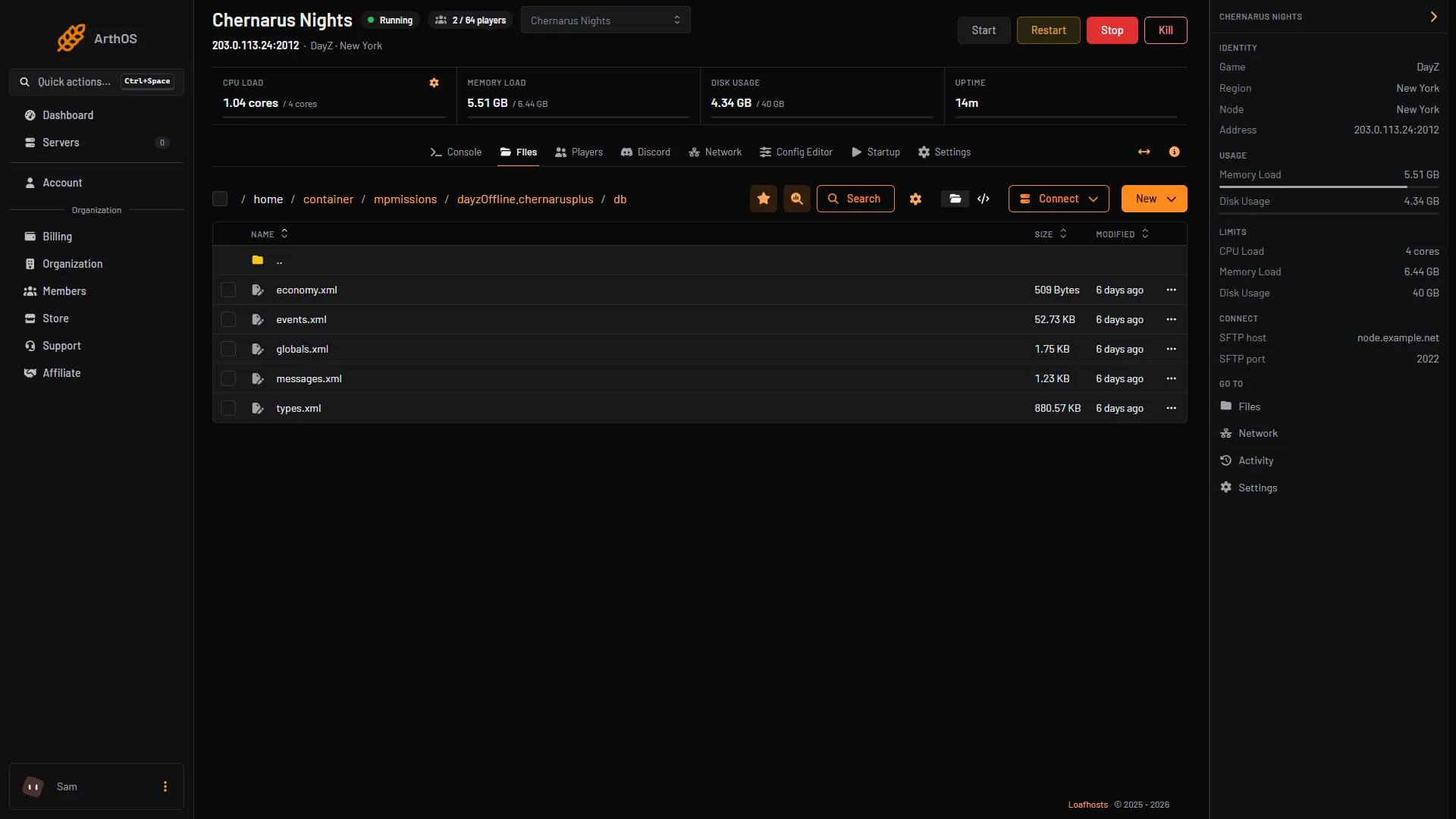
- Open events.xml
Bohemia’s advice when testing a mission is to close the game before changing mission files. Bohemia does not say whether a changed value is used at the next start without any other step, so check in game after the restart.
Mods and events
A mod can add its own events. Bohemia lets a mission list extra files in cfgeconomycore.xml with type="events". These files add to or change events without editing the original. The original event’s children always stay, and you may add more.
If it does not work
- The server does not start after an edit. The XML is broken, often a missing
>or</event>. Put the original block back from the Bohemia repository. - Nothing changed in the game. Check you edited the mission your server loads. The Map (mission) row in the Config Editor shows it.
- A vehicle or crash never appears. Check that the event is
<active>1</active>and thatcfgeventspawns.xmlhas positions listed under the same event name.
Sources: Bohemia wiki: Central Economy setup for custom terrains, Bohemia wiki: Central Economy mission files modding, github.com: DayZ Central Economy