






DayZ Expansion is a large set of mods that adds vehicles, helicopters, boats, base building, airdrops, groups and territories. For most servers you need four Workshop items: Community Framework, Dabs Framework, the Expansion Bundle and Expansion Licensed. Add them to Additional Mods and restart.
The Workshop items
| Item | Workshop ID | What it is |
|---|---|---|
| CF (Community Framework) | 1559212036 | Required by the Bundle. See the CF guide. |
| Dabs Framework | 2545327648 | Required by the Bundle. |
| DayZ-Expansion-Bundle | 2572331007 | “Includes the content of all Expansion Mods” except Licensed and Animations. |
| DayZ-Expansion-Licensed | 2116157322 | Material licensed from Bohemia Interactive. Not included in the Bundle. |
The Bundle’s Workshop page lists CF, Dabs Framework and DayZ-Expansion-Licensed as its required items. It says Licensed “is required to be loaded with this mod”. The authors listed are ZeRoY and Josecitox.
Expansion is also published as single parts, such as DayZ-Expansion-Core (2291785308), which “act as a foundation for all expansion mods”. Core needs CF and Dabs Framework. The Expansion team’s installation guide lists each part and says to check the dependencies on its Workshop page. If you only want one feature, install that part and the items it lists. If you want the usual full set, use the Bundle.
DayZ-Expansion-Animations is separate and optional. The Bundle page calls it “recommended but optional for those who know what they are doing”.
The Bundle is large. Its Workshop page shows about 2.8 GB, and Licensed adds about 700 MB. Check your disk space first.
In the ArthOS panel
- Stop the server, then take a backup. Open Settings, then Backups.
- Open Startup. In Additional Mods (1), enter the list:
@1559212036;@2545327648;@2572331007;@2116157322;The order you type does not matter: the server sorts the list before it starts, so the loaded order is the sorted one. See mod load order. - Make sure Automatic Updates is on. At the next start, the server downloads each mod and copies its
.bikeykey file intokeys. - Choose Save, then Restart on the Console page. The first start takes a long time because of the download. Watch the Console until it settles.
- Open Files. After the first start, the server creates an
ExpansionModfolder inprofiles. The Expansion team says all Expansion settings are stored there, in aSettingsfolder. Open the file you want to change in Files. The Expansion wiki explains every setting.
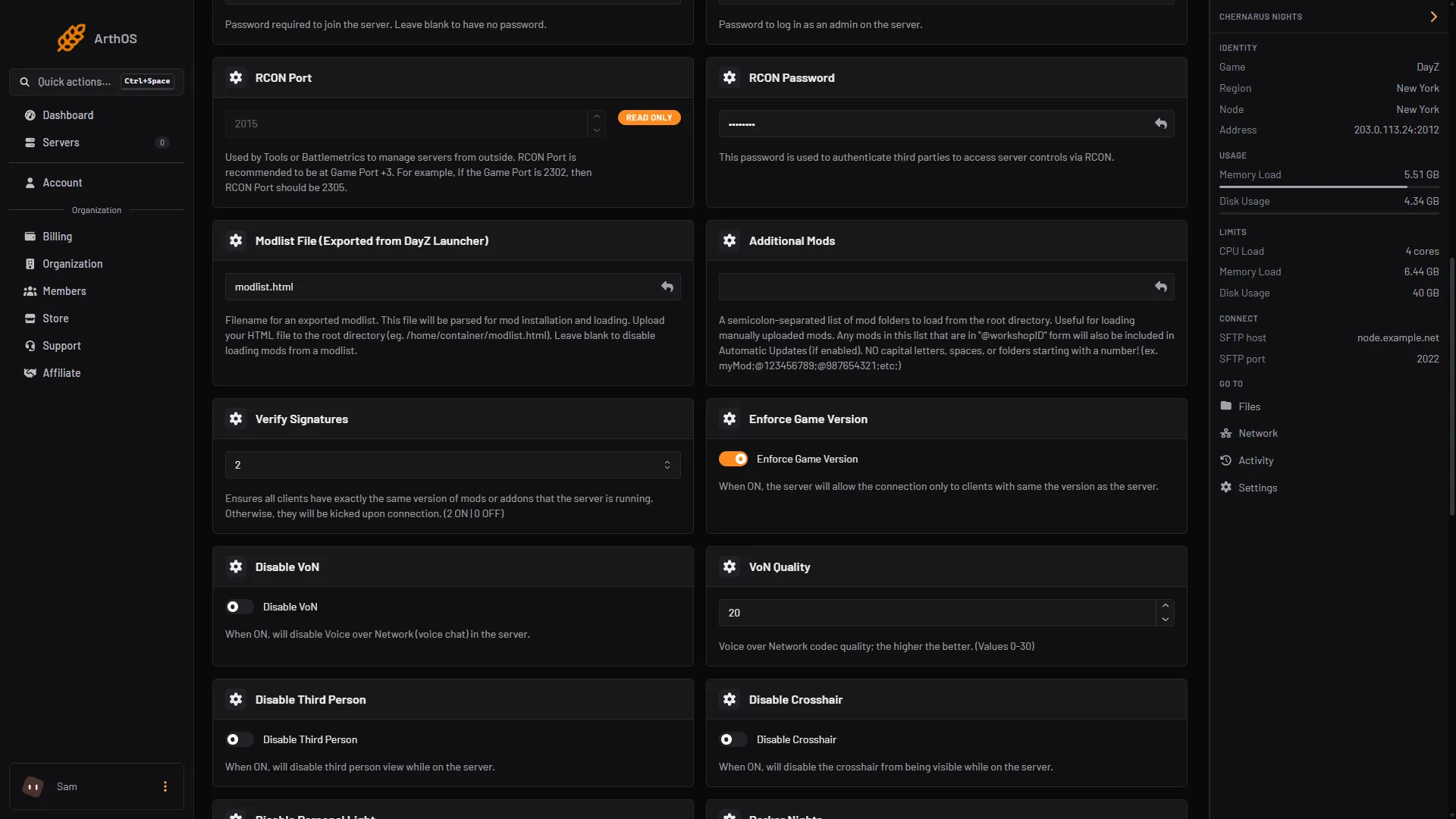
- Additional Mods: the four IDs
Players need the same mods, at the same versions. If Verify Signatures is on, anyone who lacks one is kicked: see fix the mod mismatch kick.
Mission files
Some parts need files in the mission. The Expansion team’s installation guide says to download the latest missions from https://github.com/ExpansionModTeam/DayZ-Expansion-Missions and follow the README_TUTORIAL.txt in it. The template has xml files for items, vehicles and weapons, and mapping and traders for servers that use the Expansion Market. Your mission folder is in mpmissions, for example dayzOffline.chernarusplus. Edit these files in Files.
Admin tools
The Expansion wiki points to Community Online Tools (COT) for admin tools. Its Workshop ID is 1564026768, the same one Bohemia’s server guide uses. The wiki says to turn on -adminlog, find the player’s ID in the .ADM log, and change everyone to admin in that player’s file under PermissionFramework/Players in profiles. If you want VPPAdminTools instead, see the VPPAdminTools guide.
By hand
- Subscribe to the four items. Copy their folders to the server’s main folder. Names must match your
-mod=entry, and the Expansion team says to remove any spaces from folder names if your provider does not support them. - Copy every
.bikeyfrom each mod’skeysfolder into the server’skeysfolder. - Add the mods to the startup parameter, for example
"-mod=@CF;@Dabs Framework;@DayZ-Expansion-Bundle;@DayZ-Expansion-Licensed". Keep the quotes. - Start the server once. The
ExpansionModfolder appears in the profiles folder.
If it does not work
- “Unknown Type ViewController” in the log. The Expansion team says this means the mods are not the right ones or not up to date, and in that case Dabs Framework cannot be found. Check all four are listed and current.
- The server freezes on an endless loading screen. Look in the logs for an error about a json settings file. A line missing from a settings file breaks it. Undo your last change. If there is no error, delete the
ExpansionModfolder and make sure you load an Expansion mission. - “String CORRUPTED - FIX OnStoreLoad()”. The
storage_xfolder uses the vanilla format. Deleting it fixes this and wipes all player progress.
- Players are kicked after an update. Stop the server and take a backup first. Then update the files fully: replace changed files and delete files that are no longer part of the mod. See update your mods.
More about the game: DayZ servers.
Sources: steamcommunity.com: Filedetails, steamcommunity.com: Filedetails, steamcommunity.com: Filedetails, steamcommunity.com: Filedetails, steamcommunity.com: Filedetails, github.com: Wiki, github.com: [Server Hosting] How to update mods on a DayZ server CORRECTLY, github.com: Entrypoint.sh