






To wipe a DayZ server, stop it, make a backup, delete the storage_1 folder inside your mission folder, and start it again. The world begins fresh. Checked on DayZ 1.29. Update 1.30 is due on 15 October 2026.
Where the world is saved
DayZ keeps the saved state of the world in a folder called storage_ followed by the Instance number. It is usually 1, so the folder is storage_1. It sits inside the mission folder, for example mpmissions/dayzOffline.chernarusplus/storage_1.
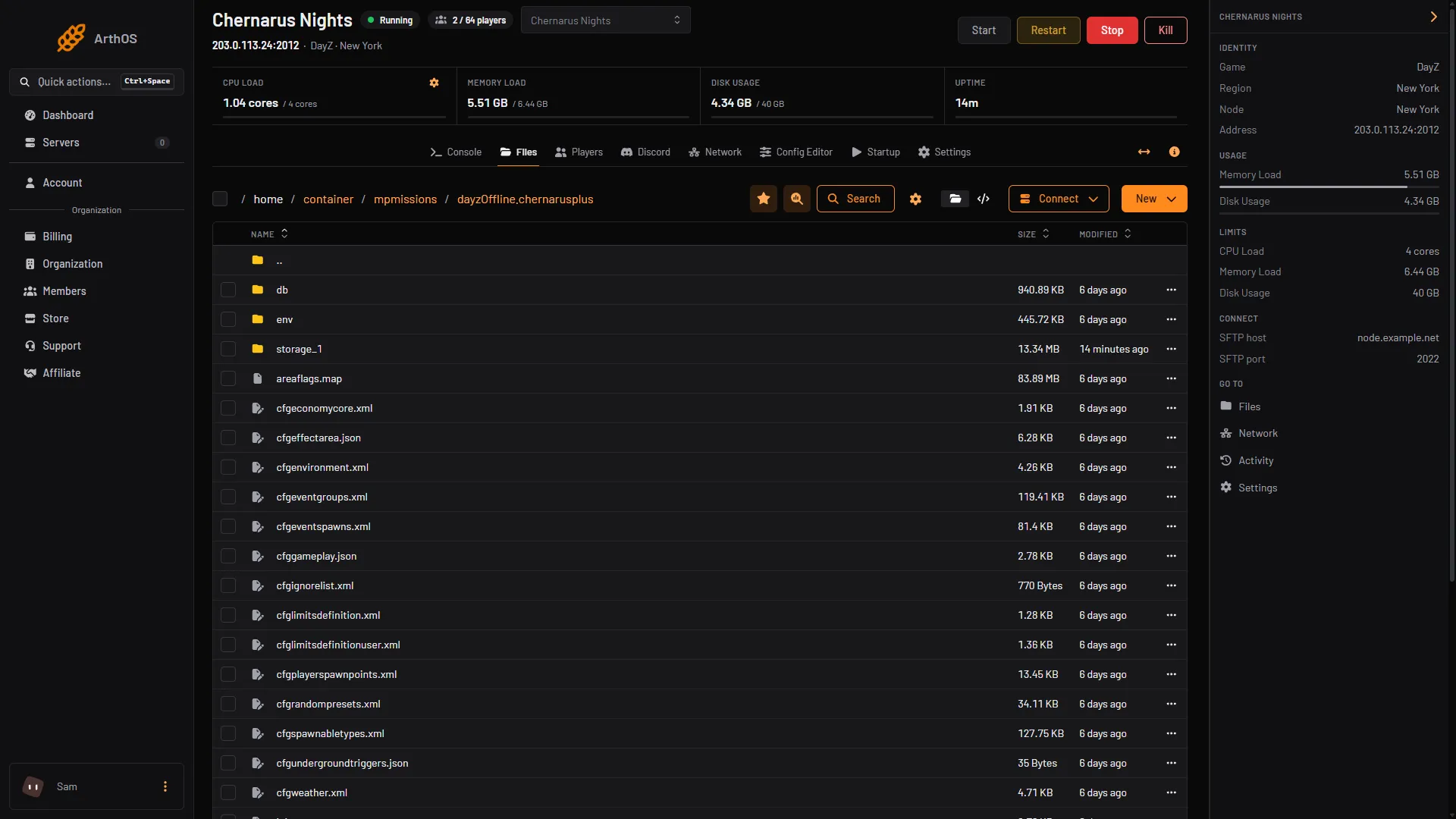
- storage_1
The saved world is the storage_1 folder (1).
Bohemia describes this folder as the actual state of the Central Economy in your mission, made of binary files and their backups that only the game changes. Loot, vehicles and the other things the economy keeps are in it.
Each map has its own mission folder, so each map keeps its own saved world. The Map (mission) row in the Config Editor picks the map. Switching the map does not delete the old world; it stays in its own folder.
The Central Economy also makes automatic backups of this saved state while the server runs. Bohemia sets them in cfgeconomycore.xml: every 60 minutes by default, keeping 12.
Two rows in the Config Editor
Both are in the Advanced group of the Config Editor:
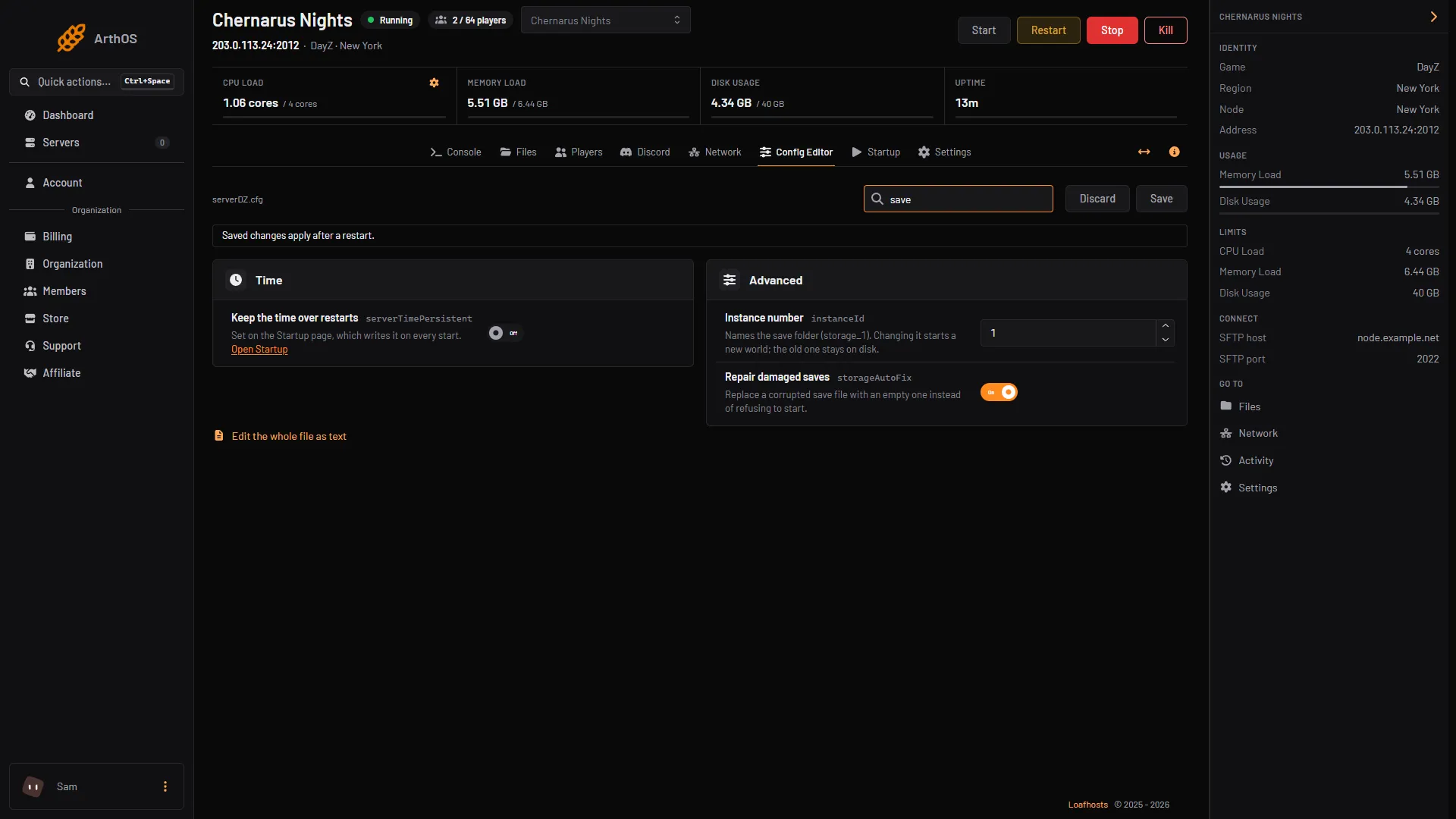
- Instance number (
instanceId): “Names the save folder (storage_1). Changing it starts a new world; the old one stays on disk.” This is a wipe that keeps the old world. - Repair damaged saves (
storageAutoFix): “Replace a corrupted save file with an empty one instead of refusing to start.” Bohemia’s exampleserverDZ.cfgturns it on.
Wipe the world
- In Console, choose Stop and wait until the server is off.
- Open Settings, then Backups, and choose Create, then Create Backup. A manual backup is refused when you are at the backup limit, so delete an old one first if you must.
- In Files, open your mission folder and delete the
storage_1folder. - Start the server. It builds a new world and spawns loot as if the server were new.
Bohemia also says that changes to the mission files are “in most cases” not applied unless the storage folder is removed. A wipe is what it describes for making such changes take effect.
Wipe without deleting
Instead of deleting, change Instance number to a new number, for example 2, then save and restart. The server makes storage_2 and starts a fresh world. The old storage_1 stays on disk, and changing the number back brings the old world back.
What a wipe clears
It clears the saved state of the world: the loot and other things the Central Economy placed and tracks. Both methods above, deleting storage_1 and changing the Instance number, are full wipes. Tell your players to expect a reset of bases and characters too. Wiping only part of the world is not covered here, and which files in storage_1 hold bases and characters: Not checked.
A wipe does not change your settings or your mods.
The world came back empty after a restart
If the world looks wiped and you did not wipe it, check these:
- The Instance number changed, so the server loaded another folder (
storage_2instead ofstorage_1). Set it back. - Map (mission) changed. Each map has its own saved world.
- Repair damaged saves replaced a damaged save with an empty one (its help text says so).
- The server was Killed, not Stopped, so it did not save first.
- A backup was restored. Restoring one puts back the files as they were at that time.
Stop and restart
The panel’s Stop sends DayZ the same signal as Ctrl+C. The server log then ends with “Termination successfully completed”, a clean shutdown (seen 13 October 2026). Whether every last change is saved at that moment: Not checked on 1.29 as of 13 October 2026. Bohemia recommends its own countdown shutdown (see By hand).
By hand
- Stop the server with a graceful shutdown, such as Bohemia’s countdown shutdown.
- Copy the
storage_1folder somewhere safe. - Delete
storage_1, or setinstanceId = 2;inserverDZ.cfg. - Start the server.
If you start the server with -storage=, the storage root is the folder you named, not the mission folder. Look for it in [Advanced] Extra Startup Parameters on the Startup page.
If it does not work
- The world did not reset. Check that you deleted the folder of the map the server loads (Map (mission)) and of the current Instance number. Delete only while the server is stopped.
- A
storage_folder with a different number appeared. The Instance number was changed. Set it back to the number you want. - The server will not start. A corrupted save file can stop it. Repair damaged saves replaces such a file with an empty one. Or restore your backup.
- You deleted the wrong folder. Restore the backup from Settings, then Backups. The server is stopped for you while a backup is restored.
More about the game: DayZ servers.
Sources: Bohemia wiki: Server Configuration, Bohemia wiki: Central Economy setup for custom terrains, Bohemia wiki: Central Economy Configuration, Bohemia wiki: Server Messages, store.steampowered.com: 221100