






A DayZ server that checks signatures kicks any player whose mods do not match the server’s mods exactly. The usual causes are a mod that updated on one side only, a mod the server has but the player lacks (or the other way round), and a missing .bikey key file on the server. If everyone is kicked right after a mod update, restart the server so it downloads the update. Find the code in the kick message, then use the matching fix below.
Read the kick message
The game shows “You were kicked off the game”, a reason, and often the file it did not like, for example (addons\ai.pbo). It also has a code like 0x0004007E. Bohemia lists the codes. These are the ones about mods:
| Code | Name | What Bohemia says it means |
|---|---|---|
0x00040073 | VE_MISSING_MOD | The client is missing a mod which is on the server. |
0x00040074 | VE_EXTRA_MOD | The client has a mod which is not on the server. |
0x00040079 | VE_UM_CLIENT_UPDATED | Extra PBO, most likely because the client has a newer version of the mod. |
0x0004007A | VE_UM_SERVER_UPDATED | Extra PBO, most likely because the server has a newer version of the mod. |
0x00040081 | VE_M_CLIENT_UPDATED | Missing PBO, most likely because the client has a newer version of the mod. |
0x00040082 | VE_M_SERVER_UPDATED | Missing PBO, most likely because the server has a newer version of the mod. |
0x0004007E | VE_MISSING_BISIGN | The client has a PBO which is missing a .bisign. |
0x0004007D | VE_INTEGRITY | The client has a corrupted or modified file. |
0x00040075 | VE_CLIENT_CORRUPT | The client installation is corrupt. |
0x00040076 | VE_SERVER_CORRUPT | The server installation is corrupt. |
0x00040092 | PBO_CLIENT_UPDATED | The client has a more recent version. |
0x00040093 | PBO_SERVER_UPDATED | The server has a more recent version. |
A player can also be refused before joining, with 0x00020016 (EQUAL_MOD): “Server and client do not have equal mods while server enforces it.” A game version that does not fit the server shows as 0x00010006 (VERSION_MISMATCH): “Your currently installed game version is not compatible with this server.”
A PBO is a mod’s data file. A .bisign is the signature file beside it. A .bikey is the public key the server uses to check those signatures.
In the ArthOS panel
- Open Startup and look at Verify Signatures (1). It is on by default (value 2). The panel offers 2 and 0; Bohemia documents only 2, so leave it on. When it is on, players with different mod versions are kicked on connection.
- Look at Automatic Updates. With it on, the server checks every Workshop mod listed in Additional Mods, the modlist file and [Advanced] Server-Side Only Mods each time it starts, and downloads the ones that changed.
- If the code says the server has the newer version (
0x0004007A,0x00040082,0x00040093), the player must update the mod in their game launcher. Ask them to subscribe again or choose repair in the launcher. - If the code says the client has the newer version (
0x00040079,0x00040081,0x00040092), the mod updated on the Workshop after the server last checked. Choose Restart on the Console page. With Automatic Updates on, the server downloads the new version while it starts. - If the code says the client is missing a mod (
0x00040073), the player needs to subscribe to it. Share the Workshop link or the mod list. - If the code says the client has an extra mod (
0x00040074), the player runs a client mod that the server does not run. They must remove it, or you add it to the server. - If the code is
0x0004007E(missing.bisign), or every player fails the check for one mod, open Files and look inkeys. Each mod ships its keys in its ownkeysfolder, inside@<Workshop ID>. The server copies them for you when it downloads a mod. Mods you upload yourself need their keys copied by hand.
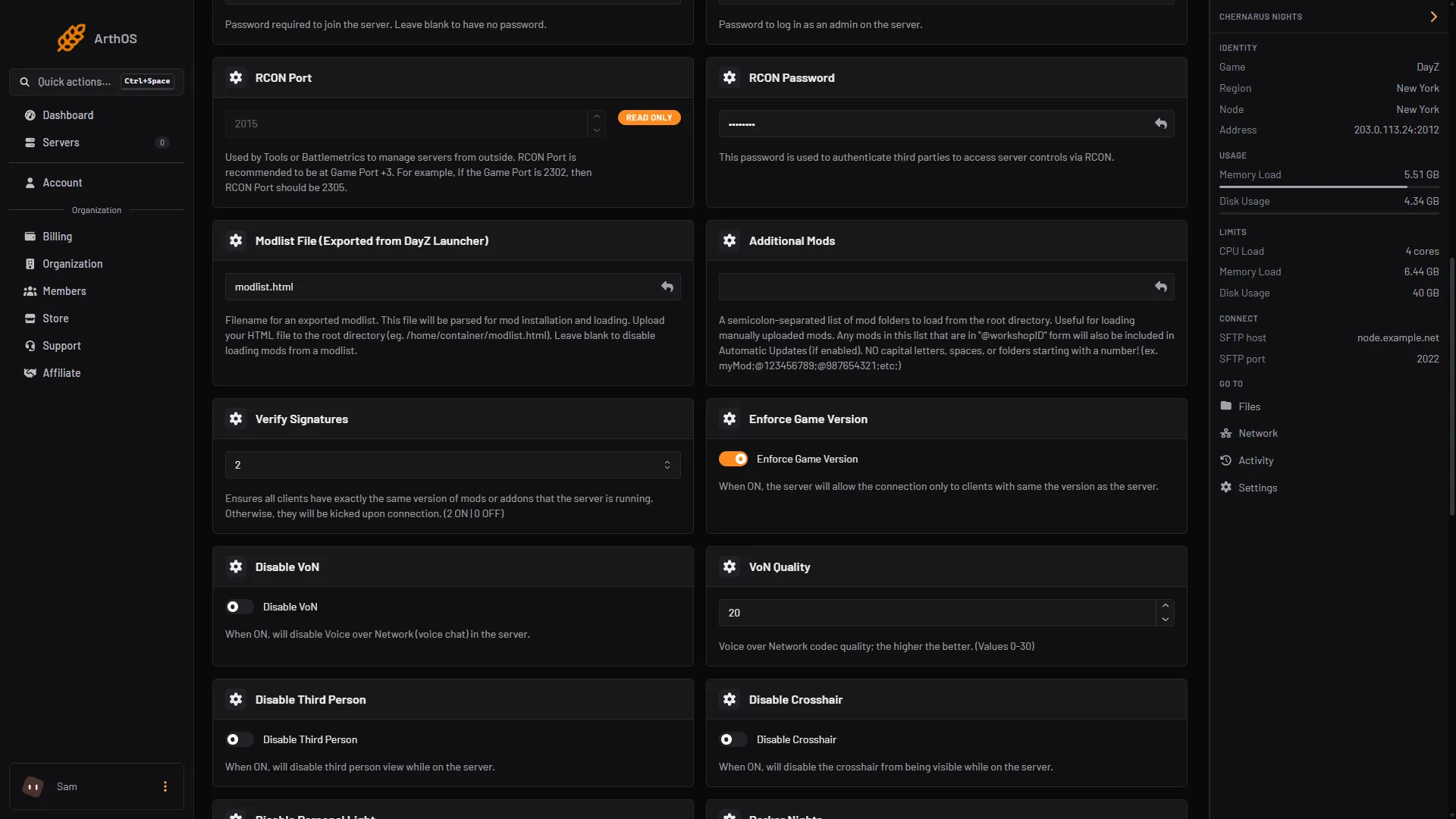
- Verify Signatures
- Enforce Game Version
Also check Enforce Game Version (2). When it is on, only players on the same game version as the server can join. After a DayZ update, players on the old version are refused until the server updates too, and the other way round.
By hand
- Make the server’s mod files the same as the Workshop’s current files. Replace the changed
.pboand.bisignfiles, then delete any file in the server’s copy of the mod that is not in the new one. The Expansion mod team explains this step by step in their update guide. - Copy every
.bikeyfrom each mod’skeysfolder into the server’skeysfolder. - Check
serverDZ.cfg.verifySignatures = 2;turns the check on. Bohemia documents only 2. - Restart the server.
If it does not work
- Only one player is kicked. The fault is on their side. Ask them to repair or re-subscribe the mod in the launcher, and to remove mods the server does not run.
- Everyone is kicked right after a Workshop update. The mod updated before the server did. Restart the server so it downloads the update.
- Everyone is kicked and nothing updated. Look in
keysfor the mod’s.bikey. - A code about the server being corrupt (
0x00040076,0x00040083). Turn on [Repair] Validate Server Files for one start, with Automatic Updates on, so Steam checks the server files. Then turn it off. - A mod on the server needs no key for players. A mod in [Advanced] Server-Side Only Mods runs on the server only. Players do not need it while Verify Signatures is on.
If players see “Client not responding” instead, that is a different problem: see the client not responding kick. More about the game: DayZ servers.
Sources: Bohemia wiki: Error Codes, Bohemia wiki: Server Configuration, github.com: Entrypoint.sh, github.com: [Server Hosting] How to update mods on a DayZ server CORRECTLY, store.steampowered.com: 221100