






When a DayZ server is full or busy, players wait in a login queue. You set how many can wait and how many log in at once in the Config Editor. To let chosen players skip ahead, list their Steam IDs in priority.txt.
The three settings
- Players logging in at once is
loginQueueConcurrentPlayers. Bohemia: “The number of players concurrently processed during the login process”, meant to prevent a big performance drop when many people connect at the same time. Bohemia’s example value is 5. The Config Editor accepts 1 to 100. - Login queue size is
loginQueueMaxPlayers. Bohemia: “The maximum number of players that can wait in login queue”. Bohemia’s example value is 500. The Config Editor accepts 1 to 1000. - Ignore the priority list is
disablePrioritylist. Bohemia: “Disables usage of priority.txt”. Its default is false.
In the ArthOS panel
- Open your server and choose Config Editor. Type
queuein Search to show only these rows. - Change Players logging in at once (1) and Login queue size (2). Leave Ignore the priority list (3) off if you use
priority.txt. - Choose Save, then restart the server. The banner says “Saved changes apply after a restart.”
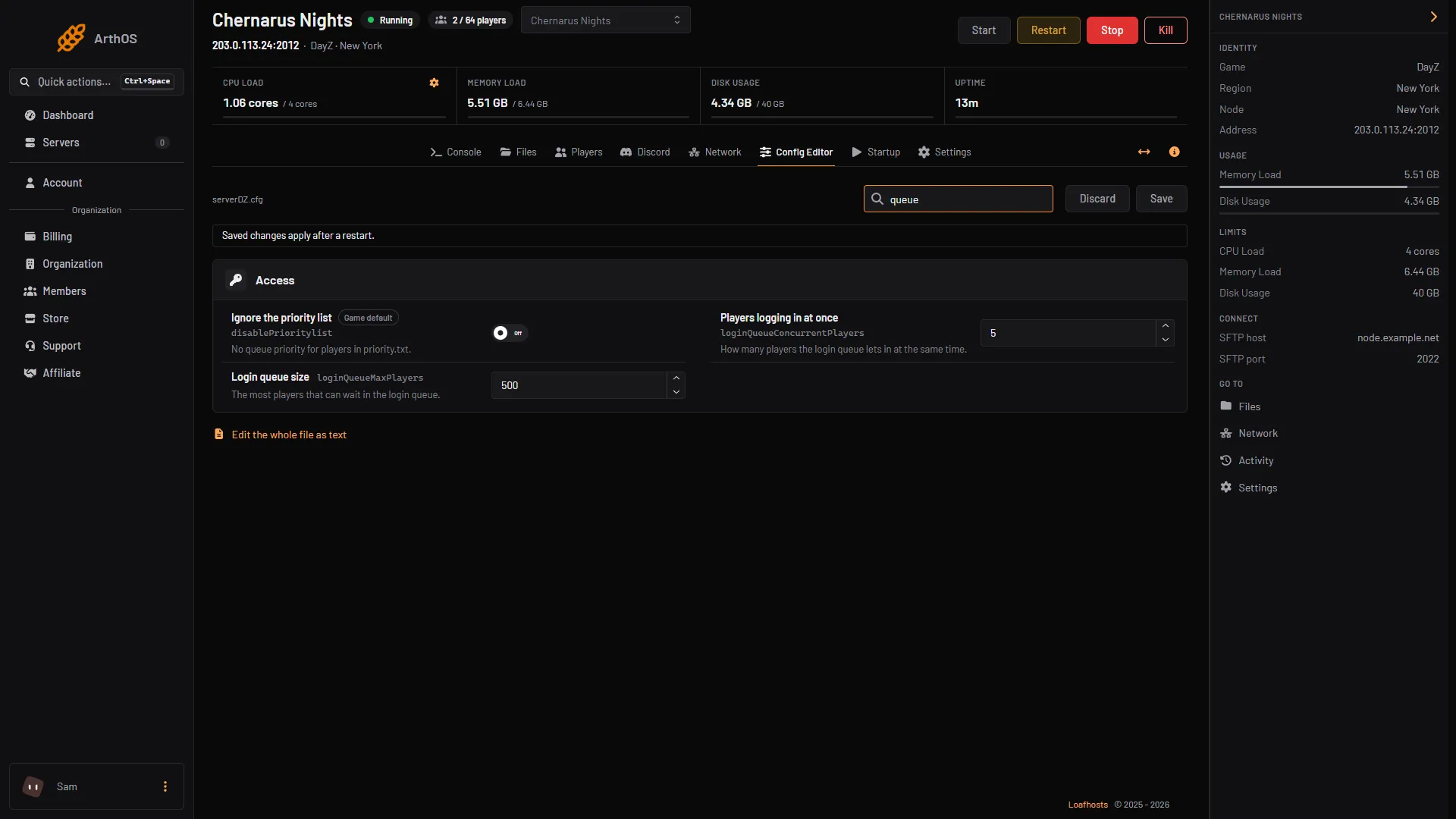
- Players logging in at once
- Login queue size
- Ignore the priority list
Put players first with priority.txt
Bohemia: specified users “will get on the first position, before the non-prioritized users”. The file is priority.txt in the root folder of the server. It holds Steam IDs separated by semicolons:
SteamId;SteamId;01234567890123456;01234567890123456Each ID is the player’s 17 digit Steam ID, not their BattlEye GUID and not the 44 character ID the whitelist uses.
- Open Files. You start in the server’s root folder, next to
serverDZ.cfgandwhitelist.txt. - A new server has no
priority.txt, so create a new file with that name. - Write the IDs on one line, separated by semicolons, and save.
- Restart the server.
Bohemia does not say whether the game reads priority.txt again without a restart, so restart to be sure.
By hand
Edit serverDZ.cfg:
loginQueueConcurrentPlayers = 5;
loginQueueMaxPlayers = 500;
disablePrioritylist = false;
Put priority.txt next to the server program.
If it does not work
- Priority players still wait. Check that Ignore the priority list is off, that the IDs are 17 digit Steam IDs, and that you restarted.
- The IDs are not separated. Bohemia’s format is IDs separated by semicolons. Check the line against the example above.
- The queue seems too short. Raise Login queue size. For the number of player slots, see max players.
To allow only certain players in at all, see the whitelist guide. The game’s own page is DayZ.
Sources: Bohemia wiki: Server Configuration