






DayZ keeps loot going with its Central Economy. Two files control it: globals.xml holds the world-wide values for respawn and cleanup, and types.xml holds the numbers for each item. A normal restart does not refill the world with loot. Checked on DayZ 1.29. Update 1.30 is due on 15 October 2026.
Neither file is in the Config Editor. You edit them in Files, in your mission folder under db, for example mpmissions/dayzOffline.chernarusplus/db/globals.xml.
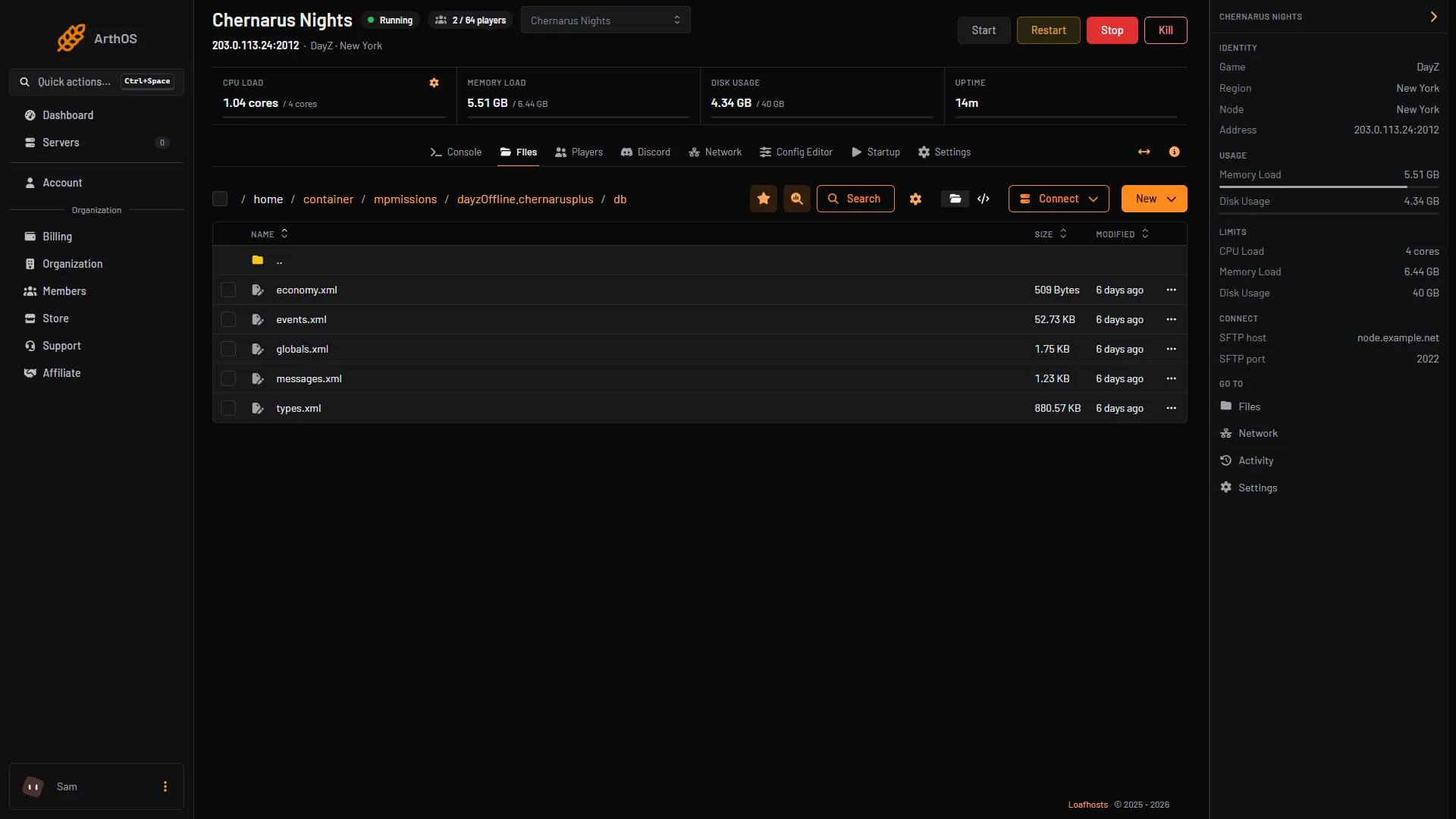
- globals.xml
Open globals.xml (1) for the world-wide values. types.xml is in the same folder.
What a restart does to loot
The world’s loot is saved in the storage_ folder of the mission. Bohemia calls that folder “the actual state of the Central Economy”. When the server starts with that folder in place, it loads the saved state.
Two values in globals.xml decide how much loot is added at a start:
InitialSpawn: how much loot spawns on the first start, without a saved world. Default 100 (percent).RestartSpawn: how much loot is respawned to the nominal amount during a restart. Default 0 (percent).
So with the default, a restart does not respawn extra loot on top of what the world saved. A wipe, which deletes the storage_ folder, gives you a fresh start with InitialSpawn applied. See wipe the DayZ world.
Respawn values in globals.xml
Bohemia’s descriptions, with its default values:
| Variable | Default | What it does |
|---|---|---|
RespawnAttempt | 2 | Attempts made during a single item respawn. |
RespawnLimit | 20 | How many items of one type can be spawned at once. |
RespawnTypes | 12 | How many different types can be respawned at once. |
SpawnInitial | 1200 | How many initial tests are allowed for item spawn. |
LootSpawnAvoidance | 50 | Metres a player must be from a loot group for loot to spawn in it. |
LootDamageMin, LootDamageMax | 0 | The least and most damage applied to any item the economy spawns, from 0 to 1. |
LootProxyPlacement | 1 | Allows dispatch containers to receive loot. |
TimeHopping | 60 | Seconds of penalty for server hoppers. |
Bohemia’s shipped Chernarus file uses LootSpawnAvoidance 100 and LootDamageMax 0.82, not the values above. Read your own file for the real numbers.
Cleanup values in globals.xml
| Variable | Default | What it does |
|---|---|---|
CleanupAvoidance | 100 | Metres a player must be from an item for it to be deleted. |
CleanupLifetimeDefault | 45 | Seconds before an entity with no economy setup, and with damage of 1.0 or more, is deleted. |
CleanupLifetimeRuined | 330 | Seconds before ruined loot is deleted. |
CleanupLifetimeDeadPlayer | 3600 | Seconds before a dead player’s body is deleted. |
CleanupLifetimeDeadInfected | 330 | Seconds before a dead infected is deleted. |
CleanupLifetimeDeadAnimal | 1200 | Seconds before a dead animal is deleted. |
CleanupLifetimeLimit | 50 | How many items can be deleted at once in a standard cleanup. |
FlagRefreshFrequency | 432000 | Seconds between refreshes of the lifetime of items near a territory flag. |
FlagRefreshMaxDuration | 3456000 | Seconds a flag keeps refreshing items. |
The last two follow Bohemia’s wording: “items lifetime will be refreshed with this frequency” and “how long the flag will be refreshing items”.
Each line in the file looks like this. The type is 0 for a whole number, 1 for a decimal:
<var name="CleanupLifetimeDeadPlayer" type="0" value="3600"/>Do not change a type.
Loot amounts per item in types.xml
Each item in types.xml has a block like this one from Bohemia’s file:
<type name="ACOGOptic_6x">
    <nominal>5</nominal>
    <lifetime>14400</lifetime>
    <restock>1800</restock>
    <min>2</min>
    ...
</type>
To get more or less of an item, change nominal and min. Keep min below nominal. A community reference, not Bohemia, says lifetime is the seconds an untouched item stays before it is removed, and restock the seconds to wait before the economy may spawn a replacement. Bohemia names these fields but does not define them, so change one number at a time. Whether items already in the world keep their old lifetime after an edit: Not checked.
Edit the files
- In Console, choose Stop and wait until the server is off.
- In Files, open the file. Make a copy first so you can undo a mistake.
- Change one value at a time. Save.
- Start the server.
Bohemia warns that changes to the mission files “in most cases” are not applied unless the storage_ folder is removed. Try a restart first. If nothing changes, read the wipe guide before you delete anything.
If it does not work
- A restart did not bring loot back.
RestartSpawndefaults to 0 and the saved world is loaded as it was. RaiseRestartSpawnto respawn loot at a restart. Bohemia does not say how much loot a given value brings back, so raise it in small steps. - Your edit did nothing. Read the part above about the
storage_folder.
More about the game: DayZ servers.
Sources: Bohemia wiki: Central Economy Configuration, Bohemia wiki: Central Economy setup for custom terrains, Bohemia wiki: Server Messages, github.com: DayZ Central Economy, store.steampowered.com: 221100