






DayZ writes its logs into the profiles folder. Every start makes a new set of files, named with the date and time of that start. Open Files, go to profiles, and take the newest file of the kind you need. The Console tab shows the live output while the server runs.
Which file is which
A start at 20:05:02 on 28 September makes files like these:
DayZServer_2026-09-28_20-05-02.RPTis the server log. It is what the game says about itself: startup, mods, warnings and errors. Open this first when something is wrong.DayZServer_2026-09-28_20-05-02.ADMis the admin log. It records what players do. See the list below.script_2026-09-28_20-05-02.logis the script log. Script errors from the game or from mods land here.error.logis a single error log. It has no date in its name.
The files of one start can be a second apart. For example, the RPT file may be stamped 10-02-43 and the ADM file 10-02-44. They still belong to the same start.
If the server crashes, it writes a crash_<date>_<time>.log text file and a .mdmp dump file. If it freezes, -freezeCheck stops it after more than 5 minutes frozen and creates a dump file. The .mdmp file is for diagnosing a crash and is not a text log.
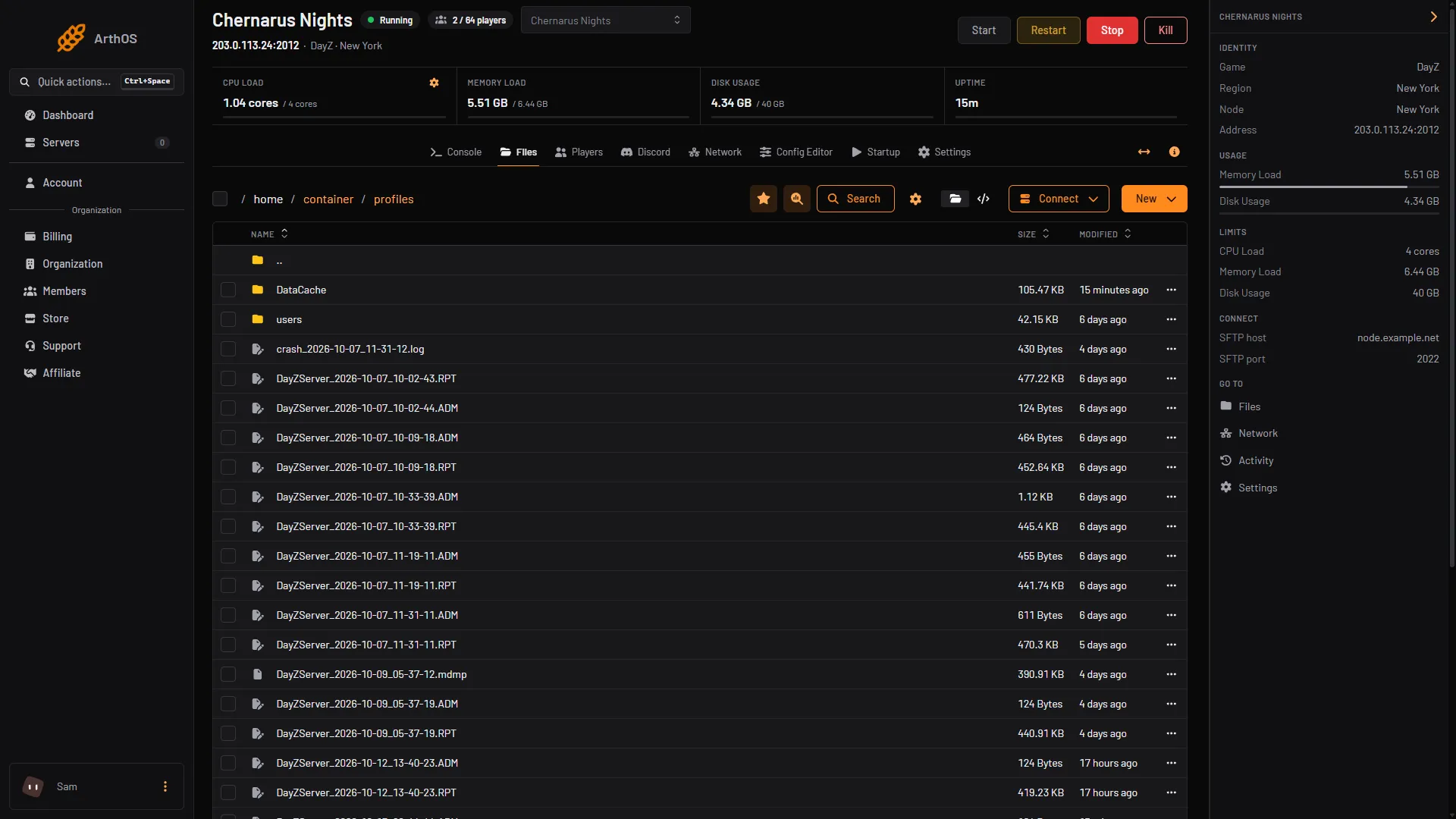
The Console is the quick view. The files are the full record, and they stay after a restart.
What the admin log records
Each line starts with the time as HH:MM:SS. Bohemia lists these events:
- players connecting and disconnecting,
- chat, and reports a player sends by typing
#toadminand a message, - players falling unconscious and waking up,
- hits on players, with the damage and the weapon,
- deaths, including who killed whom, from how far, and with what,
- suicides and bleeding out.
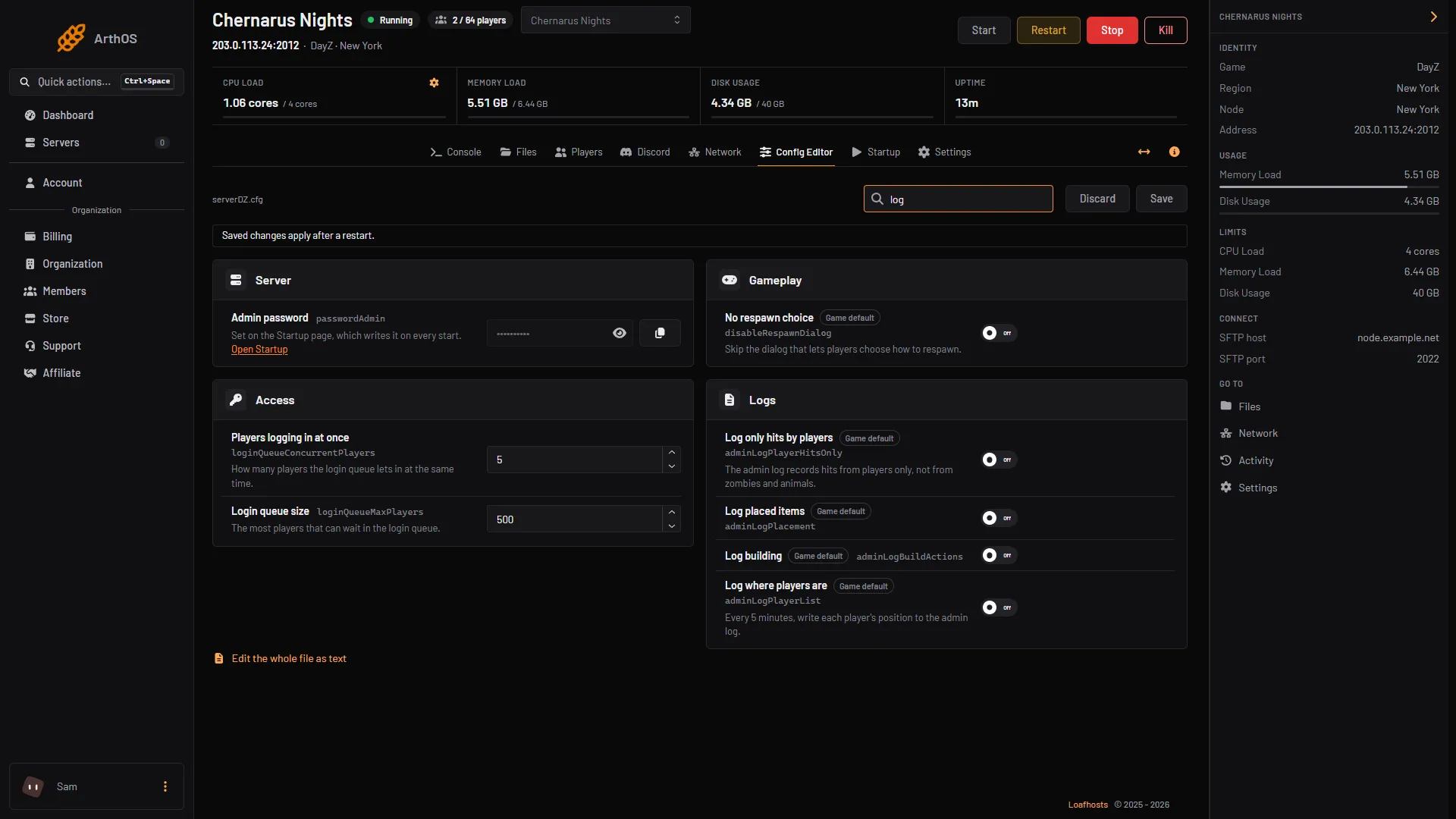
Four settings in the Config Editor, group Logs, change what the admin log records. All four are off by default:
- Log only hits by players leaves out hits from infected and animals.
- Log placed items records traps, tents and similar.
- Log building records building, dismantling and destroying.
- Log where players are writes every player’s position every 5 minutes.
Log time format sets whether time stamps in the RPT file are Short or Full.
Turn the logs on
Three flags control what is written. They are in Startup, in [Advanced] Extra Startup Parameters, and on Loafhosts the default is:
-dologs -adminlog -netlog -freezecheck-dologsputs all log messages in the RPT file.-adminlogcreates the ADM file.-netloglogs network traffic. It makes larger files.-freezecheckis the freeze stop described above.
Remove -netlog if you do not need it. Without -adminlog there is no admin log at all.
Log the server’s speed and memory
Bohemia’s server configuration has three more lines, each a number of seconds between log entries and each needing -dologs: logAverageFps, logMemory and logPlayers. They are not in the Config Editor. Add them to serverDZ.cfg in Files, for example:
logAverageFps = 60;
logMemory = 60;
logPlayers = 60;
Restart afterwards. The RPT file then gains regular lines with the average server FPS, memory use and player count. See DayZ server lag for what to do with them.
By hand
On your own machine the same files appear in the folder you pass with -profiles. Start the server with -dologs -adminlog to get the RPT and ADM files. Bohemia’s Linux example uses -profiles=profiles, which is what Loafhosts uses.
If it does not work
- There is no ADM file.
-adminlogis missing from [Advanced] Extra Startup Parameters. Add it and restart. - The RPT file has no detail.
-dologsis missing. Add it and restart. - The newest file is not from the start you want. Each start makes its own set. Sort by name; the date and time are in it. Files of one start can differ by a second.
- The admin log has no building or placement lines. Turn on Log building or Log placed items in the Config Editor and restart.
- A file is too big to open. Download it from Files and open it on your own computer.
More about the game: DayZ servers.
Sources: Bohemia wiki: Server Configuration, Bohemia wiki: Administration Logs