






A DayZ server that is missing from the list may still be starting, the list may be looking at the wrong port, or a filter may be hiding it. Work through the checks below in order. While you sort it out, you can join by typing the address in yourself (see “Join by address meanwhile” below the first three checks).
Check 1: is it finished starting?
Open the Console. The server is ready when it prints Mission read.. Before that line, the server does not answer the list. A large mod list makes this take longer. How long a started server takes to appear in the list: Not checked as of 13 October 2026.
Check 2: is the query port right?
The server list finds your server through its Steam query port, which is not the port players join on. Bohemia describes steamQueryPort as the setting that “should fix the issue with server not being visible in client server browser”.
On Loafhosts the query port is set for you. It is shown as [Host] Steam Query Port on Startup and it is read only. It is written into serverDZ.cfg at every start, so changing it in the file does nothing.
To see the port the game really used:
- Open Files and go to
profiles. - Open the newest
.RPTfile. - Search for
SteamGameServer_Init. The line looks likeSteamGameServer_Init(0,8766,2012,2013,...). The third number is the game port and the fourth is the query port. - Both numbers should match the ports on the Network page.
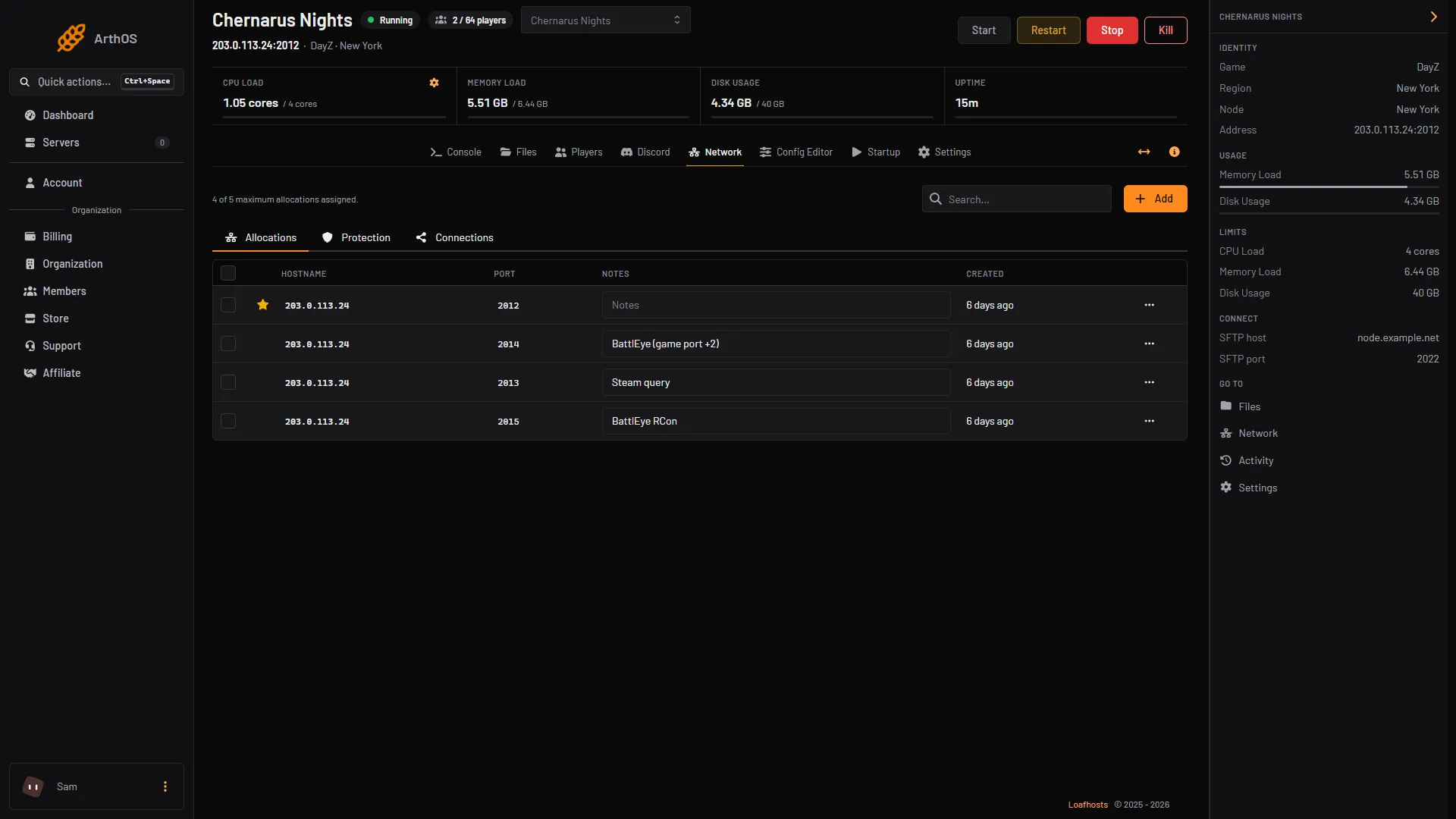
If the query port in the RPT file is not the one on Startup, restart the server and look again.
Check 3: is a filter hiding it?
The DayZ launcher and the in-game browser only show servers that pass their filters. Clear every filter, set the region to all, and search for the exact server name. If your server has a password, the list still shows it, but you cannot join without the password.
Join by address meanwhile
You need the server’s address and ports from the Network page.
- In the DayZ launcher, use Direct Connect with the address and the game port.
- Or, in Steam, open View, Game Servers, Favorites, choose the plus button, and enter the address with the query port. The server then shows in your favourites in the launcher too.
If an address does not work, the port is usually the wrong one. See connect to a DayZ server.
Check 4: is the version the same?
A player on a different game build cannot join. DayZ tells them which side must update: “Client is an older build than the server. Please update your game.” or “Client is a newer build than the server. Please wait until server is updated.” After a DayZ update, turn on Automatic Updates on Startup and restart: the server then checks for updates as it starts. Enforce Game Version on the same page is what makes the server refuse a different build. A version mismatch blocks the join; it is not a listed cause of a server going missing from the list.
Check 5: is it full, or does it use mods?
Players cannot join a full server. DayZ tells them “Maximum number of players has been reached.”. Raise Max Players on Startup or wait for a slot.
If the server runs mods, a player needs the same mods. See DayZ mismatched mods kick.
If it does not work
- It never shows
Mission read.. The server is not finishing its start. Open the newest.RPTandscript_files inprofilesand read the last errors. See DayZ server logs. - It shows
Mission read.and still does not list. Compare the query port in the RPT file with Network. If they differ, restart and recheck. - Direct Connect fails too. Check the game port, not the query port, and check the password.
More about the game: DayZ servers.
Sources: Bohemia wiki: Server Configuration, Bohemia wiki: Error Codes, steamcommunity.com: 600766144921517494