






A server-side mod runs only on the server. Players do not download it and do not need it to join. Add it to [Advanced] Server-Side Only Mods on Startup, then restart.
Bohemia describes the -serverMod startup option as loading mods that are “server-side (not broadcasted to clients)”. The panel fills -serverMod= from this setting.
When to use it
Use it only for a mod whose author says it runs on the server alone. A mod that adds items, buildings or anything players see or use must be on the players’ side as well. That kind goes in Additional Mods or in your DayZ Launcher mod list, as in install Workshop mods.
In the ArthOS panel
- Find the mod’s Workshop ID. It is the number after
id=in the mod’s web address. - Open Startup.
- In [Advanced] Server-Side Only Mods (box 1 in the picture below), type each mod as
@plus its ID, with a semicolon after each one:
@123456789;@987654321;- Use no spaces and no capital letters. Choose Save.
- Go to Console and choose Restart.
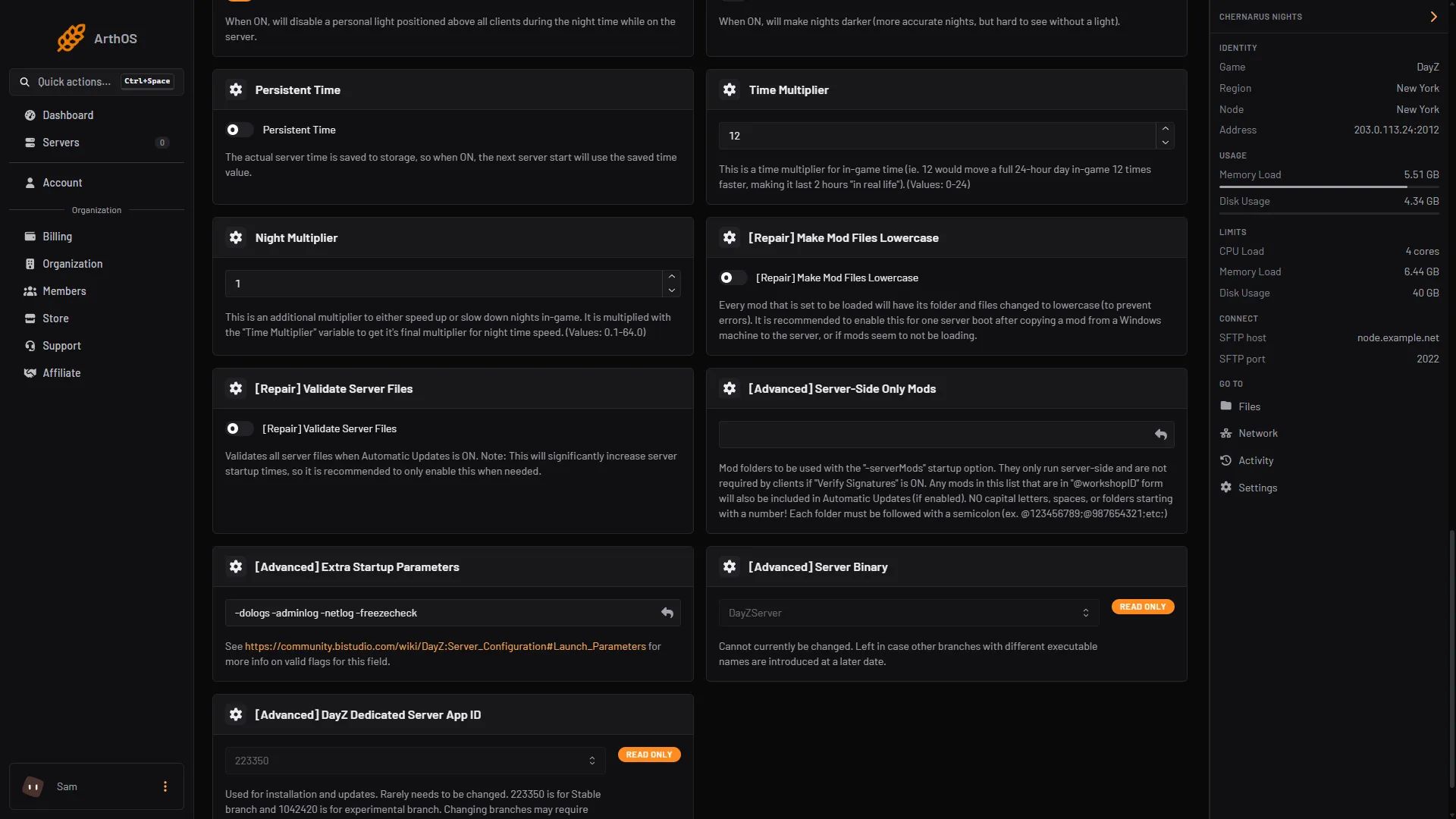
- Server-Side Only Mods
Mods written like @123456789 are Workshop mods. With Automatic Updates on, the server downloads them at start and updates them like any other mod. See update DayZ mods.
A folder you uploaded yourself works too. Write its folder name, with no capital letters, no spaces, and not starting with a number, for example mytool;.
The server copies a Workshop mod’s .bikey files into the keys folder, also for server-side mods. Players do not need them. With Verify Signatures on, a server-side mod is not required by players. See mod keys and signatures.
The server passes your server-side list as you typed it, not sorted. The Additional Mods list is sorted, so the order typed there does not matter. See mod load order.
By hand
Add -serverMod= to the start line, with the mod folders separated by semicolons:
./DayZServer -config=serverDZ.cfg "-mod=@1559212036;" "-serverMod=@123456789;"If it does not work
- The mod does not load. Check that each entry starts with
@and ends with;. Check for capital letters and spaces. - Players say a mod is missing. The mod needs to run on the players’ side. Move it to Additional Mods.
- The mod does not download. Check that Automatic Updates is on.
Sources: Bohemia wiki: Server Configuration, github.com: Entrypoint.sh