
















Most failed joins come from one of seven things: the server is not ready, the address is wrong, the game version differs, the mods differ, the join password is wrong, the whitelist or a ban keeps the player out, or the server is full. Check them in this order.
1. Is the server ready?
Open the Players page. If it says “The server is starting. Who is on shows once its world has loaded.”, wait. If it says “The server is stopped.”, start it, then wait for the page to say who is on.
2. Is the address right?
In the game, choose Multiplayer, then Connect to address. Paste the address from the Join card on the Players page. Use its Copy button (1). If the card says “This server has no address yet.”, there is no address to copy yet.
The game’s default port is 34197. Your server has its own port, shown in the Join card. On the Network page, the game port is the row with a star in the Allocations table. Copy the address as the card shows it.
The picture below also shows the Banned list and the whitelist switch, which section 6 uses.
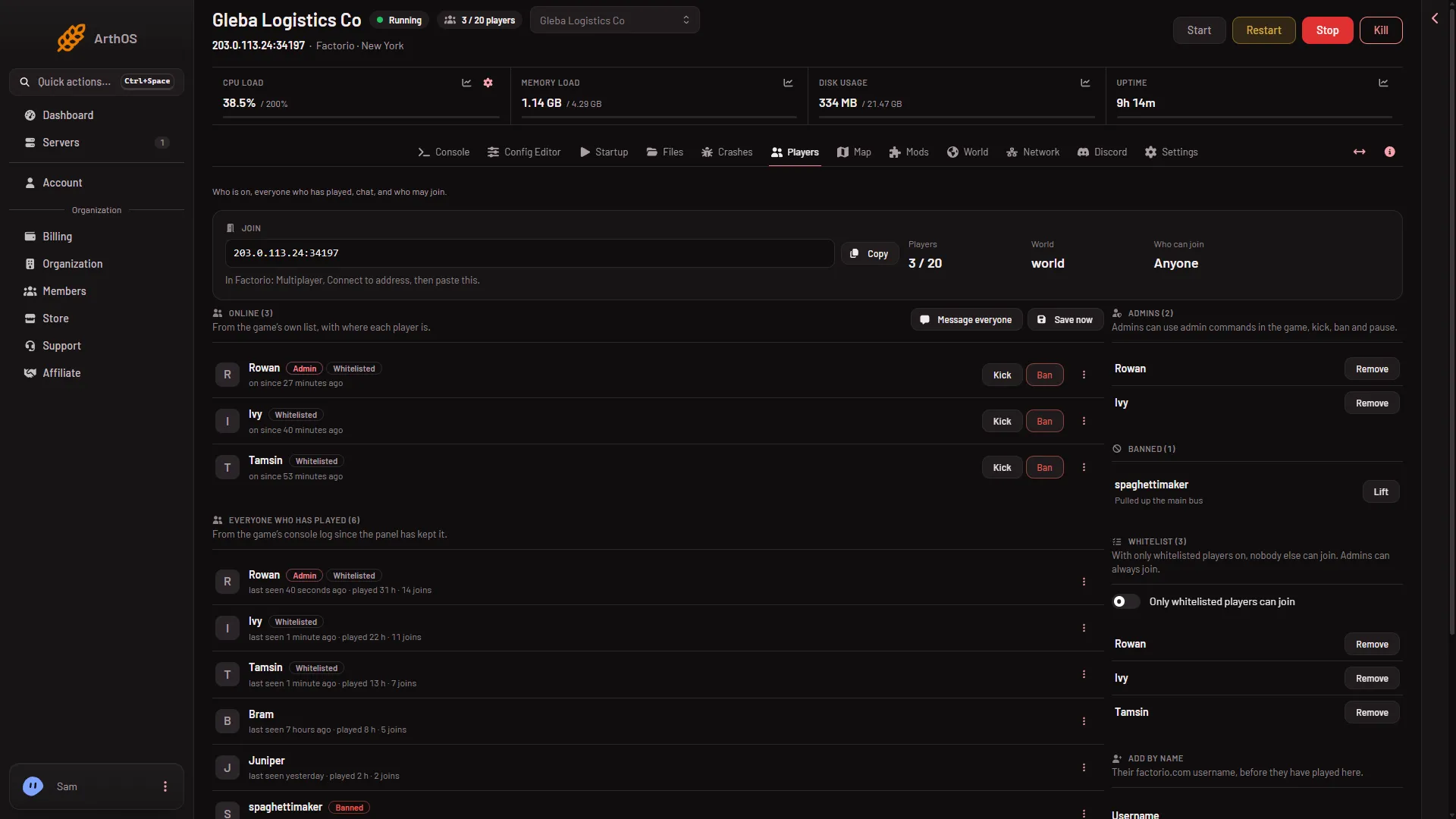
- Copy the address
- Banned list
- Whitelist switch
3. Same game version
Everyone needs exactly the same version as the server. A player on 2.0 cannot join a 2.1 server. See Factorio version mismatch.
4. Same mods
Every mod on the server must be on the player’s side with the same version. See mods mismatch on join. If Space Age is on, players need the expansion. Turning mods off on a world that uses them may lose what they added, so read that guide first.
5. The join password
A new server has no join password. If you set one, players must type it when they connect. See join password not working.
6. Whitelist, bans and sign-in
On the Players page, the Who can join tile shows Whitelist only or Anyone.
- Whitelist only. Only names in the Whitelist list can join, and admins. Add the player’s factorio.com username in Add by name, and pick Whitelist in Add to. Or turn off Only whitelisted players can join (3).
- Banned. Look in the Banned list (2). Lift removes a ban.
- factorio.com sign-in. A new server has Only factorio.com accounts on in the Config Editor, group Joining. Players must be signed in to a factorio.com account, and the name you add must be that account’s username.
7. Is the server full?
Most players in the Config Editor sets the limit. The value 0 means no limit. Admins can always join a full server. The plan size is not a join limit.
If it does not work
- If none of this works. Open What happened on the Players page. It lists joins, kicks and bans from the game’s console log, newest first.
- The player joined, then was sent back. Their game stopped matching the server, often because of a mod. Look at player desync after they rejoin.
More about the game: Factorio servers.
Sources: wiki.factorio.com: Multiplayer