
















Live game details let the panel read the running game with its own short scripts. They show where players are, what is built and how research is going. They also let you give items and move players. The cost is permanent: Factorio turns off Steam achievements on a world the first time any script runs on it, and that cannot be undone. Nobody on that world can earn achievements from then on. They are off by default for this reason.
Read this first
- The same happens if a player or admin types a Lua command,
/cor/sc, in the game. Live game details are the panel’s way of doing it, so it counts. - Other worlds on the same server are not touched.
- A world that runs mods other than Wube’s own gives no Steam achievements anyway. For such a world the box asks for less: “(world) runs mods, so it gives no Steam achievements anyway.”
If your players care about achievements, leave live game details off. Everything else on the Players page works without them.
What they unlock
With them on, the panel can show:
- Where each player is, as
(planet) at (x), (y), andin a (vehicle)when they are in one. - The Map page with what is built, train stops and players.
- On the World page: how long the world has been played, research, rockets launched and the game speed.
And it can act in the game, from the Act button on a player’s row on the Players page:
- Give items
- Move to a player
- Move to a spot on the map
- Kill
Messages, kicks, bans, admins and the whitelist work without live game details. Message on the map card is a plain whisper and needs none either.
Turn them on
The server must be running. You need the role that allows changing the server’s settings on the Startup page.
- Open Players on your server.
- Find the card about live game details. It says “Live game details are off: the panel shows only what the game says without them.” If the server is stopped it says “Start the server to turn them on.”
- Choose Turn on live game details.
- A box titled “Turn on live game details for (world)?” repeats the warning about achievements. Read it, then confirm.
- The card now says “Live game details are on for (world) (since (when)).”
Once they are on, the Players page shows no card any more. The card stays on the Map page, with a Turn off button:
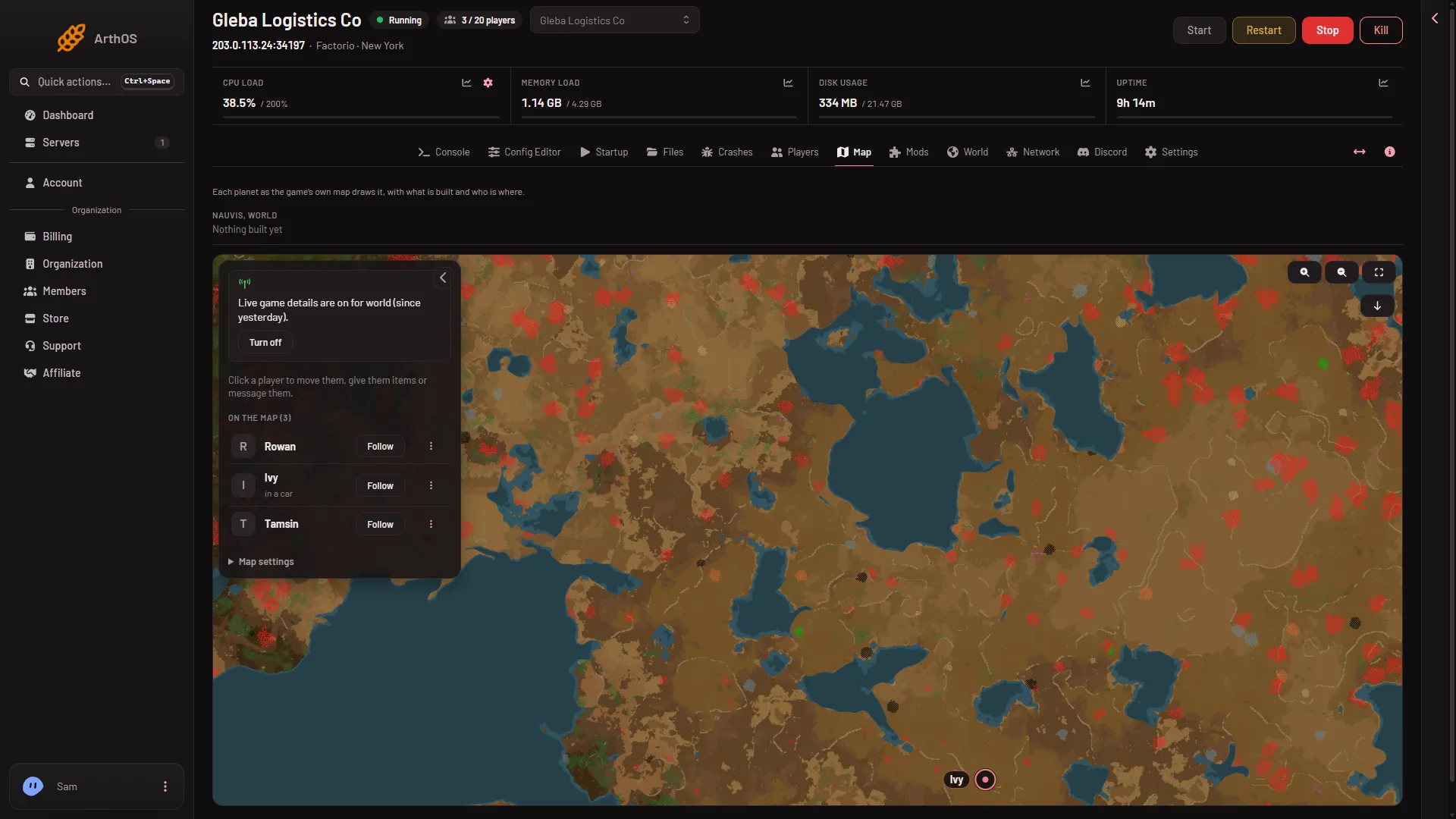
Per world
The panel asks each world once. If you turn them on for one save and later run another, the card says “Live game details are off for (world): they were turned on for (other), and each world is asked for once.” They are off again until you turn them on for the new world.
This includes a new world made from the World page and a save you choose with Run this from the next start.
Turn them off
Open the Map page and choose Turn off on the card. The box says “The panel stops reading the running game. Achievements stay off on this world, as the game decided when they were turned on.” The panel stops asking the game.
If it does not work
- You cannot turn them on. The server may not be running: the card says “Start the server to turn them on.” Start it first.
- Nothing happens or the panel refuses. Your role may not allow changing the server’s settings.
- Give, Move or Kill is refused. The panel says live game details are off for this world. Turn them on from the card on the Players page.
- You want achievements back. The only way is a different world that has never run a script.
More about the game: Factorio servers.
Sources: wiki.factorio.com: Console