
















The Map page shows one planet at a time. When the world has more than one planet, use the Planet picker to switch between Nauvis, Vulcanus, Gleba, Fulgora and Aquilo. Nauvis is the base game’s planet. Space Age adds the other four.
Open a planet
- Open the Map page.
- In Planet, choose the planet you want. If there is no Planet choice, the world has one planet.
- The heading above the map shows the planet and the world, such as “NAUVIS, WORLD”.
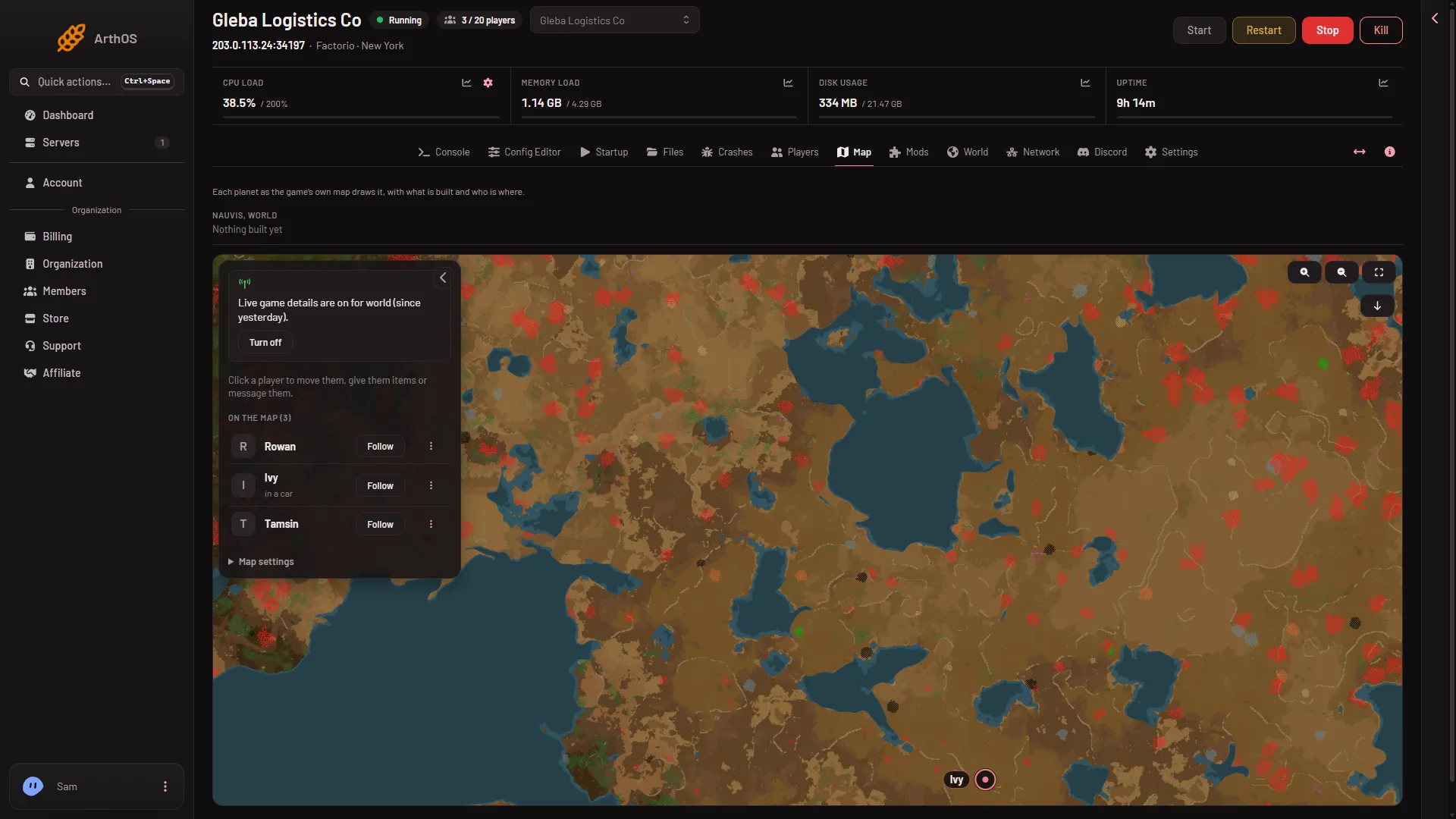
- On the map
Above the map, the page counts what it knows about that planet. You may see “charted by players”, a count of chunks with something built, or “Nothing built yet”. A chunk is one square piece of the generated world.
What you see on a planet
With live game details off, you see only the ground the world was made with. The page says so: “The ground the world was made with. What is built shows with live game details on.” The picture is the world as it was made. Ore that players mined and trees they cut still show.
With live game details on and the server running, the map also shows what is built, train stops, enemy bases players have charted, and where players are. A player’s card shows which planet they are on. You can read more about the map itself in the server map guide.
A planet that is not drawn yet
A planet may show: “The ground of (planet) is not drawn yet.” The server has to draw it once.
- Choose Draw the map.
- Read the box Draw the map’s ground?. The panel draws the ground from the world’s seed with the game itself. It takes about a minute.
- Confirm.
The game cannot draw a map while the server is running in the same folder. If the server is on, it stops for about a minute and starts again. Players are disconnected while it is stopped. Choose a quiet time. See draw the map.
Drawing needs a role that allows managing the live map and restarting the server (ask the owner: Settings, Access, Manage roles, then the organization page). It also needs the world’s seed. If the panel says it cannot read the seed, start the server once, then try again.
Players on other planets
On the Players page, with live game details on, each online player shows their planet and place, such as “(planet) at 12, -40”. Click a player on the Map page to move them or give them items. Those two need live game details on. Message works without them.
Space Age must be on
The four planets besides Nauvis come with Space Age. Turn it on or off on the Mods page. See Space Age on a server. Not checked on 2.1.24 as of 13 November 2026: which planets the picker lists while Space Age is off.
If it does not work
- The map says the server is stopped. Start the server. The drawn ground still shows, but built things and players need the running game.
- Nobody shows on a planet. The page says “Where players are shows with live game details on.” Turn them on, or nobody is on that planet.
- Draw the map does nothing. Your role may not allow it, or the seed is not known yet. Start the server once.
More about the game: Factorio servers.
Sources: wiki.factorio.com: Multiplayer