
















Returning players skip the limit (ignore_player_limit_for_returning_players in server-settings.json) lets players who have played this world before join a full server. New players still wait for a free place. The setting applies at once, while the server runs.
It only matters when you have set a player limit. A new Loafhosts Factorio server has Most players at 0, which means no limit, so nobody is ever turned away. Set a limit first: see the player limit guide.
Turn it on or off
- Open the Config Editor tab of your server.
- Choose the source Server settings.
- Find the group Joining.
- Switch Returning players skip the limit on or off.
- Save the file.
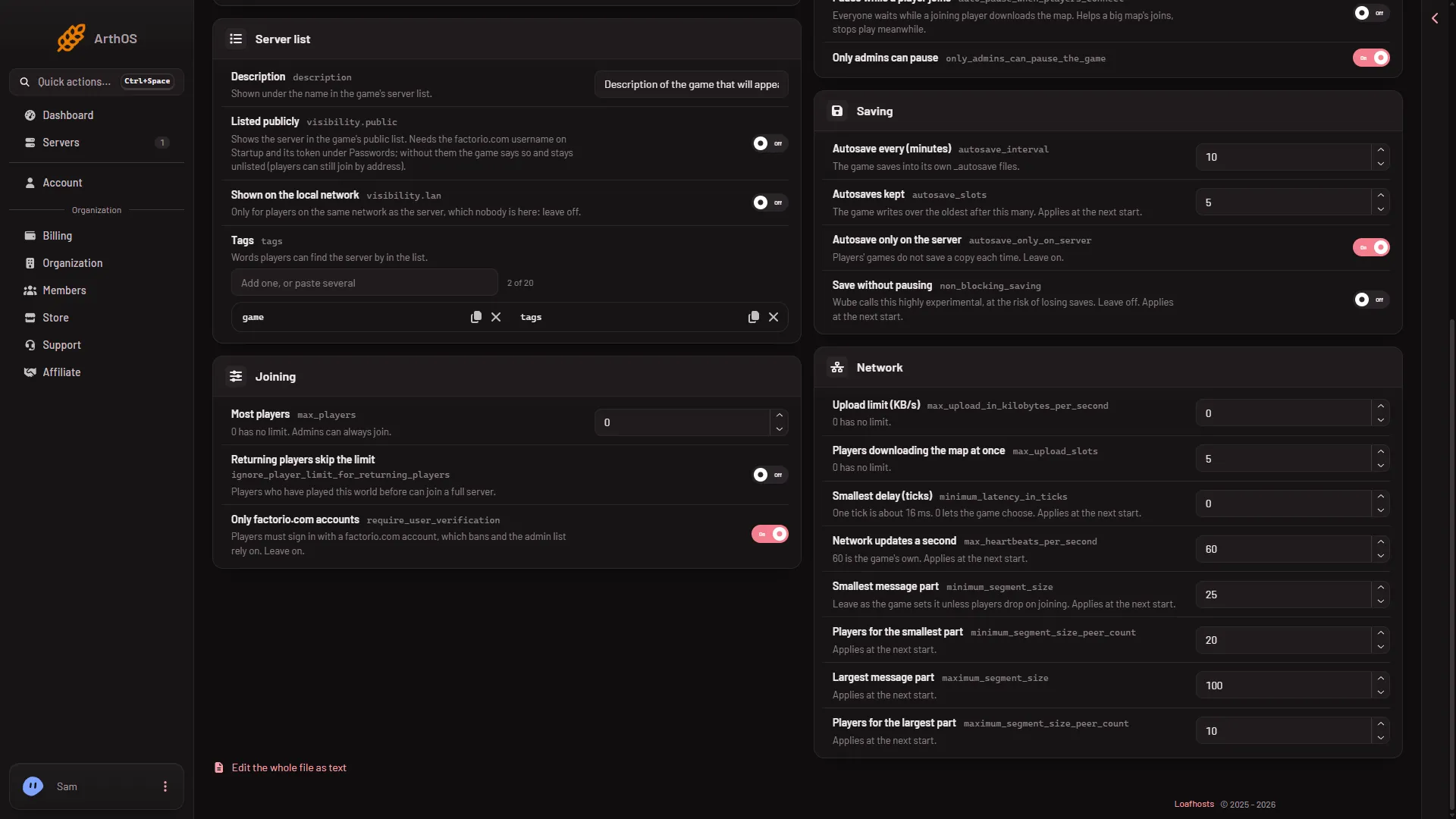
The panel shows which settings took effect at once. This one is among them.
When to use it
- You keep a limit that fits your plan, and you want your regular players to always get in.
- You have a few more regulars than places, and you do not want to raise the limit for strangers.
Turn it off when you want the limit to apply to everyone the same way.
Admins
Admins can always join, even when the server is full. That is not this setting. It is how Most players works.
If it does not work
- A regular player is still turned away. Check that the switch is on and saved. The setting names players who played this world. A player who only played on another world of yours may count as new.
- Nothing seems to change. Most players may be
0, so there is no limit to skip.
More about the game: Factorio servers.
Sources: wiki.factorio.com: Multiplayer