






All the Mods 10 (ATM10) is a large modpack for Minecraft 1.21.1 on the NeoForge mod loader. In the panel, open Add-ons, choose Modpacks, search CurseForge for All the Mods 10 and install it. Start a new world, then have every player install the same pack version.
The panel’s plan for version 8.2 says packs this size usually need about 15 GB of memory. Check your server’s memory before you install; to change it, see out of memory.
What the pack is
CurseForge describes ATM10 as a pack with around 500 mods, quests and an endgame. Its page shows:
- Minecraft version: 1.21.1.
- Mod loader: NeoForge.
- Latest release: All the Mods 10-8.2, published on 22 September 2026.
- A server pack for the same release, named ServerFiles-8.2.
The pack needs NeoForge on Minecraft 1.21.1. You do not have to set that up: the panel replaces the server software for you. On 11 October 2026 the plan for version 8.2 read “Installs NeoForge 21.1.251 for Minecraft 1.21.1, on Java 21.” It listed 448 files (1.6 GB), left out 47 client-only files and fetched 4 files from Modrinth. Not checked on 26.3 as of 11 October 2026: the finished server starting and running.
Memory
The pack’s author gives no memory figure on its CurseForge page or in its GitHub repository (read 11 October 2026). Do not take a number from a third party as the author’s.
The panel does its own check. For version 8.2 on a server with 4.3 GB of memory, the plan said: “Packs this size usually need about 15 GB of memory; this server has 4.3 GB. It may run out when players join.” If your plan shows a figure above your server’s memory, pick a larger size first. With players on, watch Memory Load in the server header. If the server stops with an out-of-memory error, see out of memory.
In the ArthOS panel
You can choose the pack when you order. The order page has a Modpack field for Java servers. Or use a server you already have:
- Open Add-ons, then choose Modpacks.
- Under Find a modpack, choose CurseForge and search
All the Mods 10. - Choose the result named All the Mods 10 - ATM10. Similar packs are listed too, for example All the Mods 10: To the Sky and All the Mods 11 (NeoForge 26.1.2), and they are different packs.
- Choose Install. A list of versions opens, newest first. A version marked “has a server pack” has one from the author. Press the Choose button on the newest unless your players use an older one.
- Read the plan. The loader line (1) names the loader, the Minecraft version and the Java version. The memory line (2) appears when the pack needs more than the server has. The plan also says how many files it downloads and ends: “A backup is taken first, so this can be rolled back.”
- Leave Start a new world ticked (3). Choose Install (4). The server is unavailable while it runs, and progress shows at the top of every page.
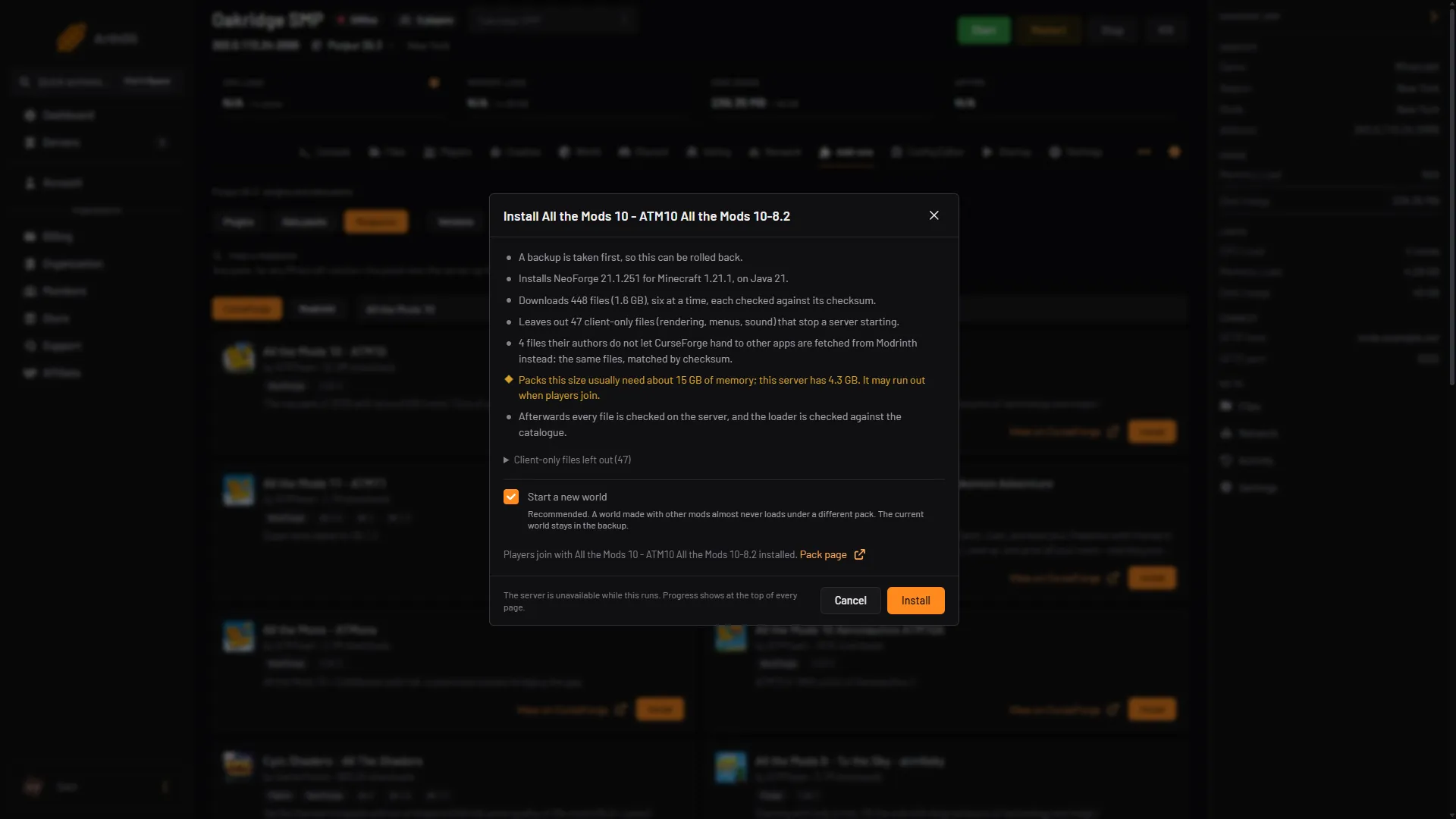
- Loader line
- Memory warning
- Start a new world
- Install
The panel downloads each file and checks it against the checksum the pack names. Some authors do not let CurseForge hand a file to other apps. The panel then tries Modrinth, and lists what is left with a Get it link. Download it, upload it to the folder shown and choose Check again. More in install a modpack.
When it finishes, start the server. Watch the Console. Then open Players. The files decide whether the whitelist is on, so add your players or turn it off.
Players join with the same version
Each player installs ATM10 in the CurseForge app, at the same version as the server, for example 8.2. The app sets up NeoForge and Minecraft 1.21.1 for them. Their game address is your server’s address.
By hand
- Download the server pack named ServerFiles from the pack’s CurseForge Files page.
- Install NeoForge for Minecraft 1.21.1, the loader the pack lists.
- Upload the server pack to your server, accept the Minecraft End User License Agreement (EULA) and start it. Not checked as of 11 October 2026: a by-hand install of this pack.
If it does not work
- The panel lists files with a Get it link. Download each from its page, upload it to the folder shown and choose Check again.
- The plan warns about memory. Pick a larger size, then try again.
- The server stops while it starts. Read the first error in the Console or in Crashes. A mod error names the mod.
- A player cannot join. They need the same pack and version, and the Minecraft version 1.21.1 that the pack sets up.
- Everyone is refused. Check the whitelist on Players.
More on the game: Minecraft servers.
Sources: curseforge.com: All the mods 10, github.com: ATM 10, github.com: CHANGELOG.md