






ChestShop lets players sell items from a chest with a sign on it. Anyone can then buy by right clicking the sign, or sell to the shop by left clicking it. It needs a plugin called Vault and an economy plugin for the money. On a 26.3 server the panel offers ChestShop only from SpigotMC, and only as a build made for Minecraft 26.2.
Check the version first
- The newest ChestShop is 3.13-pre-1, a pre-release published on 15 July 2026. It lists Minecraft up to 26.2. Its notes say it needs Java 21.
- The newest full release, 3.12.2 (February 2023), lists Minecraft up to 1.19.4.
ChestShop is not on Modrinth or Hangar in the panel. On Modrinth, a search for it shows QuickShop-Hikari instead, which is a different plugin. On SpigotMC the panel does offer 3.13-pre-1. SpigotMC only lists the versions an author says they tested, so the panel shows the build with an amber note in the install dialog: the author lists it as tested up to Minecraft 26.2, not 26.3, and many plugins keep working on newer versions, so check the console after it loads. Seen on 11 October 2026. The dialog also shows how many builds cannot be installed here.
A build made for an older version can cause bugs or lag. Read use a build made for an older version and take a backup first.
Install it
- Install Vault, or VaultUnlocked, a fork made to replace it. The panel offers VaultUnlocked from Modrinth. See the Vault guide.
- Install an economy plugin that works with Vault and supports your Minecraft version. It is the plugin that holds the money. This guide does not name an economy plugin for 26.3: EssentialsX, the usual one, had no 26.3 build on 11 October 2026 (see the EssentialsX guide). In Add-ons, search for an economy plugin, check on its page that it supports Vault and your version, and take a backup first. See what Vault is.
- Open Add-ons, then Plugins. Under Find plugins choose SpigotMC and search for
ChestShop. - Choose Install on ChestShop. Read the amber note (1) and the version, then choose Install in the dialog (2). The picture shows the same dialog for a different plugin, Jobs Reborn, as it looks when an author lists an older version.
- Choose Restart now when the page offers it. Type
pluginsin the Console. ChestShop should be green.
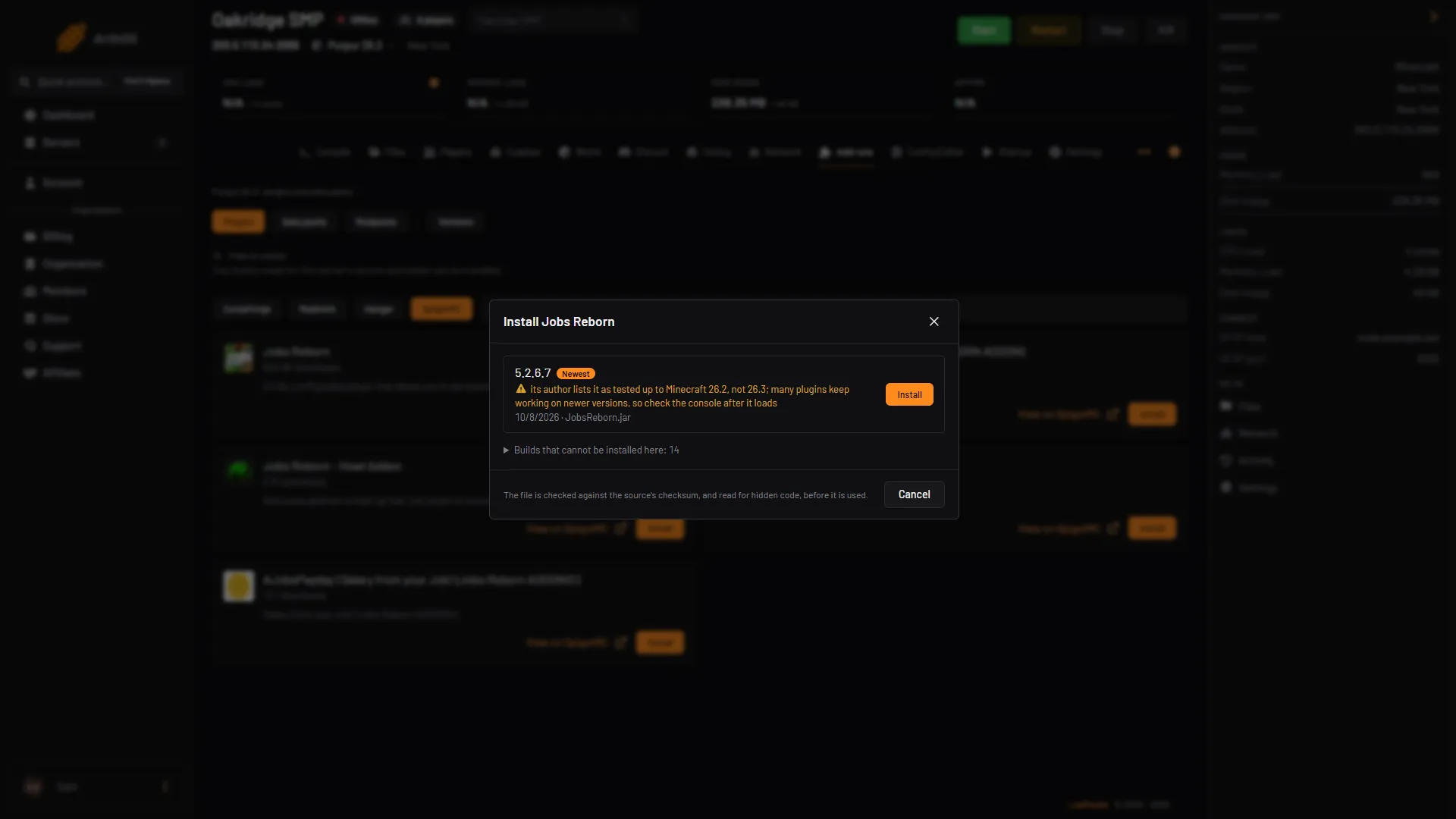
- Amber caution
- Install
Not checked on 26.3 as of 11 October 2026: ChestShop together with VaultUnlocked, and ChestShop loading on a 26.3 server.
Make a player shop
Do this in the game.
- Place a chest and put the items in it.
- Place a sign 1 block away from the chest, for example above it (ChestShop’s page words it this way).
- Write the four lines:
| Line | What to write |
|---|---|
| 1 | Leave empty. ChestShop fills in your name. |
| 2 | How many items one click buys or sells, for example 64. |
| 3 | The prices, for example B 10:5 S. |
| 4 | The item. Write ? and ChestShop takes it from the chest. |
On line 3, B is the price a player pays to buy, and S is what the shop pays a player who sells. Separate them with a colon. The author’s examples are B 5:5 S, B 5 and S free. A player can then buy 64 items for 10 and sell them back for 5.
You can also write the item’s name on line 4. Hold the item and type /iteminfo in game chat to see its name.
Make an admin shop
An admin shop has no owner and no stock limit. You need the ChestShop.admin permission or operator status. Write Admin Shop on line 1 of the sign. It needs no chest. If you do put a chest under it, the shop sells what is in the chest, so it is not unlimited, unless FORCE_UNLIMITED_ADMIN_SHOP is on in the config.
Commands and permissions
Type these in game chat.
| Command | What it does |
|---|---|
/iteminfo | Shows information about the item in your hand. |
/shopinfo | Shows information about the shop you look at. |
/chestshop reload | Reloads the config and messages. The author says this might not reload some features. |
In the plugin’s plugin.yml, ChestShop.shop.* is on for everyone, so players can create shops, buy and sell without more setup. ChestShop.admin is for operators by default. To limit what players can make, see LuckPerms permissions.
The config file
The config is plugins/ChestShop/config.yml. Edit it in Files with the server stopped, then start it. Some keys and their defaults:
| Key | Default | Meaning |
|---|---|---|
ADMIN_SHOP_NAME | Admin Shop | The words that make an admin shop. |
FORCE_UNLIMITED_ADMIN_SHOP | false | Admin shops with a chest stay unlimited when on. |
SHOP_CREATION_PRICE | 0 | What it costs to make a shop. |
Price limits go in priceLimits.yml and admin shop discounts in discounts.yml, in the same folder.
If it does not work
- ChestShop is not green in
plugins. Read the start of the Console for an error naming ChestShop. If it fails on 26.3, turn it off in Manage all and restart. - The Install button does not show a ChestShop build. Check that SpigotMC is the chosen source. Modrinth and Hangar have none for it.
- No shop forms when you finish the sign. Check that the sign is placed as in step 2 above and that line 1 is empty. Check that you have the permission to create shops.
- Buying or selling does nothing. ChestShop needs Vault and an economy plugin that loaded. Check both are green in
plugins.
More on the game: Minecraft servers.
Sources: modrinth.com: Chestshop, modrinth.com: Versions, hangar.papermc.io: ChestShop, github.com: ChestShop 3, raw.githubusercontent.com: Plugin.yml, raw.githubusercontent.com: Properties.java, modrinth.com: Vaultunlocked