






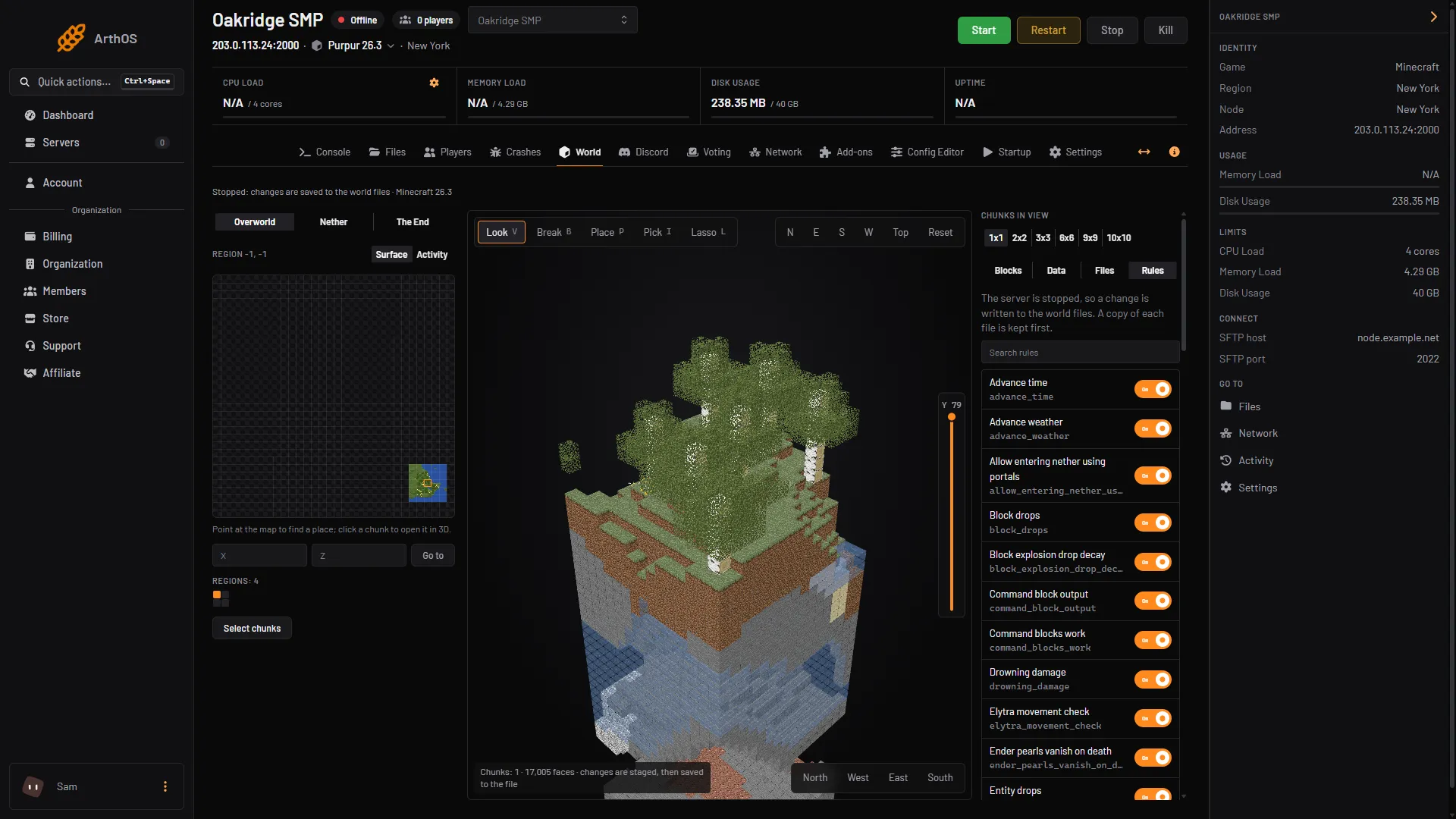
On Minecraft 26.3, command blocks work by default. The old enable-command-block line is gone from server.properties. A game rule called command_blocks_work replaced it, and it is on by default. To use one, an operator in Creative mode gets a block with /give @s minecraft:command_block and places it.
The Config Editor has no row for command blocks on 26.3. The wiki’s server.properties history says the property enable-command-block was replaced by a game rule. A game rule is a setting that belongs to one world.
Get a command block
Only an operator can use command blocks. In game chat, with a slash:
/give @s minecraft:command_blockThe wiki gives this command. The block goes into your inventory.
In the server Console you type no slash and you have to name the player, because @s means “me” and the console is not a player. For a player named Alex:
give Alex minecraft:command_blockTo be in Creative mode, set it in the Console with gamemode creative <name>. See change a player’s game mode.
The wiki also says command blocks can be found in the Creative inventory under the “Operator Utilities” tab, when the “Operator Items Tab” setting of the game is on.
Who can place and edit one
- The wiki says command blocks “can only be placed or broken by an operator player in Creative mode”.
- The window to edit a command opens only in Creative mode, for an operator.
- On a Java server,
op-permission-levelmust be 2 or above. The default is 4. In the Config Editor this is Operator permission level. See make a player an operator.
Turn command blocks on or off
On 26.3 the switch is the game rule command_blocks_work. The wiki lists it with the default true.
In the Console:
- Type
gamerule command_blocks_workto read the value. - Type
gamerule command_blocks_work falseto turn command blocks off, orgamerule command_blocks_work trueto turn them on. Type no slash.
You can also use the Rules list in the World tab (open a chunk, then choose Rules). It works whether the server runs or is stopped, but the world must exist, so start the server once first. Type “command” in Search rules (1) and find Command blocks work (2), the rule command_blocks_work. The rule is on in a new world. This is the same place as the Pvp switch in turn PvP on or off.
- Search rules
- Command blocks work
With the server stopped, the panel says a change is written to the world files and keeps a copy of each file first. With the server running, a change goes through the game.
A game rule belongs to one world. A new world starts with the default.
By hand
In game, an operator types /gamerule command_blocks_work false.
On a server older than the change, the setting was a line in server.properties: enable-command-block=true. The Config Editor lists a line it does not know under Advanced. The line does not exist on 26.3, so do not add it there.
If it does not work
- /give says you are not allowed. You are not an operator. See the operator guide above.
- The block is there but its window will not open. You must be in Creative mode, as an operator, with permission level 2 or above.
- Placed blocks do nothing. Read
gamerule command_blocks_workin the Console. It must be true. - The old line has no effect.
enable-command-blockis not used on 26.3. Use the game rule.
More on the game: Minecraft servers.
Sources: minecraft.wiki: Command Block, minecraft.wiki: Game rule, minecraft.wiki: Server.properties, minecraft.wiki: Permission level