






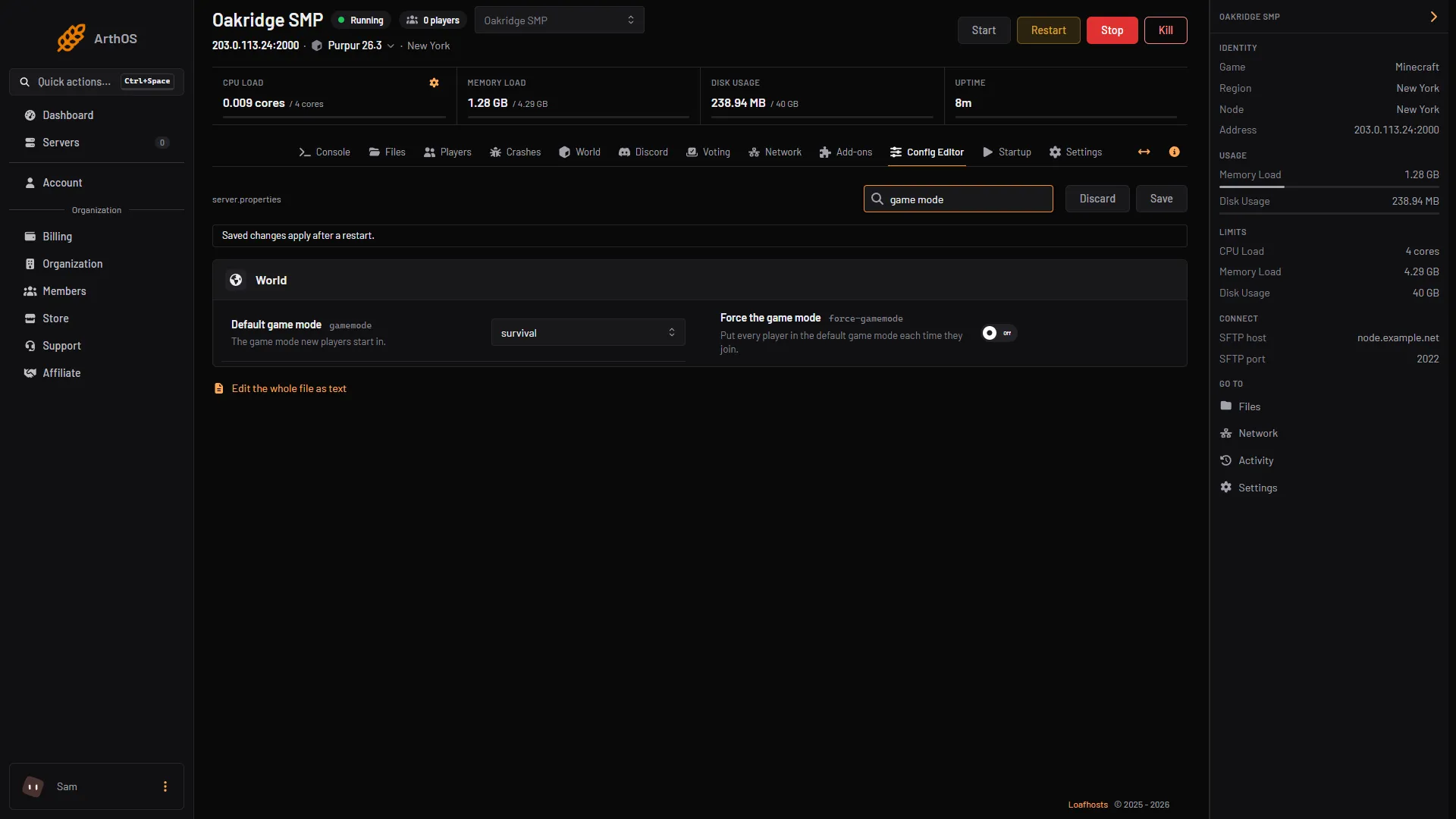
Open the Config Editor, set Default game mode to survival, creative, adventure or spectator, choose Save and restart. That mode is what a player starts in the first time they join. To change one player who is already in, use their window on the Players tab, or /gamemode.
What the two settings do
| Setting in the Config Editor | File key | What it does |
|---|---|---|
| Default game mode | gamemode | The game mode new players start in. The default is survival. |
| Force the game mode | force-gamemode | Off (the default): a player joins in the mode they left in. On: every player is put in the default mode each time they join. |
So changing Default game mode alone does not move players who have already joined. They keep the mode they had. Turn Force the game mode on if you want everyone reset to the default at every join.
In the ArthOS panel
Set the default for everyone
- Open your Minecraft server and choose Config Editor. Type “game mode” in Search (1).
- Set Default game mode (2). The list shows the raw value, for example
survival. - To reset everyone at every join, turn on Force the game mode (3).
- Choose Save (4), then restart the server. The Config Editor says “Saved changes apply after a restart.”
- Search
- Default game mode
- Force the game mode
- Save
Change one player
- Open the Players tab and click the player.
- In the In the game section, choose Survival, Creative, Adventure or Spectator.
The player has to be online. The panel says “Game mode, teleporting and messages need the player in the game.” Their window also needs you to have permission to manage players.
By hand
In the server console, type commands with no slash. In game, an operator types them with a slash, and needs permission level 2 or higher.
gamemode creativeputs you in creative.gamemode survival Alexputs the player Alex in survival. You can also use a target such as@afor everyone online.defaultgamemode survivalsets the default for new players in the running game. Set Default game mode in the Config Editor too, so the mode lasts after a restart.
To set it in the file, open Files, then server.properties, and change gamemode=survival to the mode you want. Add force-gamemode=true to force it. Restart the server.
Hardcore is not a game mode
hardcore is its own setting and /gamemode hardcore does not exist. In the Config Editor it is the Hardcore switch in the World group: “One life: a player who dies becomes a spectator.” The Minecraft Wiki describes it as applying to created worlds, so set it before you generate a new world. See how to reset the world.
Bedrock servers
A Bedrock Dedicated Server takes the mode from a Startup variable. Open Startup, set Gamemode and save. The panel writes it into server.properties at every start, so editing the file by hand is overwritten. Its choices are survival, creative and adventure, and the mode is applied when a player first joins; changing it does not change existing players (Minecraft Wiki, Bedrock server.properties).
If it does not work
- Players are still in the old mode. The default only applies to new players. Turn on Force the game mode, or change each player in their window.
- Saved but nothing changed. Restart the server.
/gamemodesays you are not allowed. It needs permission level 2. See operators.- The player is offline. The game mode controls in their window need them in the game. Change the default and force it, or change them when they join.
More on the game: Minecraft servers.
Sources: minecraft.wiki: Server.properties, minecraft.wiki: Gamemode, minecraft.wiki: Defaultgamemode