






Open your server’s Network tab, choose Domains, type a name you own such as play.example.com, and choose Add domain. Then create the records the panel lists at your DNS provider and choose Check again. Players then type play.example.com with no port.
You need a domain you have registered. The panel does not change your DNS and does not sell domains.
The record that hides the port is the SRV record. Its name is _minecraft._tcp.<your domain>. Its value has four parts in this order: priority, weight, port, target. The panel’s example is 0 5 2000 play.example.com. The target must be a name that has an A record, never a CNAME and never an IP address.
Why two records
Your server’s address has a port, for example 203.0.113.24:2000; use the port the panel shows under the server’s name, not 25565. The game tries 25565 when a player types a name with no port. An SRV record tells the game which port to use, and an A record points the name at the server’s address. The wiki says the game has read SRV records since Java Edition 1.3.1, and looks them up only at _minecraft._tcp.<your domain>.
In the ArthOS panel
- Open the server, then Network, then the Domains sub tab. The page shows what players type now (your address and port) and what they type with your domain.
- Under Add a domain, type the name (1), for example
play.example.com, and choose Add domain. Leave off the port,https://and any trailing dot. An IP address is refused.
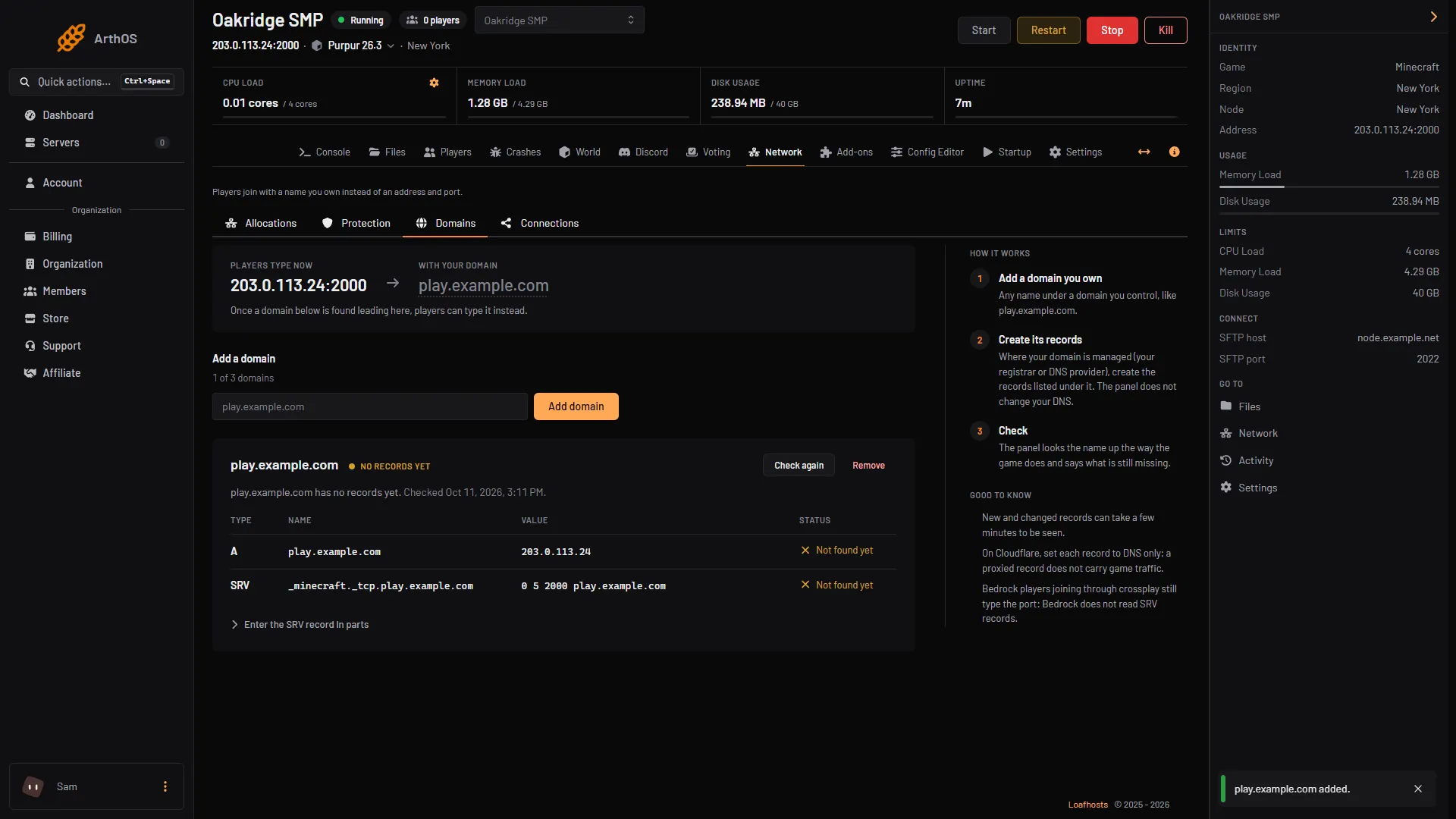
- Type the domain, Add domain
- Records to create
- Check again
- A new domain shows “NO RECORDS YET” and a table (2) of the records to create, each marked “Not found yet” until it exists. For a server at
203.0.113.24:2000they look like this:
| Type | Name | Value |
|---|---|---|
| A | play.example.com | 203.0.113.24 |
| SRV | _minecraft._tcp.play.example.com | 0 5 2000 play.example.com |
If the server is reached by a host name instead of an address, the panel lists a CNAME for your domain that points to that host name, and the SRV record’s target is that host name. If the server is on port 25565, no SRV record is needed.
- Sign in where your domain is managed (your registrar or DNS provider) and create those records. For the SRV record, the panel also shows the parts one by one under Enter the SRV record in parts: Service
_minecraft, Protocol_tcp, Priority 0, Weight 5, Port, and Target. - Choose Check again (3). The panel looks the name up the way the game does and says what is still missing. New and changed records can take a few minutes to be seen.
- When it says Working, “Players can type the domain. It is also the address shown in the server header.”
A server can have up to 3 domains; the page counts them, for example “1 of 3 domains”. To add or remove one you need permission to manage domains. Remove asks you to confirm, and then only stops the panel showing it. Your DNS records stay, so players can still join with the name until you delete the records where the domain is managed.
Domains are for Java Edition. The panel notes that Bedrock players joining through crossplay still type the port, because Bedrock does not read SRV records.
By hand
For any host, with any Java server:
- Create an A record for the name, pointing at the server’s public IP address. Leave the TTL at its default or use 600.
- If the server is not on port 25565, create an SRV record named
_minecraft._tcp.<your name>, with the port and a target that is a name (not an address) which has the A record, for exampleplay.example.com. Providers ask for the fields differently, usually priority, weight, port and target. - Check it. On Windows run
nslookup -q=srv _minecraft._tcp.play.example.com. On Linux and macOS rundig _minecraft._tcp.play.example.com srv. UseaorAin place ofsrvto check the A record.
The wiki warns that changes are not instant: depending on the resolver, it can take a day for a change to reach everyone.
If it does not work
- No records yet, or a record still “Not found yet”. The A record or the SRV record has not been created, or is on the wrong name. The SRV name starts with
_minecraft._tcp.. - The domain leads to the server but players land on port 25565. The SRV record is missing. Add it so the game uses the real port.
- The SRV record sends players to the wrong port. The panel shows the port it found and the one the server uses. Fix the port in the record.
- The SRV target has no address. The target must be a name with its own A record. Do not put an IP address there.
- Points elsewhere. The name leads to a different address than the server. If the name already points at another server, change the A record, and the SRV record’s port, when you are ready to move players. Until then the panel’s check says Points elsewhere. If the domain is on Cloudflare, also switch the record to DNS only.
- DNS did not answer. Wait a minute and choose Check again.
More on the game: Minecraft servers.