






A healthy Minecraft server runs at 20 ticks per second (TPS), which means each tick takes 50 milliseconds (MSPT) or less. To find out whether your server lags, run spark tps in the Console. If TPS is below 20, run a spark profile to see what is eating the time, then fix that: lower the view and simulation distance, thin out entities and farms, pregenerate chunks, and check memory.
Check TPS and MSPT
Paper and Purpur include spark. On other server software, install spark first from https://spark.lucko.me/ (a plugin or a mod). On Paper and Purpur the startup log says “This server bundles the spark profiler”, so there is nothing to install. In the Console tab, type the command in the command box without a slash.
spark tpsprints the TPS from the last 5 seconds, 10 seconds, 1 minute, 5 minutes and 15 minutes. Under it come the tick durations (minimum, median, 95th percentile and maximum, in milliseconds) and the CPU use.spark healthprints a health report with TPS, CPU, memory and disk use.
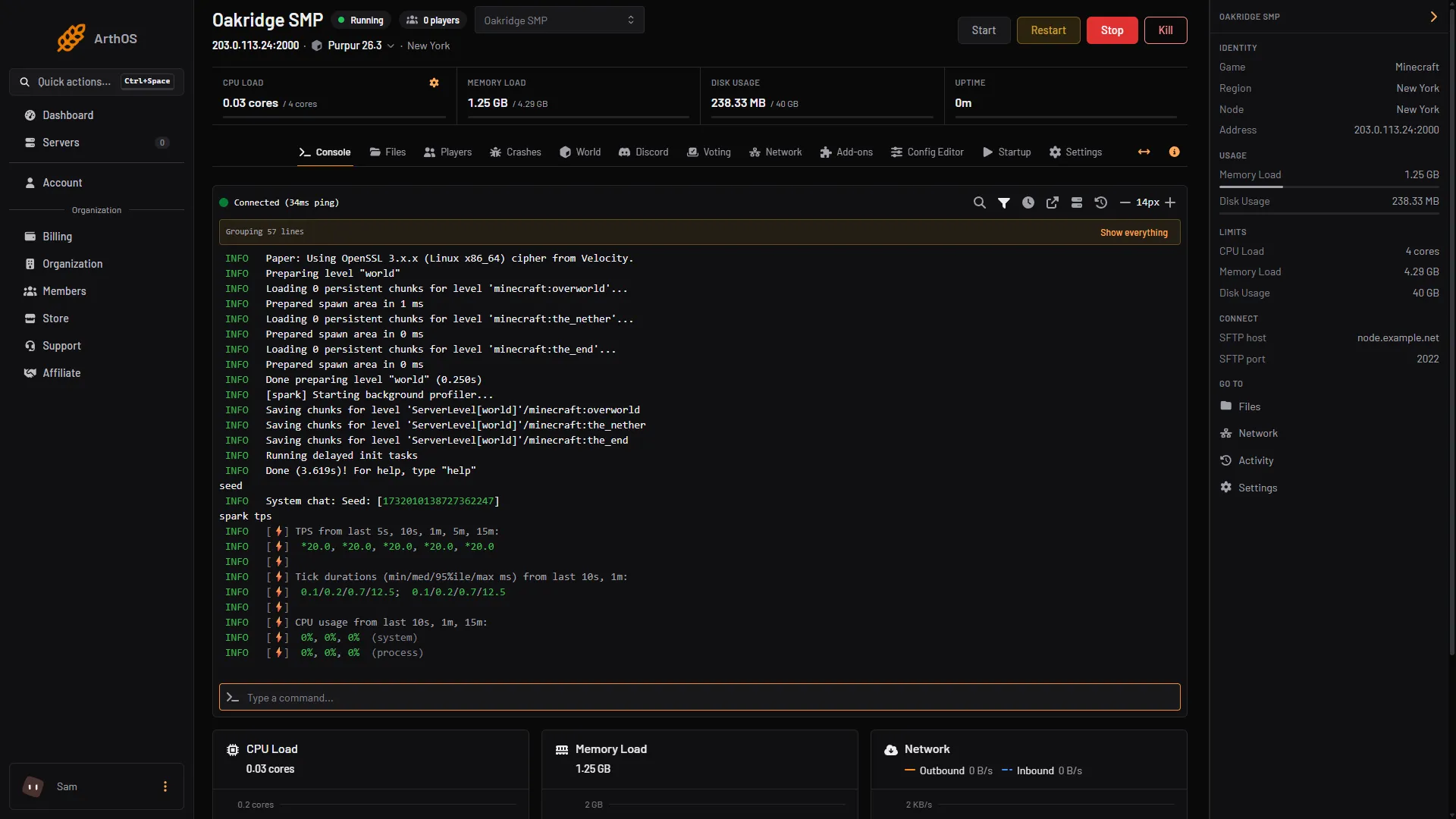
- The TPS line
- Tick durations
- Command box
The target is 20 TPS and 50 MSPT or less. A healthy server shows 20.0. A server that sits under 20 TPS is lagging.
The CPU Load and Memory Load charts on the Console are the panel’s own view. They show how busy the server and its memory are, but not TPS: use spark for that.
Find the cause with a profile
- In the Console type
spark profiler start --timeout 600. The profiler runs for 10 minutes. Leave players on the server doing what lags. - When it ends, spark prints a link. Open it in a browser to see which plugins, chunks or entities spent the time.
- To catch a single bad moment, use
spark profiler start --only-ticks-over 100 --timeout 300. It only records ticks that took more than 100 ms.
The link can be shared with whoever helps you.
Lower the view and simulation distance
Both are measured in chunks around each player. A lower number means less for the server to load, send and run. Entities outside the simulation distance are not updated.
- Open Config Editor. Type
distancein Search…. - Lower View distance (1), how many chunks around each player are sent to them, and Simulation distance (2), how many chunks around each player keep running: crops grow and mobs move. Lower them a little at a time and check
spark tpsagain after each change. - Choose Save (3), then restart. The Config Editor reminds you that saved changes apply after a restart.
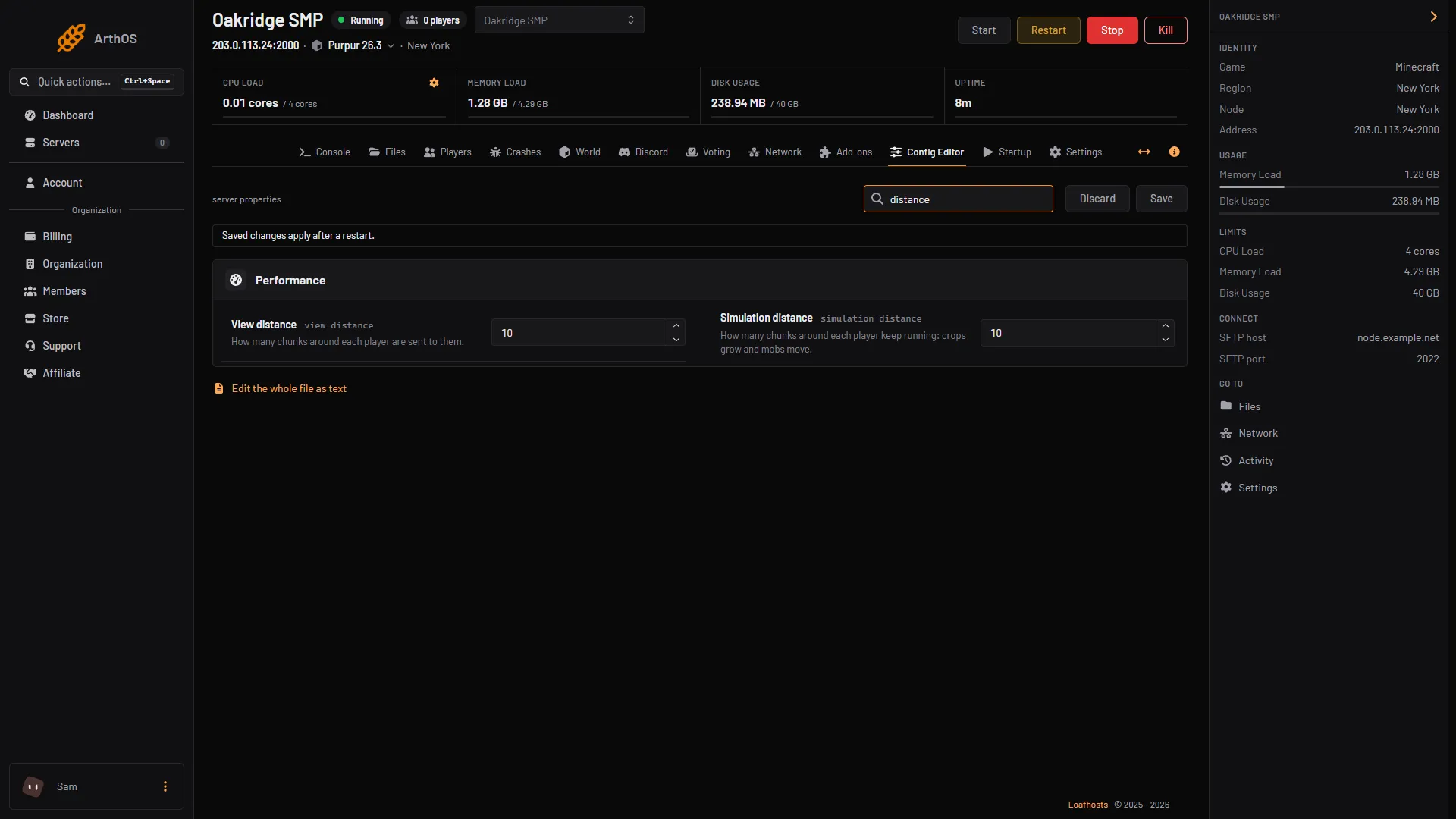
- View distance
- Simulation distance
- Save
Entities, farms and redstone
The Minecraft Wiki lists hoppers, redstone dust, mob AI and a high random tick speed as common sources of lag. In practice the cause is usually one build or one crowd of mobs. The profile from spark shows which chunk or plugin costs the most. Typical fixes are fewer hoppers, simpler redstone, and removing a mob farm that runs all the time. This is general advice: the profile tells you which one applies to you.
Pregenerate chunks
Generating new terrain costs a lot of time per chunk, and exploring players cause it all at once. Generating the world ahead of time, while nobody is on, moves that cost off your players. See pregenerate chunks.
Check memory
The panel shows memory as Memory Load in the header. If it stays near its limit, the server can freeze while the game collects garbage. The Java heap on a Loafhosts server is a share of the memory in your plan. Fewer plugins and a smaller view distance lower use. If the server runs out of memory, the Crashes tab says so. See why a Minecraft server crashes.
By hand
Outside the panel, the same commands work in the server console and in game for operators. spark is bundled with Paper and its forks. Vanilla has no spark, so use /tick query (operator level 3), which prints the average time per tick and percentiles. Set view-distance and simulation-distance in server.properties and restart.
If it does not work
- The server stops because one tick took far too long. This is the watchdog, which stops the server by itself. The Crashes tab shows it as Performance. Profile the moment it happens.
- TPS is fine but players lag. That is a connection or client problem, not the server. Players can see their own ping bars in the Tab player list.
- TPS drops only when many players are on. Lower the simulation distance first, then look at the plan’s CPU.
- TPS drops right after a plugin install. Turn that plugin off in Manage all and compare.
More on the game: Minecraft servers.
Sources: spark.lucko.me: TPS and MSPT, spark.lucko.me: Command Usage, spark.lucko.me: Using the viewer, docs.papermc.io: Profiling, docs.papermc.io: Basic troubleshooting, minecraft.wiki: Tick, minecraft.wiki: Server.properties, minecraft.wiki: Tick