






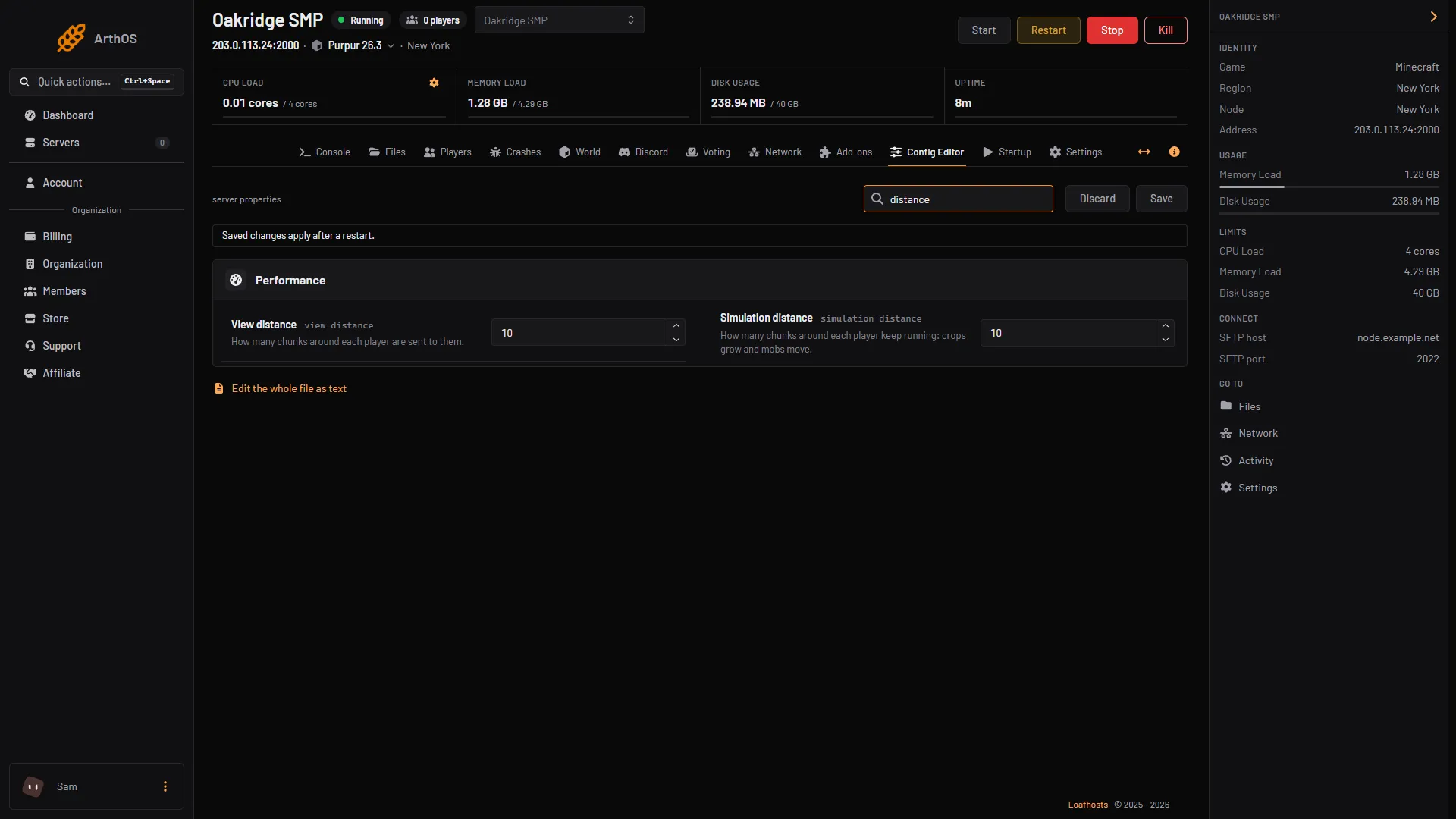
Open the Config Editor and look in the Performance group for View distance and Simulation distance. Both default to 10 chunks. Lowering them is the first thing to try when a server lags, because each player loads fewer chunks. Save, then restart.
What each one does
Both numbers are chunks in each direction from the player: a radius, not a width.
| Config Editor label | File key | What it controls |
|---|---|---|
| View distance | view-distance | How many chunks around each player the server sends to them. This sets how far a player can see. |
| Simulation distance | simulation-distance | How many chunks around each player keep running: crops grow and mobs move. Beyond it, entities are not updated. |
The Minecraft Wiki gives 3 to 32 as the range, with 10 as the default and recommended value, and says to reduce them if players have major lag.
A player can set their own render distance lower in their game options. The server’s view distance is the most they can get, not a minimum.
Which one to lower
- Simulation distance is the one that costs processing time on the server. Mobs, farms and redstone near every player are all running. Lowering it makes farms stop growing when players walk away from them.
- View distance is about sending world data to players. Lowering it makes the world look smaller at the edges, but does not stop anything from running up close.
A reasonable first test is to lower both by a few chunks, restart, play for a while and compare. Busy farms and mobs near players are what Simulation distance controls, so it is the one to lower for those. For the other causes, see server lag and TPS.
To raise it
Both can go up to 32. Raise View distance first and watch TPS (type spark tps in the Console). Simulation distance costs more server time, so raise it only if the server stays at 20.0 TPS.
In the ArthOS panel
- Open your Minecraft server and choose Config Editor. Type “distance” in Search….
- In the Performance group, set View distance (1) and Simulation distance (2). The help text reads “How many chunks around each player are sent to them.” and “How many chunks around each player keep running: crops grow and mobs move.”
- Choose Save (3). The editor says “Saved changes apply after a restart.”
- Restart the server.
- View distance
- Simulation distance
- Save
By hand
Open Files, then server.properties:
view-distance=8
simulation-distance=6
Save and restart. Changes to this file only take effect at start.
Bedrock servers
A Bedrock Dedicated Server uses different keys. view-distance is the largest view distance a player may use (5 or more, default 32), and tick-distance (4 to 12, default 4) is how far the world is ticked from a player. Edit them in Files, then server.properties, and restart.
If it does not work
- The number is refused. Use a whole number. The Minecraft Wiki gives 3 to 32 as the range.
- Nothing changed after saving. Restart the server. These settings are read at start.
- The world looks short at the edges now. That is the lower view distance working. Raise it a little.
- The server still lags. Too many players, heavy plugins or a small plan can all cause it. See max players and server lag and TPS.
More on the game: Minecraft servers.
Sources: minecraft.wiki: Server.properties