






Open the Voting tab and choose Set up voting. The panel installs the vote listener VotifierPlus, gives it a port vote sites can reach, turns on token votes, and restarts the server. Then copy the Address and Token from the same page into each server list site.
VotifierPlus only receives votes. To hand out rewards for them you also need VotingPlugin, which the same page can install.
Check the plugin has a build for your version
The panel only installs a build made for your server’s exact Minecraft version. On 11 October 2026 SpigotMC lists VotifierPlus as tested up to Minecraft 1.21 (last updated August 2025) and VotingPlugin up to 1.21 (updated July 2026). If there is none for your version, the panel will not install it.
Set up voting restarts the server. Press it at a quiet time, when few players are online.
In the ArthOS panel
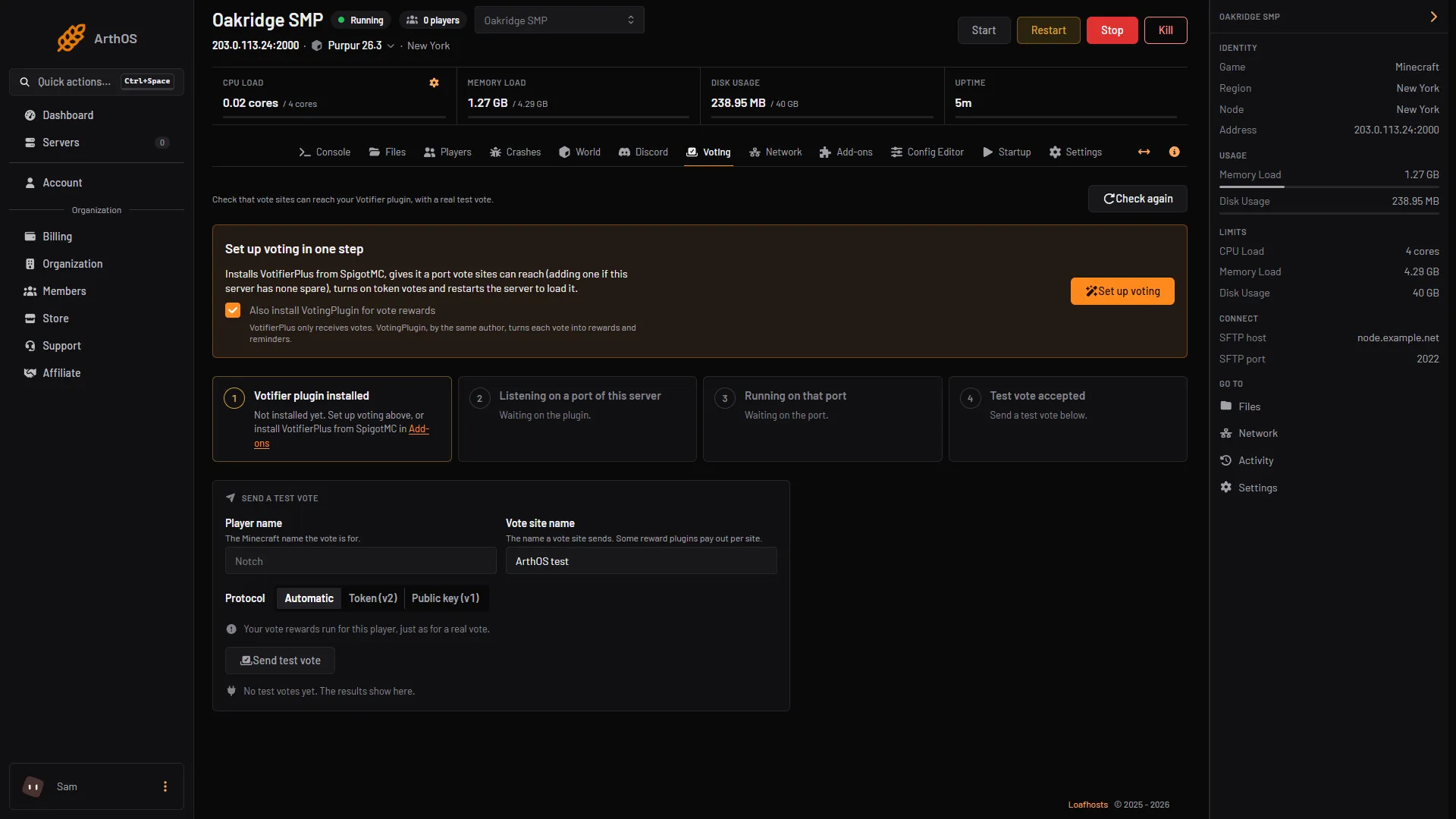
- Open the server and the Voting tab (Java servers only). Before setup, the page says “Check that vote sites can reach your Votifier plugin, with a real test vote.”
- Under Set up voting in one step, tick Also install VotingPlugin for vote rewards (1) if you want rewards, then choose Set up voting (2). The card says it installs VotifierPlus from SpigotMC, gives it a port vote sites can reach (adding one if the server has none spare), turns on token votes and restarts the server.
- Also install VotingPlugin
- Set up voting
- The four checks
- Send a test vote
- Wait. The page says “The server is restarting to load the plugin. This page updates when it answers.”
- Look at the four checks (3): Votifier plugin installed, Listening on a port of this server, Running on that port and Test vote accepted. Before setup the first reads “Not installed yet.” If the port check fails, pick a Port and choose Use this port, or choose Add a port on the Network page.
- Under What vote sites ask for, use Copy address and Copy token. Most vote sites ask for the address and the token. Older sites ask for the public key instead: use Copy public key.
- Under Send a test vote (4), type Player name (use your own, because your rewards run) and a Vote site name, leave Protocol on Automatic, and choose Send test vote. The panel says: “Your vote rewards run for this player, just as for a real vote.”
- The result is Accepted, Sent, Refused or Not sent. Accepted means the plugin took the vote. Until you send one, the panel says “No test votes yet. The results show here.”
- Add your server on each list site, with the address (host and port) and the token or public key.
The Votifier settings card has switches for Token votes (protocol 2, most sites) and Public key votes (protocol 1, older sites). The panel saves them to the plugin’s config.yml, and the plugin reads them at start, so restart after a change.
Give rewards with VotingPlugin
- Restart the server so VotingPlugin loads.
- In Files, open
plugins/VotingPlugin/VoteSites.yml. Each site has aServiceSitevalue. It has to match the name the site sends, not its web address. - Find the value by sending a real or test vote, then run
/av servicesitesin game as an operator. The wiki says “Matching is case-insensitive, but otherwise the received service-site text must match”. - Put rewards in a file such as
plugins/VotingPlugin/Rewards/MyReward.yml:
Commands:
- 'say %player% voted'
Then list it in the reward section: Rewards: followed by - MyReward.
By hand
For any host: install VotifierPlus, pick a port your server really owns and that is open to the internet, and edit its config.yml. The default port is 8192, and TokenSupport is false, so set it to true to use tokens. The host 0.0.0.0 only says “listen on everything”. Never give it to a vote site. Give the server’s public address and the port.
Give the site your address and port and either the token or the public key. VotifierPlus’s own setup guide says the same. To check VotingPlugin separately, av vote <player> <site> tests its processing but does not test the port, the token or the site.
If it does not work
- “Nothing answered on port …”. If you just installed the plugin or changed its port, restart the server. The server must also be running.
- Refused. A wrong token or public key is the usual cause. Copy it again from the page.
- Sent, but no reward. Check the console, and that
ServiceSitematches what the site sends. - The port is not one of this server’s ports. Vote sites cannot reach it. Use Use this port, or add a port in Network.
- The reward ran twice. More than one Votifier plugin or forwarding path delivers the vote. Keep one.
More on the game: Minecraft servers.
Sources: github.com: VotifierPlus, raw.githubusercontent.com: Config.yml, raw.githubusercontent.com: Setup guide.md, raw.githubusercontent.com: VotingPlugin.md, raw.githubusercontent.com: Votifier Troubleshooting.md, raw.githubusercontent.com: Service sites.md, raw.githubusercontent.com: Rewards.md