









In Build 42, loot is set per item type with a number from 0.00 to 4.00. Higher means more of that type. Looted containers only refill if you set Hours for loot respawn above 0. Both are sandbox settings, and they apply after a restart.
How the loot numbers work
Earlier builds used a list of names, from “None” to “Abundant”. The sandbox file on Build 42.21 uses a plain number for each type instead. 0 means none of that type. The game’s default is shown below.
| Row (key) | What it covers | Default |
|---|---|---|
FoodLootNew | Food that can rot or spoil | 0.80 |
CannedFoodLootNew | Canned and dried food, drinks | 0.60 |
MedicalLootNew | Medicine, bandages, first aid tools | 0.60 |
WeaponLootNew | Weapons that are not tools in another type | 0.60 |
RangedWeaponLootNew | Guns, and weapon attachments | 1.20 |
AmmoLootNew | Loose ammo, boxes, magazines | 0.60 |
ClothingLootNew | Wearable items that are not containers | 0.60 |
ContainerLootNew | Backpacks and other wearable containers | 0.60 |
ToolLootNew | Tools that fit no other type | 0.60 |
MechanicsLootNew | Vehicle parts and the tools to fit them | 0.60 |
SurvivalGearsLootNew | Fishing rods, tents, camping gear | 0.60 |
OtherLootNew | Everything else, and foraging in Town and Road zones | 0.80 |
The file has more types: LiteratureLootNew, SkillBookLoot, RecipeResourceLoot, KeyLootNew (default 0.40), MediaLootNew, MementoLootNew, CookwareLootNew, MaterialLootNew and FarmingLootNew. They all follow the same 0.00 to 4.00 rule.
Leave RollsMultiplier at 1.0. The game warns against changing it, because high values can hurt performance.
Change a loot number
- Open the Config Editor and choose the sandbox file.
- Find the row. Each row is named from its key, so
FoodLootNewshows as “Food loot new”. - Type a number between 0.00 and 4.00.
- Save, then restart the server. If it is running, the page tells you that saved changes apply after a restart.
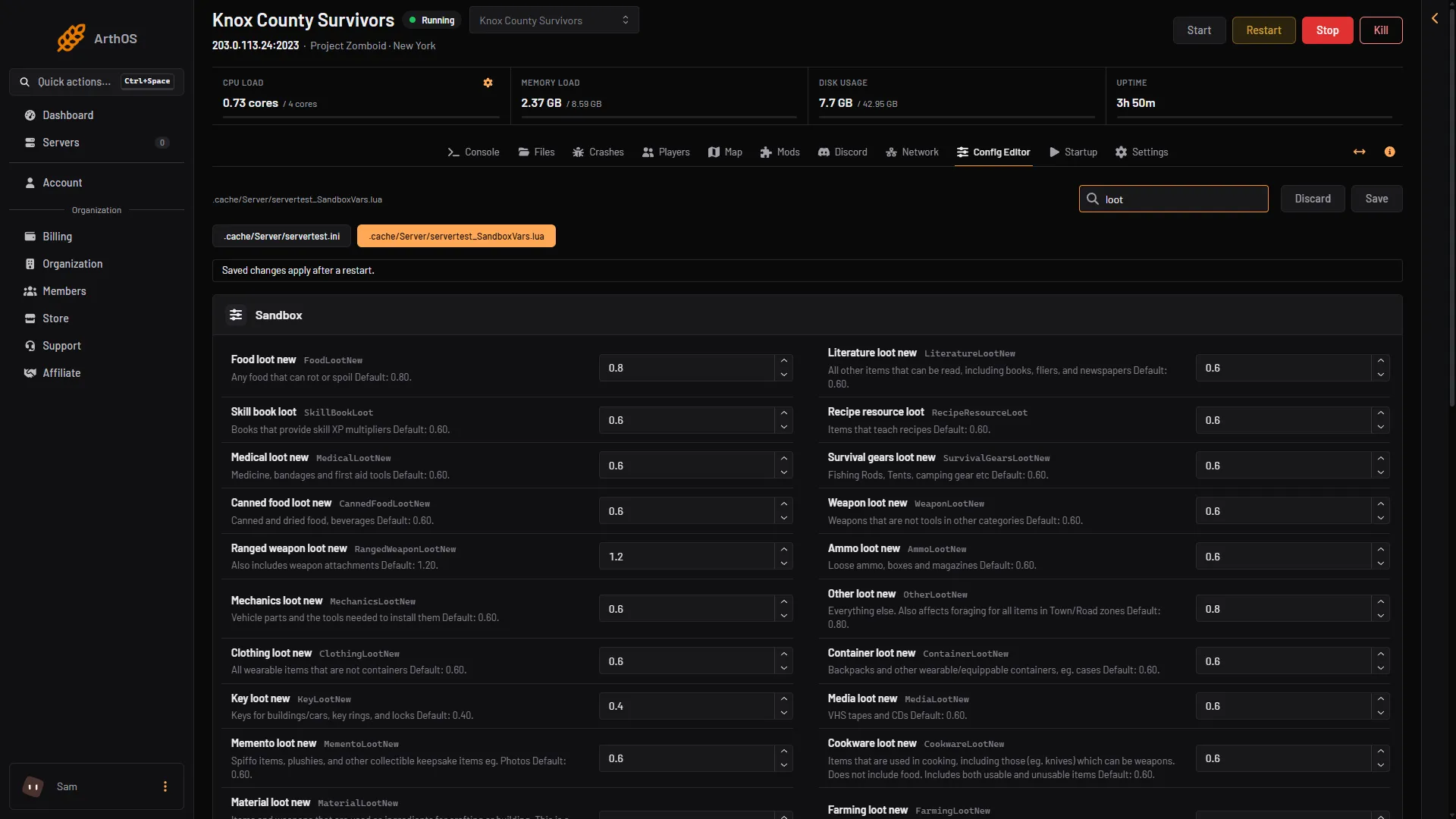
- Food loot new
- Canned food loot new
- Ranged weapon loot new
Box 1 is food that spoils, box 2 is canned food and box 3 is guns.
Make looted containers refill
Containers do not refill by default. These rows control it:
- Hours for loot respawn (
HoursForLootRespawn). Default 0, which is off. Above 0, all containers in towns and trailer parks respawn loot after that many hours. A container must have been looted at least once. The game says respawn does not depend on whether anyone can see the container. - Max items for loot respawn (
MaxItemsForLootRespawn). Default 5. A container that already holds this many items or more does not respawn. - Construction prevents loot respawn (
ConstructionPreventsLootRespawn). Default on. Buildings that players barricaded or built in do not respawn. - Safehouse prevents loot respawn (
SafehousePreventsLootRespawn). Default on, and it lives in the server ini, not the sandbox file. Claimed safehouses do not respawn. - Seen hours prevent loot respawn (
SeenHoursPreventLootRespawn). Default 0. Above 0, loot does not respawn in zones a player visited within that many hours.
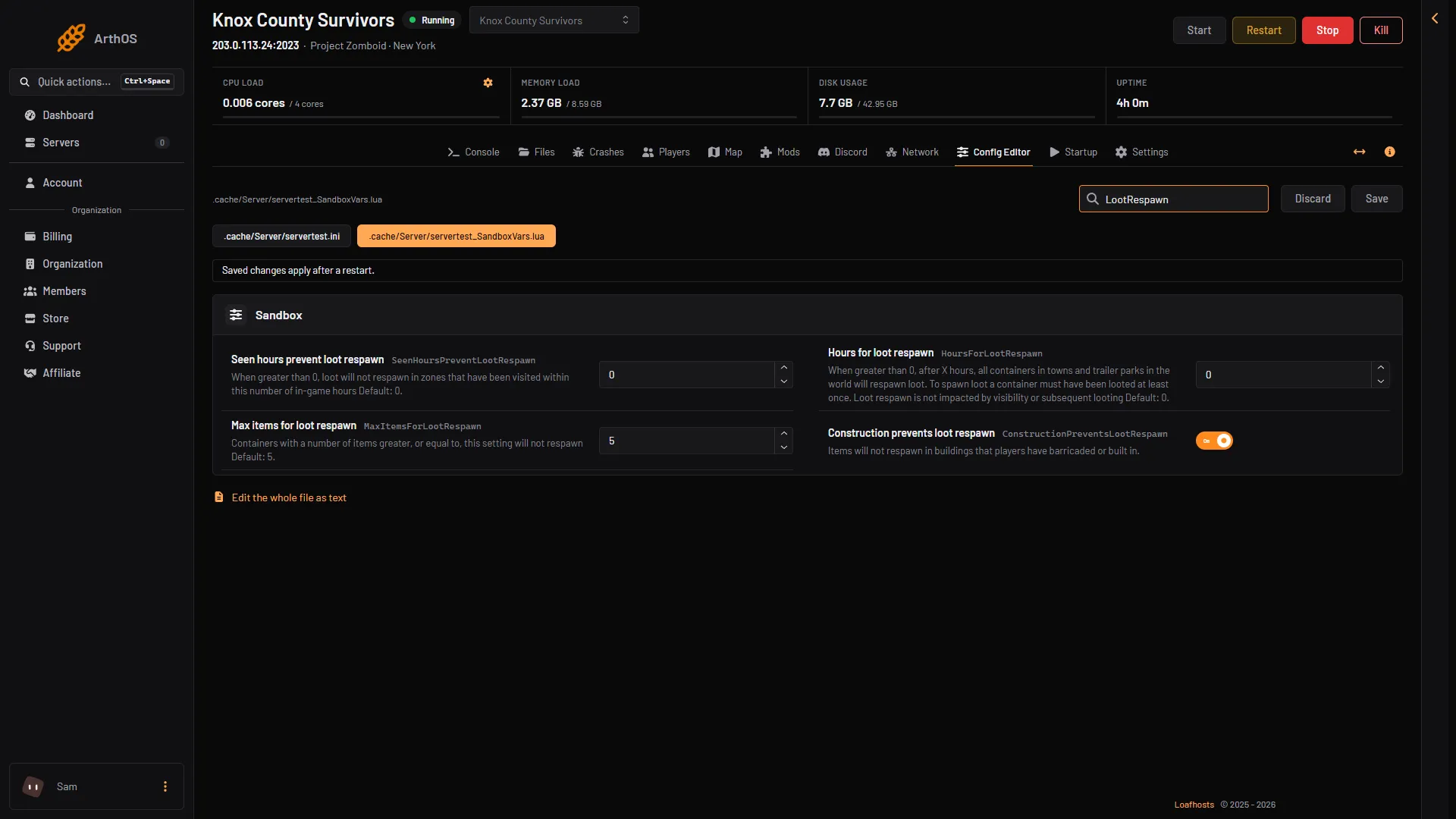
- Hours for loot respawn
- Max items for loot respawn
- Construction prevents loot respawn
Set box 1 above 0 to turn respawn on. Box 2 and box 3 decide which containers are skipped.
Containers that players made themselves do not respawn.
Example: a value of 72 means a looted container refills after 72 hours, about 3 days of game time if the game counts game hours. How long that is on the clock depends on Day length. The game does not state the unit.
Other loot rows
LootItemRemovalList takes a comma-separated list of item types that will not spawn as ordinary loot. RemoveStoryLoot and RemoveZombieLoot extend that list to world stories and to items zombies wear. Six rows named InsaneLootFactor to AbundantLootFactor also exist. The game gives only their ranges, so leave them as they are.
Not checked on Build 42.21 as of 18 October 2026: whether changing a number alters containers that were already generated in your world.
If it does not work
- Nothing changed. Restart the server. Sandbox changes apply at the next start.
- Containers still do not refill. Check that Hours for loot respawn is above 0, that the container was looted once, and that it holds fewer items than Max items for loot respawn.
- A building never refills. It may be a claimed safehouse, or players built or barricaded in it.
- The server will not start after an edit. Open Crashes. If the sandbox file cannot be read, the panel puts back the last copy that worked and keeps the broken one beside it as
.broken.
More about the game: Project Zomboid servers. See also sandbox settings.
Sources: pzwiki.net: Custom Sandbox