









A safehouse is a building a player claims as their own base. Players can only claim one when you allow it. On the Config Editor page, turn on Players can claim safehouses, save and restart the server. Admins can always claim a safehouse.
Turn them on
- Open the Config Editor page and choose the
.inifile, the first one. - Find the group Safehouses and factions.
- Turn on Players can claim safehouses (
PlayerSafehouse). Its note says “Admins can always.” - Choose Save.
- Restart the server. The page says “Saved changes apply after a restart.”
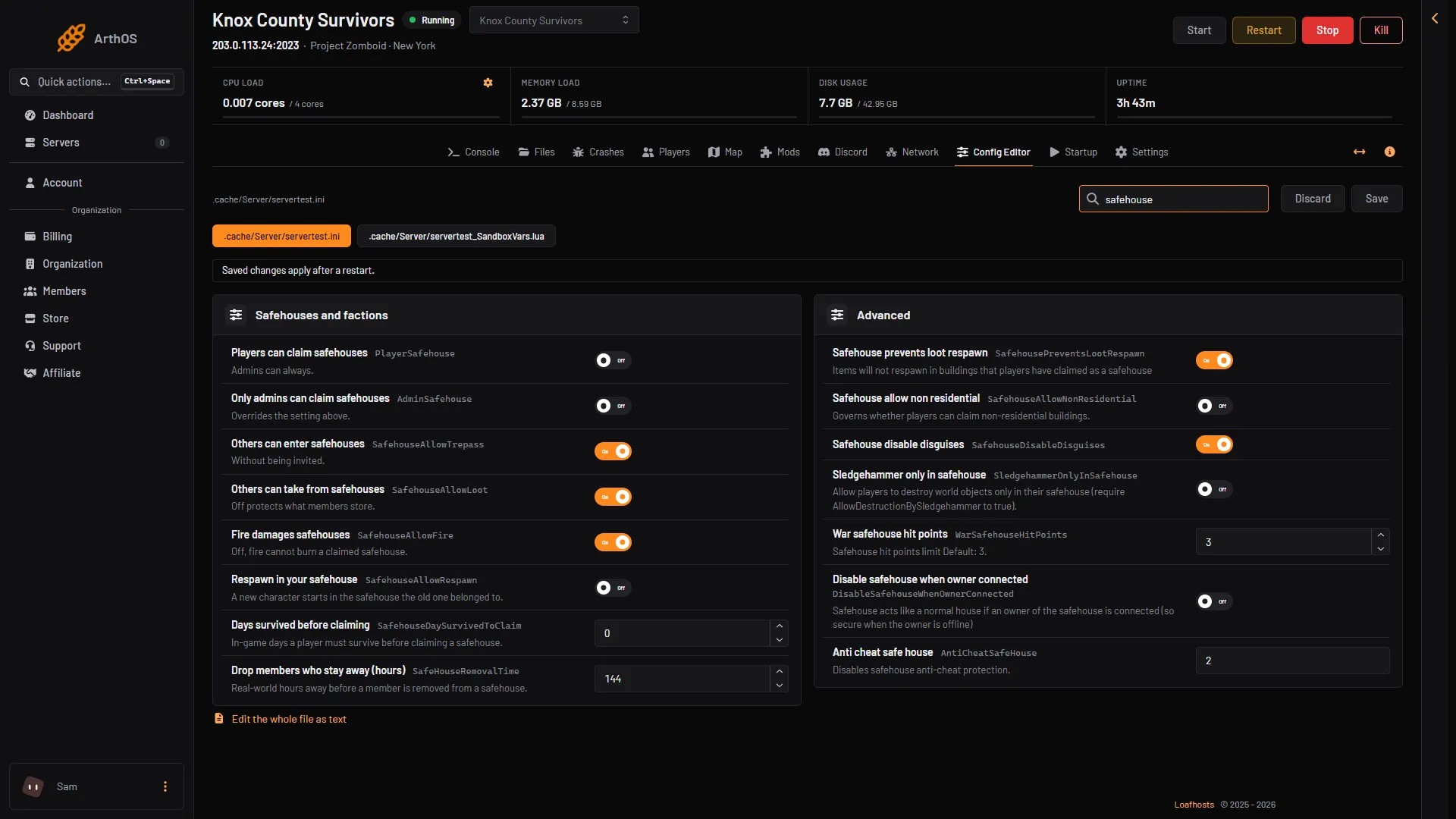
- Players can claim safehouses
- Only admins can claim
- Others can enter
- Others can take
- Fire damages
Box 1 is the switch that allows claims. The rows below it are the rules in the next section.
If you want only admins to claim, turn on Only admins can claim safehouses (AdminSafehouse). It overrides the setting above.
The rules for a safehouse
All these rows are in Safehouses and factions. The game’s own default is in brackets.
- Others can enter safehouses (
SafehouseAllowTrepass): people who are not members can walk in without an invitation (on). - Others can take from safehouses (
SafehouseAllowLoot): non-members can take items. Turn it off to protect what members store (on). - Fire damages safehouses (
SafehouseAllowFire): turn it off and fire cannot burn a claimed safehouse (on). - Respawn in your safehouse (
SafehouseAllowRespawn): a new character starts in the safehouse the old one belonged to (off). - Days survived before claiming (
SafehouseDaySurvivedToClaim): in-game days a player must survive before claiming. 0 means no wait (0). - Drop members who stay away (hours) (
SafeHouseRemovalTime): real-world hours away before a member is removed from a safehouse (144, which is 6 days).
A player who is not allowed to claim yet may see a tooltip on the claim option saying so. Not checked on Build 42.21 as of 18 October 2026.
Disable safehouse when owner connected (DisableSafehouseWhenOwnerConnected, in Advanced, off): the game’s note says “Safehouse acts like a normal house if an owner of the safehouse is connected.”
The game also has SafehouseAllowNonResidential, which allows claims on shops and other non-residential buildings. It is off by default. In the Config Editor its row reads Safehouse allow non residential, from the key.
How a player claims one
The player stands inside the building and right-clicks to open the menu. The menu has Claim Safehouse. The claim covers the building and 2 tiles around it. Not checked on Build 42.21 as of 18 October 2026.
Once a player has claimed it, they can right-click inside and choose View Safehouse. From there the owner adds or removes members, renames the safehouse and can pass ownership to someone else. Menu wording can change between builds. Not checked on Build 42.21 as of 18 October 2026.
Members can talk to each other with /sh in chat.
See them on the Map
Open the Map page. Safehouses show in green. The list Safehouses (N) shows each one with its owner, or “Owner” and the members. See the server map.
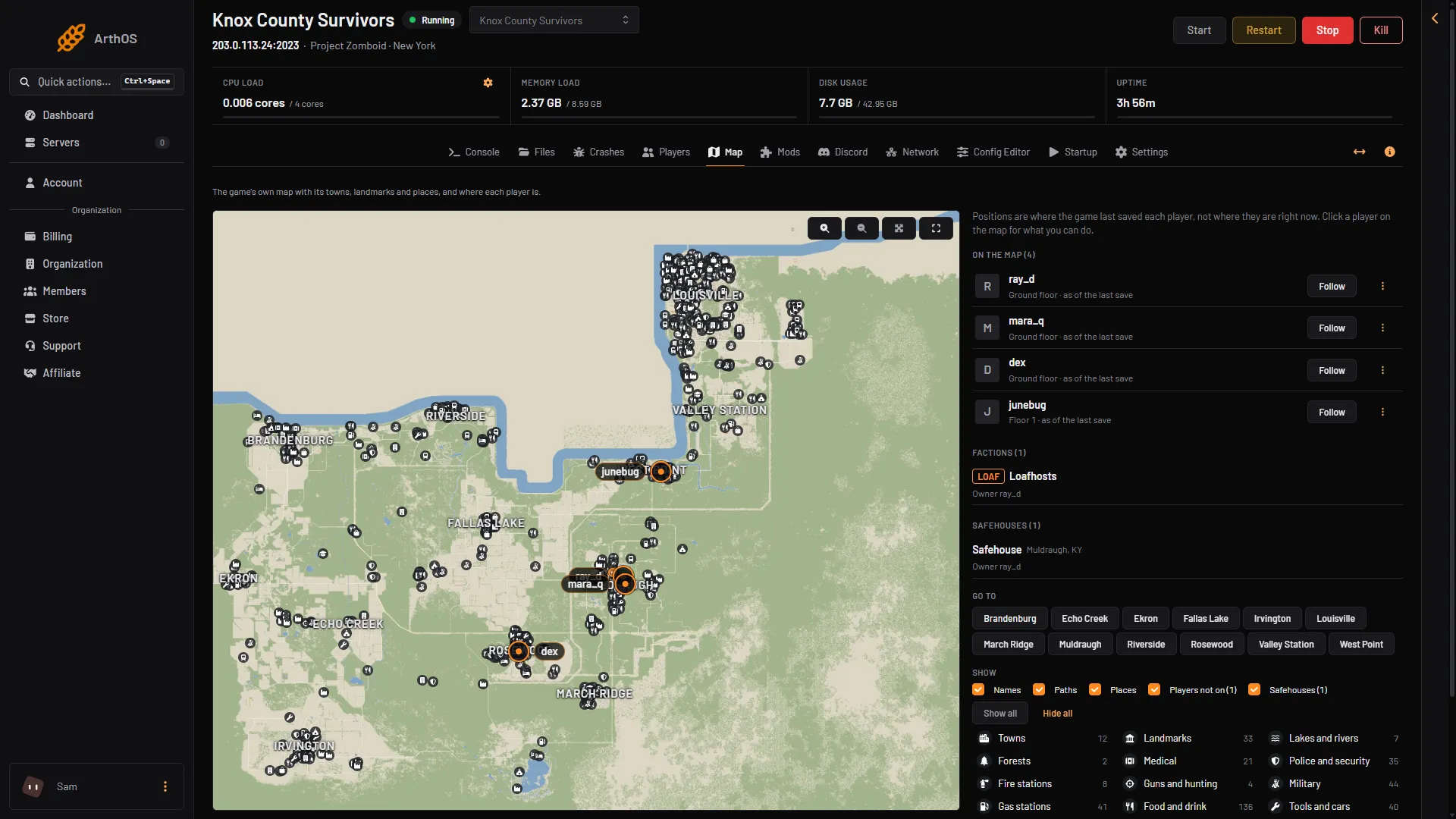
- Safehouses
Release a safehouse
The owner types /releasesafehouse in game chat while the safehouse is theirs. The command in the game’s own list reads “Release a safehouse you own.”
There is no release button on the panel. Ask the owner to release it. An admin cannot remove a safehouse from the panel; the game lists addtosafehouse and kickfromsafehouse as work in progress.
If it does not work
- Players cannot claim. Check that Players can claim safehouses is on and Only admins can claim safehouses is off, then restart. A player under Days survived before claiming cannot claim yet.
- A claim is refused from a distance. The player should be at the building. Not checked on Build 42.21 as of 18 October 2026.
- The settings did not change. Changes apply after a restart.
- Others get in anyway. Turn off Others can enter safehouses.
More about the game: Project Zomboid servers.
Sources: pzwiki.net: Server settings, pzwiki.net: Admin commands, pzwiki.net: Build 35, pzwiki.net: Build 39, pzwiki.net: Build 42.20.0