









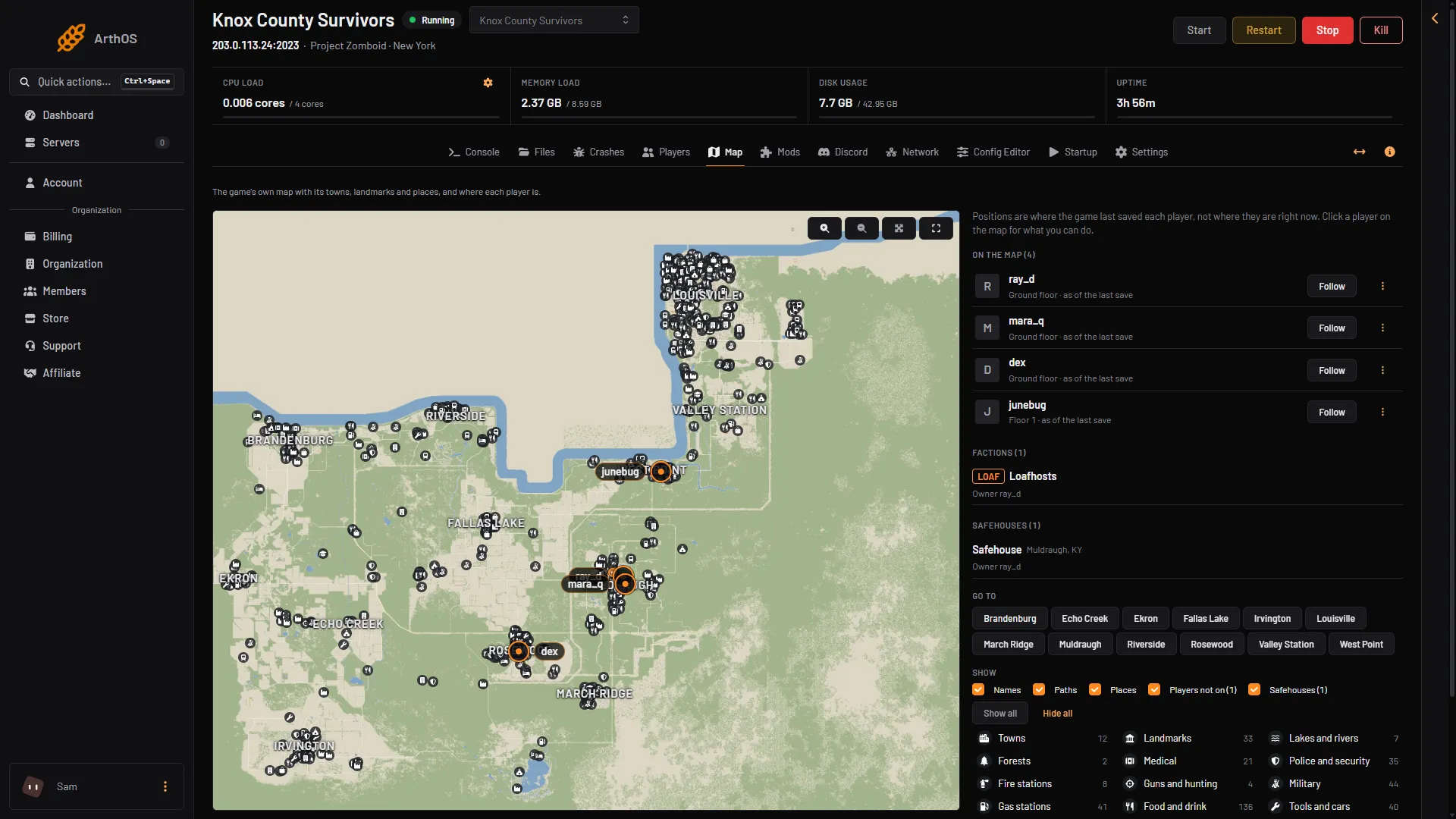
Open the Map page of your server. It draws the game’s own map with its towns, landmarks and places, and marks where each player was when the game last saved. Click a player’s marker to see what you can do for them.
The Map page draws from the server’s map files. How a map mod from the Mods page is drawn: Not checked on Build 42.21 as of 18 October 2026.
The first time
The first time you open the page, the panel draws the map from the server’s map files. This takes about a minute. The page says “The map is being drawn from the server’s map files.” Wait for it to finish.
- Players on the map
- Factions
- Safehouses
- Go to
- Show
The side lists are On the map (box 1, with Follow on each player), Factions (N) (box 2), Safehouses (N) (box 3), Go to (box 4, a button for each town) and Show (box 5, switches for names, paths, places, players not on and safehouses). The pointer’s tile coordinates show at the bottom left of the map.
What is on the map
- Towns and Landmarks, such as churches and factories.
- Places in groups: Lakes and rivers, Forests, Medical, Police and security, Fire stations, Guns and hunting, Military, Gas stations, Food and drink, Tools and cars, Shops, Schools and libraries, Churches, Industry, Transport, Hotels and motels and Offices and banks. Switch a group off to clear the map.
- Safehouses, in green, with the owner’s name. The page lists them as Safehouses (N). See safehouses.
- No-PvP zones, as areas marked “No PvP”. See PvP settings. The panel only shows these zones on the Map. It cannot make or remove one, and how they are made in game is not covered here.
- Factions (N), listed with their owners and members. See factions.
The map has more than one floor. A floor shows as “Ground floor”, “Floor 1” and so on, or “Basement 1” below the ground.
Where players are
Players show at the place where the game last saved them. This is not always where they are right now. The page says so: “Positions are where the game last saved each player, not where they are right now.”
To keep positions close to live, the panel asks the game to save often while the page is open. A line on the page says how often.
- A player who is on shows with a marker and the tag “as of the last save”.
- Players not on shows players who have left. Their marker says “was here at the last save”.
- A dead player’s marker says “died here”.
- “Not saved yet” lists players the game has no position for yet.
Act on a player
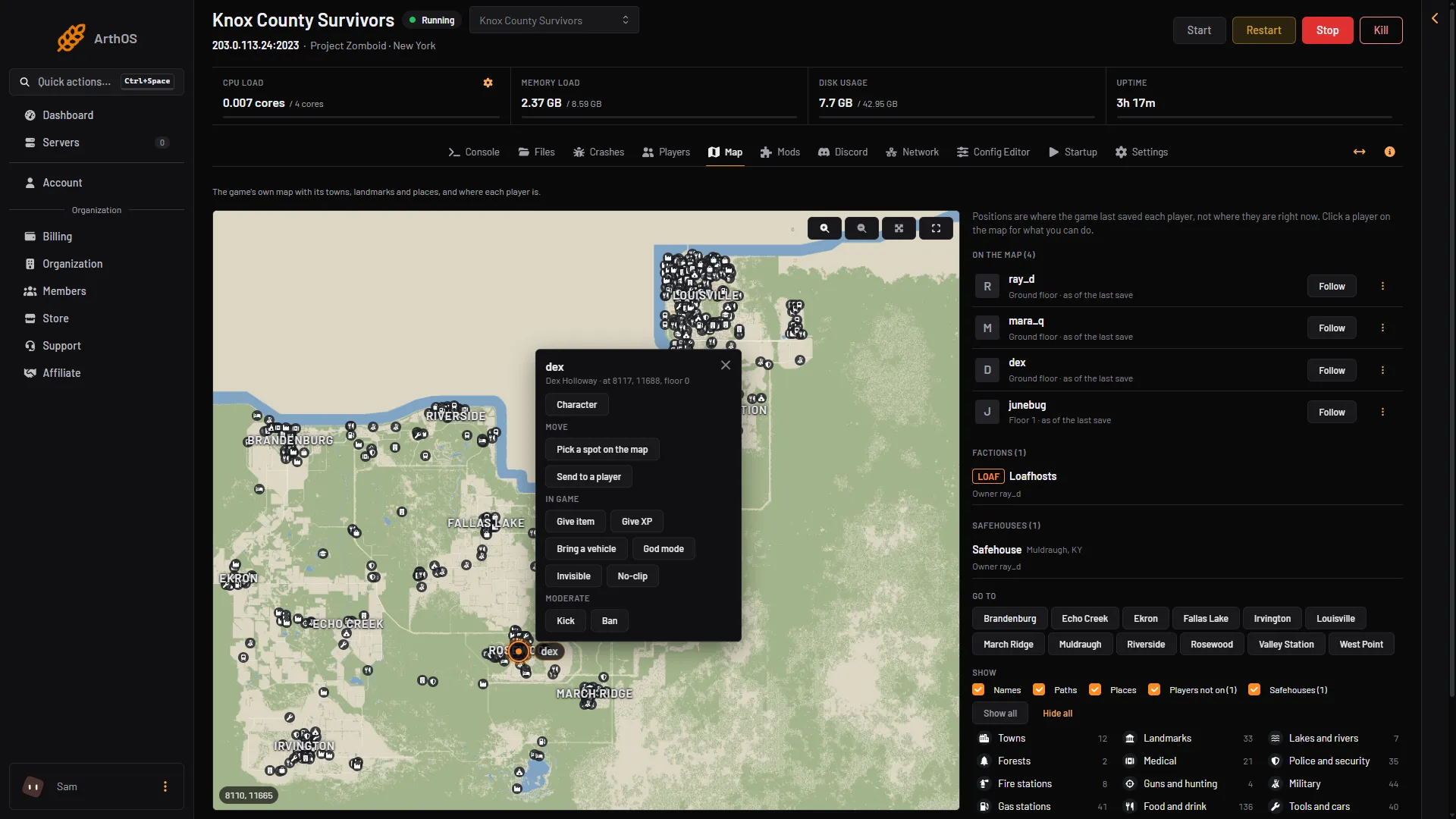
Click a player’s marker. A card opens with:
- Character, which opens the player’s inventory and skills.
- Move, with Pick a spot on the map and Send to a player. Choose Pick a spot on the map, then click where to send the player. The page says “Click where to send” and the name. They arrive in a moment, once the game has loaded the area around them.
- In game, with Give item, Give XP, Bring a vehicle, God mode, Invisible and No-clip.
- Moderate, with Kick and Ban. See kick and ban players.
You can also send a player by typing coordinates. See teleport players.
Who can see it
The Map page needs the live map permission, live-map.read, in your organization role. Players show on it only for people who are also allowed to see the Players page.
If it does not work
- The map stays blank. Wait about a minute on the first visit. If it still does not draw, reload the page.
- A player is in the wrong place. The marker shows the last save. Keep the page open and it catches up.
- Nobody shows. The page says “Nobody is on.” when the server is empty. Players show only to people allowed to see the Players page.
- You do not see the Map page. Ask the server owner for the live map permission.
More about the game: Project Zomboid servers.
Sources: pzwiki.net: Server settings