









Vehicle settings are sandbox options. Open the Config Editor, pick the sandbox file and change them there. Each option has a short list of choices, such as Low, Normal or High. Saved changes apply after a restart.
The settings
Each row is labelled from its key, so look for the words in the first column. The key is in backticks so you can search for it.
| Setting | What it does | Choices or range | Game default |
|---|---|---|---|
EnableVehicles | Whether vehicles spawn at all. | on or off | on |
CarSpawnRate | How often cars are found on the map. | None, Very Low, Low, Normal, High | Low |
InitialGas | How full the tank of a found car is. | Very Low, Low, Normal, High, Very High, Full | Low |
ChanceHasGas | How likely a found car has fuel in it. | Low, Normal, High | Normal |
LockedCar | How often cars are locked. | Never, Extremely Rare, Rare, Sometimes, Often, Very Often | Sometimes |
CarGeneralCondition | The condition of found cars. | Very Low, Low, Normal, High, Very High | Normal |
CarDamageOnImpact | How much damage a car takes in a crash. | Very Low, Low, Normal, High, Very High | Normal |
DamageToPlayerFromHitByACar | Damage to a player hit by a car. | None, Low, Normal, High, Very High | None |
CarAlarm | How often found cars have an active alarm. | Never, Extremely Rare, Rare, Sometimes, Often, Very Often | Rare |
CarGasConsumption | How fast cars burn fuel. | 0.00 to 100.00 | 1.00 |
TrafficJam | Wrecked cars jammed on main roads. | on or off | on |
PlayerDamageFromCrash | Whether players are hurt in a crash. | on or off | on |
RecentlySurvivorVehicles | Chance of finding a car that someone cared for after the outbreak. | None, Low, Normal, High | Low |
VehicleEasyUse | Whether found cars are locked and need keys. | on or off | off |
Gas pumps have their own rows:
FuelStationGasInfinite: pumps never run out.FuelStationGasMinandFuelStationGasMax: how full a pump can start, from 0.00 to 1.00. The defaults are 0.00 and 0.80.FuelStationGasEmptyChance: the chance, from 0 to 100, that a pump starts empty. The default is 20.
Two more rows matter for noise. ZombieAttractionMultiplier (0.00 to 100.00, default 1.00) sets how loud engines are to zombies. SirenEffectsZombies decides whether sirens draw zombies.
In the panel
- Stop the server if you can. Players on it are better off with a short warning first.
- Open the Config Editor.
- Open the sandbox file tab (it ends in
_SandboxVars.lua) and find the vehicle rows, for example Car spawn rate (1), Locked car (2) and Car general condition (3). - Change the rows you want. A list shows names such as Low and Normal. A number field shows its range.
- Save, then restart the server.
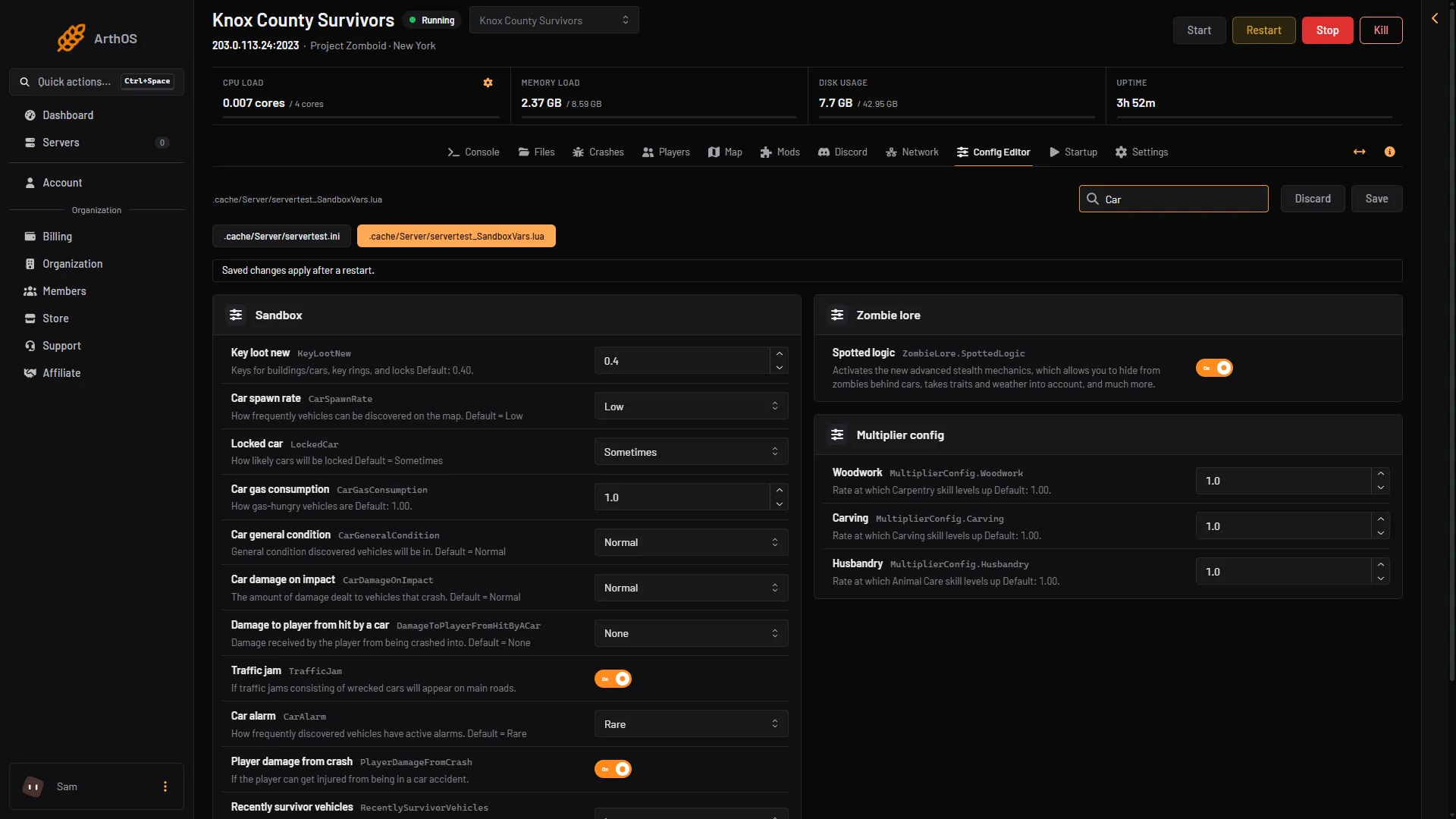
- Car spawn rate
- Locked car
- Car general condition
One more ini setting
The server ini has CarEngineAttractionModifier, from 0.00 to 10.00, default 0.50. It changes how far zombies are drawn to cars. The game’s own comment says lower values can help with lag. DisableVehicleTowing switches towing off.
Spawn one vehicle for a player
You do not need a setting for this. On the Players page, open the menu on a player who is online, choose Bring a vehicle, pick a Vehicle and confirm. For a vehicle from a mod, choose Another vehicle and type its Vehicle script. See spawn a vehicle.
By hand
Open .cache/Server/<Server Name>_SandboxVars.lua in Files. The options sit in the SandboxVars table. Each has a comment above it listing the choices, for example:
    -- How frequently vehicles can be discovered on the map. Default = Low
    -- 1 = None
    -- 2 = Very Low
    -- 3 = Low
    -- 4 = Normal
    -- 5 = High
    CarSpawnRate = 3,
Change the number after the equals sign. Keep the comma. If the file no longer reads, the panel puts back the last copy that did and keeps the broken one beside it with .broken at the end of its name. In game, an admin can spawn a car with /addvehicle "Base.VanAmbulance" "playername".
If it does not work
- No cars appear. Check
EnableVehiclesis on andCarSpawnRateis not None. - Cars are found but will not start. Check
InitialGasandChanceHasGas. The default tank is Low. - The change did nothing. Restart the server. Not checked on Build 42.21 as of 18 October 2026: whether cars already placed in an existing world change.
- The page says the sandbox settings could not be read. A value is wrong. Open Crashes and read the finding, then fix the row.
More about the game: Project Zomboid servers.
Sources: pzwiki.net: Server settings, pzwiki.net: Admin commands