









Open the Config Editor, choose the sandbox file and raise Global in the Multiplier config group. 1.00 is normal speed, 2.00 doubles it. Restart the server to apply it. To help one player only, use Give XP on the Players page.
What Build 42 changed
Older guides talk about an “XP Multiplier” and “XP Multiplier Affects Passive Skills”. The sandbox file on Build 42.21 has neither of those rows. It has a group of rows called MultiplierConfig instead.
Change the rate for every skill
- Open the Config Editor and choose the sandbox file.
- Find the group Multiplier config.
- Make sure Global toggle (
GlobalToggle) is on. The game says that when it is on, all skills use the Global multiplier. - Set Global (
MultiplierConfig.Global) to a number from 0.00 to 1000.00. The default is 1.00. - Save, then restart the server.
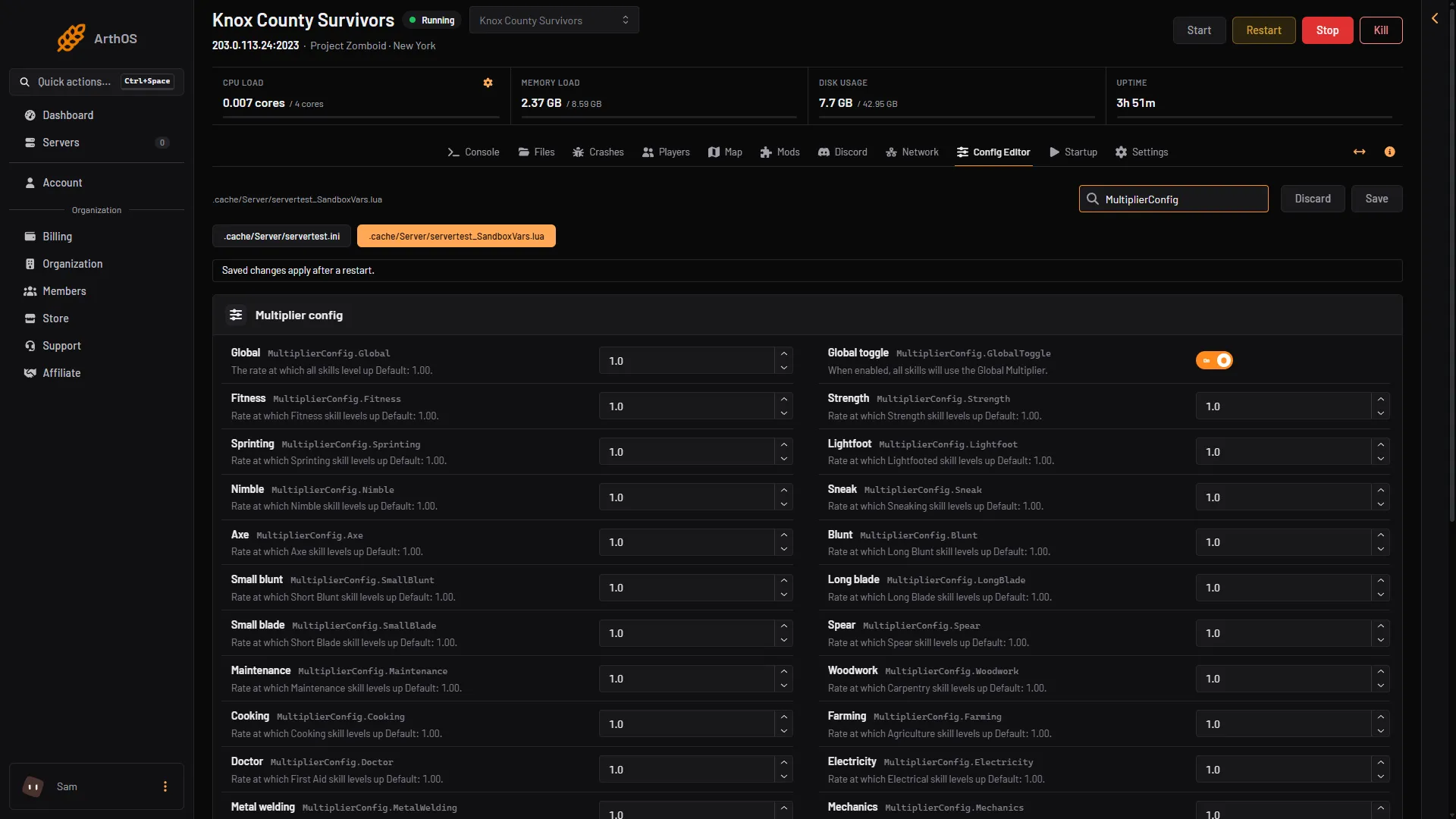
- Global
- Global toggle
Box 1 is the rate and box 2 is the switch that makes every skill use it.
Examples:
0.5: skills level up at half speed.2.0: twice as fast.10: ten times as fast.
Set a rate for one skill
Each skill has its own row in the same group, also from 0.00 to 1000.00, default 1.00. The rows use the game’s internal names, which differ from the names players see in some cases:
| Row | Skill players see |
|---|---|
Woodwork | Carpentry |
Farming | Agriculture |
Doctor | First Aid |
Electricity | Electrical |
MetalWelding | Welding |
Lightfoot | Lightfooted |
Sneak | Sneaking |
Blunt | Long Blunt |
SmallBlunt | Short Blunt |
PlantScavenging | Foraging |
FlintKnapping | Knapping |
Husbandry | Animal Care |
Blacksmith | Blacksmithing |
Sprinting | Sprinting (Running in the Give XP list) |
The others match their names: Fitness, Strength, Nimble, Axe, LongBlade, SmallBlade, Spear, Maintenance, Cooking, Mechanics, Tailoring, Aiming, Reloading, Fishing, Trapping, Masonry, Pottery, Carving, Tracking, Butchering and Glassmaking.
To use these, switch Global toggle off, then set the skills you want.
Not checked on Build 42.21 as of 18 October 2026: whether Fitness and Strength follow the Global rate, and what happens to a skill row while Global toggle is on.
Other rows that limit XP
LevelForMediaXPCutoff. Default 3. At this skill level or above, TV and VHS tapes give no XP for that skill.LevelForDismantleXPCutoff. Default 0. At this skill level or above, scrapping furniture gives no XP. It does not apply to Electrical.
Give one player XP
Use this for a single player, or to fix a skill after a mistake. The player must be online.
- Open the Players page.
- Open the three-dot menu on the player’s row and choose Give XP.
- In the “Give (name) XP” box, pick the Skill (1) and type the XP (2). The panel accepts 1 to 1,000,000.
- Choose Give XP (3). The game answers with a line such as
Added 100.0 Woodwork xp's to <name>.
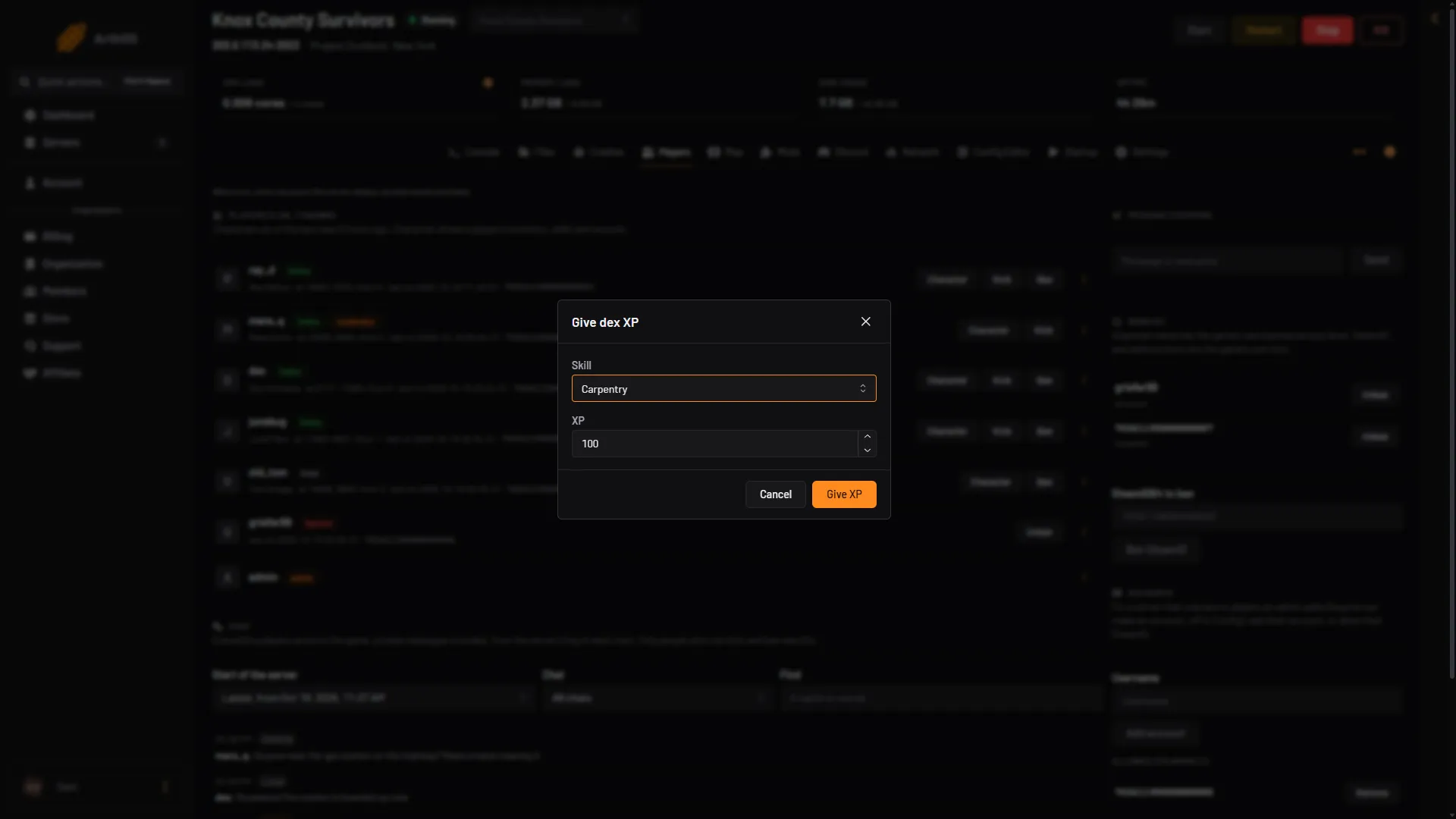
- Skill
- XP
- Give XP
By hand
In the server console, or in game as an admin with a slash in front:
addxp "<name>" Woodwork=100Use the internal skill name from the table above. Edit the sandbox file in Files only if you must: it is .cache/Server/<Server Name>_SandboxVars.lua.
If it does not work
- Nothing changed. Restart the server. Sandbox changes apply at the next start.
- Skills still level at the old speed. Check Global toggle. The game says that with it on, all skills use the Global multiplier.
- Give XP does nothing. The player must be online, and the skill must be one the list offers.
- The server will not start after an edit. Open Crashes. The panel restores the last sandbox copy that worked and keeps the broken one as
.broken.
More about the game: Project Zomboid servers.
Sources: pzwiki.net: Custom Sandbox, pzwiki.net: Admin commands