









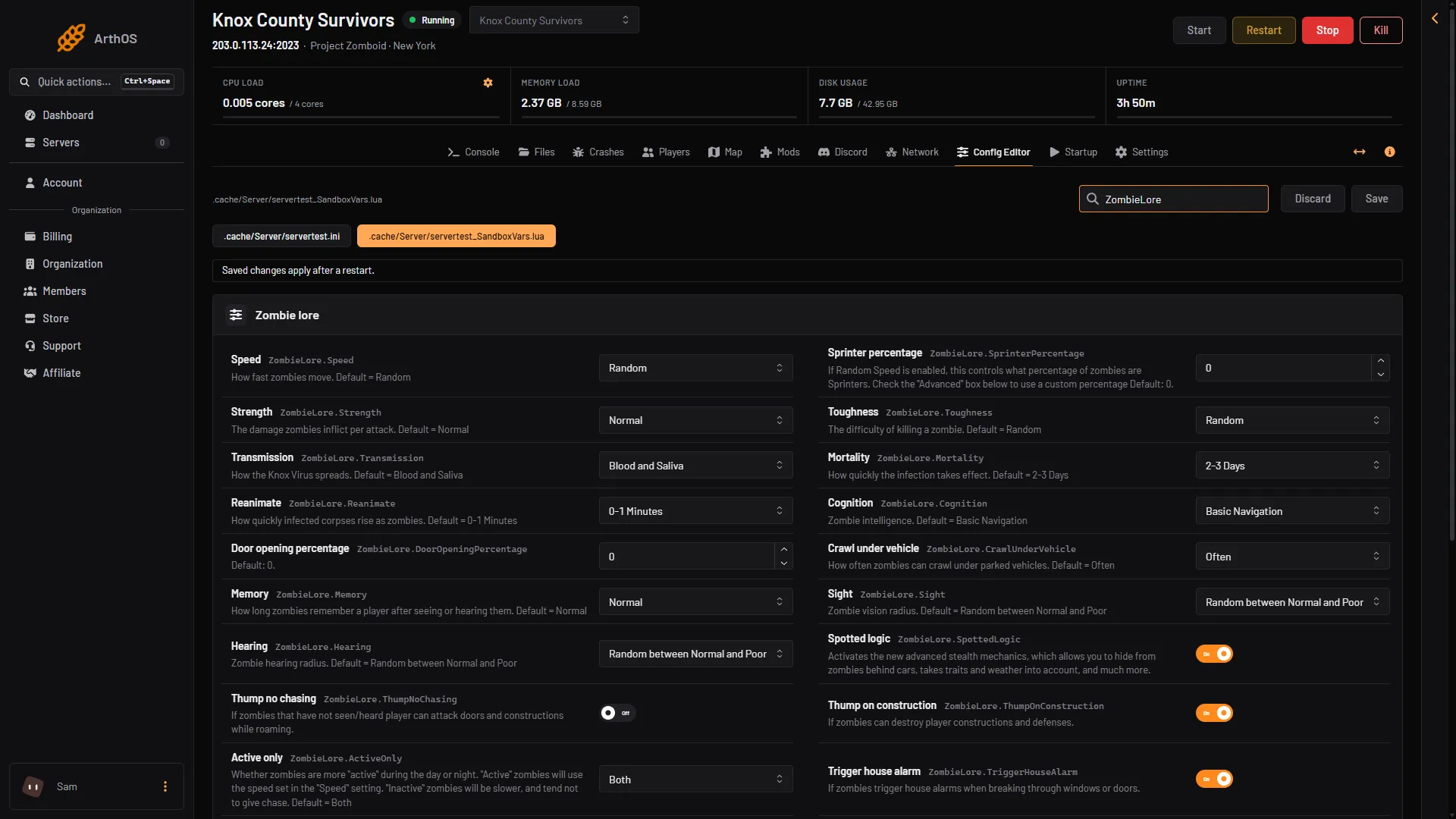
Zombie behaviour is set in the sandbox file, in a group called Zombie lore. You can make zombies faster, stronger, tougher or sharper, or make them easier to escape. The change applies after a restart.
In the ArthOS panel
- Open the Config Editor page of your server.
- Choose the file
.cache/Server/<Server Name>_SandboxVars.lua. It is the second tab. The first tab is the server ini, which does not hold zombie settings. - Find the Zombie lore group. You can also type a word, such as
Memory, in the search box. - Change the rows you want, then choose Save.
- Restart the server. The page says “Saved changes apply after a restart.”
- Speed
- Strength
- Toughness
- Cognition
- Memory
The panel shows each row as its name plus the game’s own key, for example Speed and ZombieLore.Speed. The game’s own description sits under it.
The main rows
Each row is a list. The game’s default choice is the one shown in bold type below.
- Speed (
Speed): Sprinters, Fast Shamblers, Shamblers, Random. See the sprinters guide. - Strength (
Strength): how hard zombies hit. Superhuman, Normal, Weak, Random. - Toughness (
Toughness): how hard they are to kill. Tough, Normal, Fragile, Random. - Cognition (
Cognition): how well zombies find their way. Navigate and Use Doors, Navigate, Basic Navigation, Random. - Crawl under vehicle (
CrawlUnderVehicle): how often zombies crawl under parked vehicles. Crawlers Only, Extremely Rare, Rare, Sometimes, Often, Very Often, Always. - Memory (
Memory): how long a zombie remembers a player after seeing or hearing them. Long, Normal, Short, None, Random, Random between Normal and None. - Sight (
Sight): how far zombies see. Eagle, Normal, Poor, Random, Random between Normal and Poor. - Hearing (
Hearing): how far zombies hear. Pinpoint, Normal, Poor, Random, Random between Normal and Poor. - Active only (
ActiveOnly): when zombies use their full speed. Both, Night, Day. Inactive zombies are slower and tend not to give chase.
Speed, infection and population have their own guides. Other rows in the group are on and off switches or numbers, such as whether zombies can drag a player down, or the chance that a zombie carries a weapon. The game’s description under each row says what it does and its range. One exception: the help text of Sprinter percentage mentions an “Advanced” box. That box is on the game’s own sandbox screen, and the server’s sandbox file has no row for it. See the sprinters guide.
A harder server
| Row | Choice |
|---|---|
| Speed | Fast Shamblers |
| Strength | Superhuman |
| Toughness | Tough |
| Cognition | Navigate and Use Doors |
| Memory | Long |
| Sight | Eagle |
| Hearing | Pinpoint |
An easier server
| Row | Choice |
|---|---|
| Speed | Shamblers |
| Strength | Weak |
| Toughness | Fragile |
| Cognition | Basic Navigation |
| Memory | Short |
| Sight | Poor |
| Hearing | Poor |
By hand
- Stop the server. Open Files and the folder
.cache, thenServer. - Open
<Server Name>_SandboxVars.lua. - Find the
ZombieLoretable. Each setting is a number, and the comment above it lists what each number means. For example:
    ZombieLore = {
        -- How fast zombies move. Default = Random
        -- 1 = Sprinters
        -- 2 = Fast Shamblers
        -- 3 = Shamblers
        -- 4 = Random
Speed = 4,- Change the number, save the file and start the server.
If it does not work
- The change did not show. Settings are read when the server starts. Restart it.
- The file was put back. If the sandbox file cannot be read, the panel restores its last good copy and keeps yours beside it as
.broken. Open the.brokencopy and look for a missing comma or brace. - Zombies already in the world. Not checked on Build 42.21 as of 18 October 2026: how much a change affects zombies that already exist in a running world.
See also the zombie population guide. Hosting a server? Start at Project Zomboid servers.
Sources: pzwiki.net: Custom Sandbox, pzwiki.net: Server settings