









The Zombies row sets how many zombies there are, from Insane to None. The game’s default is Normal. Restart the server after you change it. A bigger crowd also asks more of the server.
The Zombies row
Zombies (Zombies) is in the top group, Sandbox, of the sandbox file. The game’s own note says that changing it also sets the Population multiplier under the advanced zombie options. The numbers are:
| Zombies | Population multiplier |
|---|---|
| Insane | 2.5 |
| Very High | 1.6 |
| High | 1.2 |
| Normal | 0.65 |
| Low | 0.15 |
| None | 0.0 |
- Open the Config Editor page and choose the second tab,
.cache/Server/<Server Name>_SandboxVars.lua. - Set Zombies.
- Choose Save and restart the server.
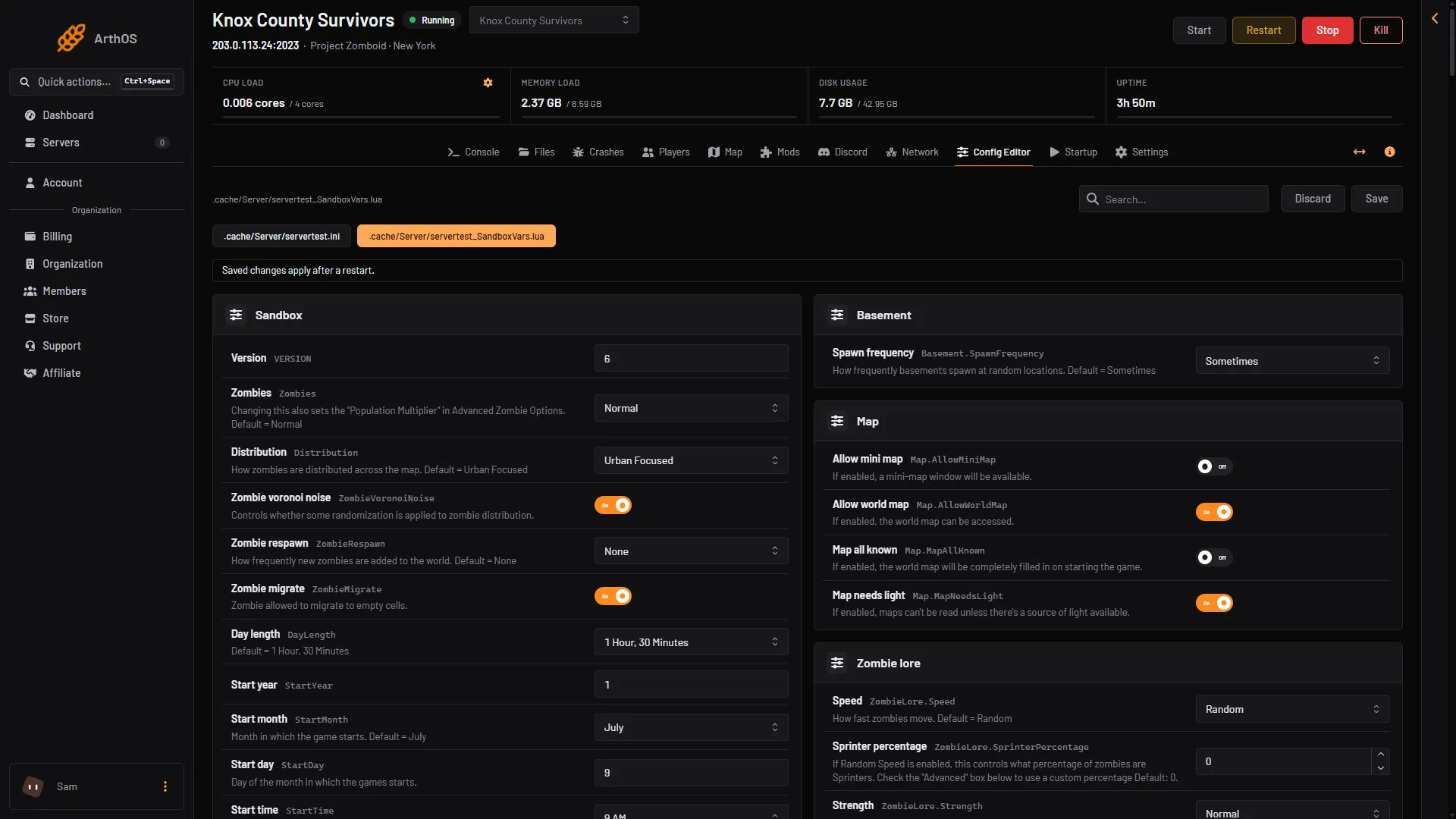
- Zombies
- Distribution
- Zombie respawn
- Zombie migrate
Where the zombies are
- Distribution (
Distribution): Urban Focused puts most zombies in towns. Uniform spreads them across the map. - Zombie voronoi noise (
ZombieVoronoiNoise): adds some randomness to the distribution. On by default.
Respawn and migration
- Zombie respawn (
ZombieRespawn): how often new zombies are added to the world. The choices are High, Normal, Low and None. None is the default, so cleared areas stay clear. According to PZwiki, the choices are presets for three advanced rows: High is 16 hours, 6 hours unseen and 0.5; Normal is 72, 16 and 0.1; Low is 216, 48 and 0.05. - Zombie migrate (
ZombieMigrate): lets zombies move into empty cells. On by default.
Advanced rows
These are in the group Zombie config of the same file. Each key is shown beside its label. Every range and default here is the game’s own.
| Key | What it does | Range | Default |
|---|---|---|---|
PopulationMultiplier | The overall zombie multiplier | 0 to 4 | 0.65 |
PopulationStartMultiplier | Population at the start of the game | 0 to 4 | 1.00 |
PopulationPeakMultiplier | Population on the peak day | 0 to 4 | 1.50 |
PopulationPeakDay | The day the population peaks | 1 to 365 | 28 |
RespawnHours | Hours before zombies may respawn in a cell. 0 turns respawn off | 0 to 8760 | 0 |
RespawnUnseenHours | Hours a chunk must be unseen before zombies respawn in it | 0 to 8760 | 0 |
RespawnMultiplier | Share of a cell’s population that may respawn each time | 0 to 1 | 0 |
RedistributeHours | Hours before zombies move to empty parts of a cell. 0 turns it off | 0 to 8760 | 12 |
FollowSoundDistance | How far a zombie walks toward the last sound it heard | 10 to 1000 | 100 |
RallyGroupSize | Size of idle zombie groups. 0 means no groups | 0 to 1000 | 20 |
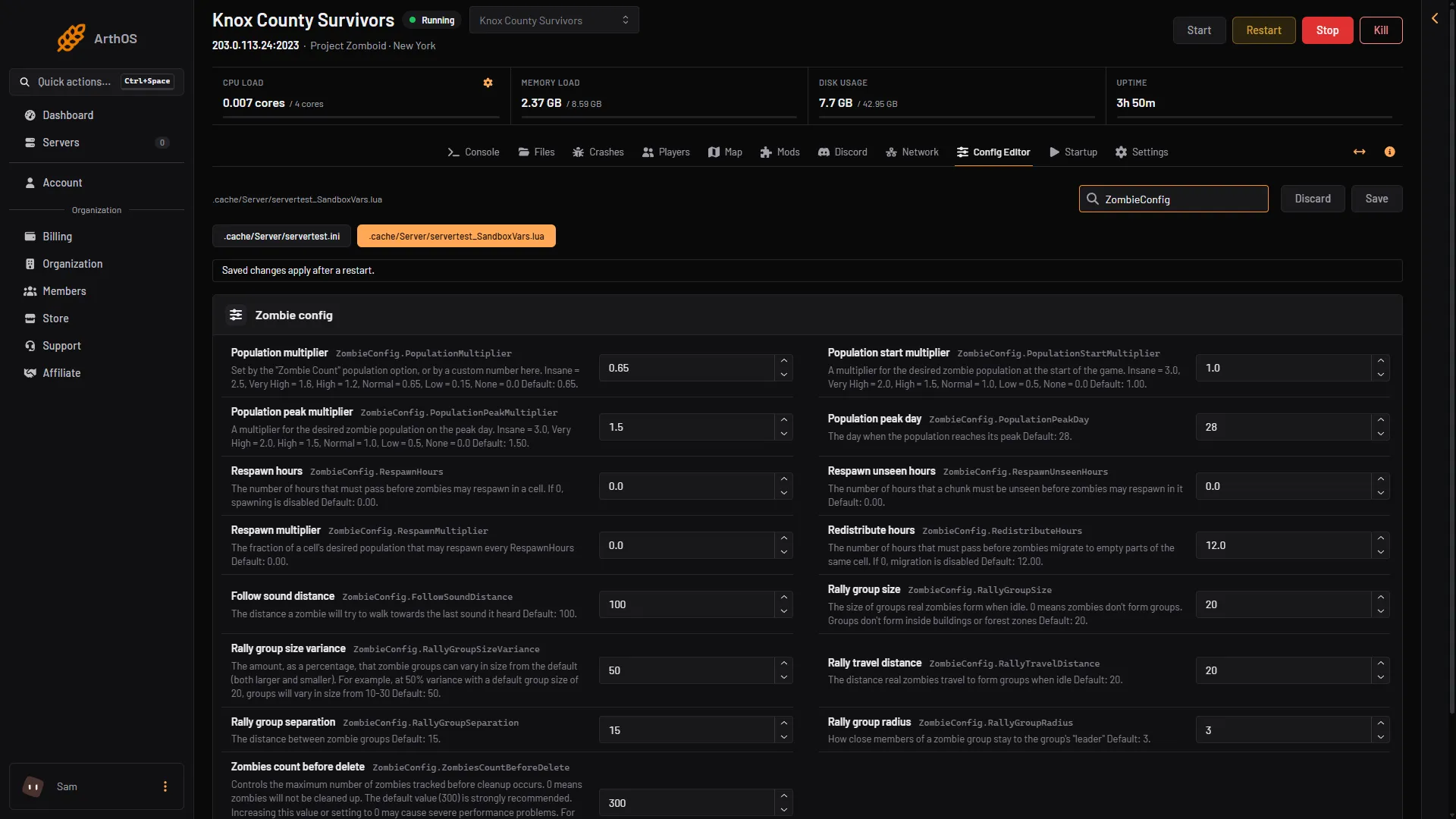
- Population multiplier
- Population peak day
- Respawn hours
The game keeps a safety limit, ZombiesCountBeforeDelete, at 300. Its comment says the default is strongly recommended, and that raising it or setting 0 may cause severe performance problems.
More zombies need more server power
Every zombie the server tracks costs processor time and memory. A larger crowd with many players can make the server lag. If you raise the population, watch the MEMORY LOAD and CPU LOAD figures at the top of the server page. See the lag guide and the server requirements guide.
By hand
Stop the server and open .cache/Server/<Server Name>_SandboxVars.lua in Files. The top of the file holds the first rows:
    Zombies = 4,
    Distribution = 1,
    ZombieVoronoiNoise = true,
    ZombieRespawn = 4,
    ZombieMigrate = true,
Here Zombies = 4 is Normal and ZombieRespawn = 4 is None. The advanced rows are in the ZombieConfig table. Set the number and start the server.
If it does not work
- Same number of zombies as before. Restart the server. If you changed Zombies, also check Population multiplier, since a custom number there can differ from the preset.
- Zombies already in the world. Not checked on Build 42.21 as of 18 October 2026: how much a population change affects an existing world.
More behaviour rows are in the zombie settings guide. Hosting a server? Start at Project Zomboid servers.
Sources: pzwiki.net: Custom Sandbox