






To make every item craft at once, open Config Editor, turn on Instant crafting in the Gameplay group, choose Save and restart the server. This applies to every player and every item. If you only want crafting to be faster, use the Crafting Controller plugin instead.
In the ArthOS panel
- Open your server and choose Config Editor. The file is
server/rust/cfg/server.cfg. - Type
craftin Search…, or look in the Gameplay group for Instant crafting (1). Its help reads “Every item crafts at once.” It is off until you change it. - Switch it on.
- Choose Save (2).
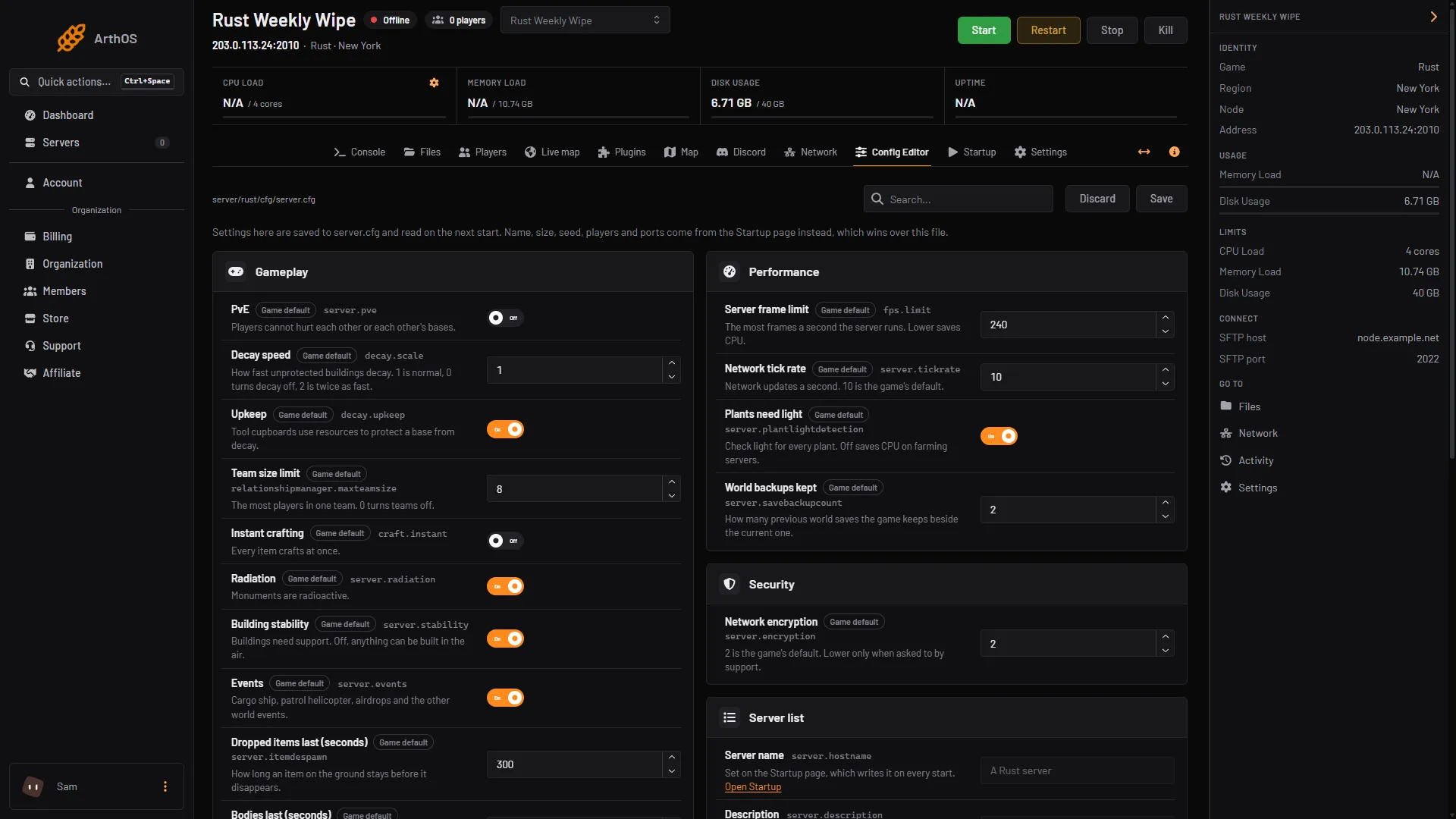
- Instant crafting row
- Save
- The panel says “Saved. Restart the server to apply the changes.” Choose Restart now. If the server is stopped, the change applies when it starts.
To go back, switch Instant crafting off, Save and restart.
Faster, but not instant
Crafting Controller (by Whispers88, version 3.3.7 on uMod, released 1 August 2026) changes the time crafting takes. Its uMod page says it allows you to modify the time spent crafting and which items can be crafted. It needs Oxide or Carbon.
- Open Plugins. In Search uMod type
Crafting Controller, and choose Install on its card. See the plugin manager guide. - Check that its row under Installed says LOADED. If it says NOT LOADED, see plugins not loading.
- Press Config on its row. Config appears once the plugin has loaded and written its settings file,
CraftingController.json. - Find this setting:
"Default crafting rate multiplier 0 = Instant, 1 = Default, 2 = 2x speed". It starts at1. Set2for crafting twice as fast,0for instant crafting. Keep the quotes and the colon as they are. - Save the file and press Reload on the plugin’s row. The plugin then reads the new setting.
The plugin also has extra speeds for some players. Its settings list a “Crafting rate bonus mulitplier” with two example groups, vip1 at 1.5 and vip2 at 2. A player who holds craftingcontroller.vip1 gets the 1.5 rate. Grant it as shown in plugin permissions.
Two commands set the rate in game, for a player who holds the permission craftingcontroller.craftingrate. Type them in game chat, with the slash:
| Command | What it does |
|---|---|
/craftrate | Shows the current default multiplier. |
/craftrate 2 | Sets the default multiplier to 2. |
By hand
When you host Rust yourself, add this line to server/<identity>/cfg/server.cfg, where <identity> is the name you gave with +server.identity, and restart:
craft.instant trueRemove the line, or set it to false, to go back.
If it does not work
- Crafting still takes time. The server has not restarted since you saved. Restart it.
- The plugin row says NOT LOADED. See plugins not loading. The Console holds the reason.
/craftratesays you have no permission. Grantcraftingcontroller.craftingrateto yourself.- Only some players craft fast. The plugin gives bonus speeds by permission. Check which groups hold the
craftingcontroller.permissions.
Hosting Rust? See the Rust page.
Sources: umod.org: Crafting controller, umod.org: CraftingController.cs, umod.org: Permissions