






Rust Kits (by k1lly0u) lets players claim a ready-made set of items with /kit. Install it from the Plugins page (it installs at once), give yourself the kits.admin permission, then build a kit in game with /kit new. Your server needs Oxide or Carbon first (see install Oxide or Carbon).
In the ArthOS panel
- Open your server and choose Plugins. Under Find plugins, type
kitsin Search uMod (1). Find Rust Kits by k1lly0u (2) and choose Install (3). The panel does not ask a question.
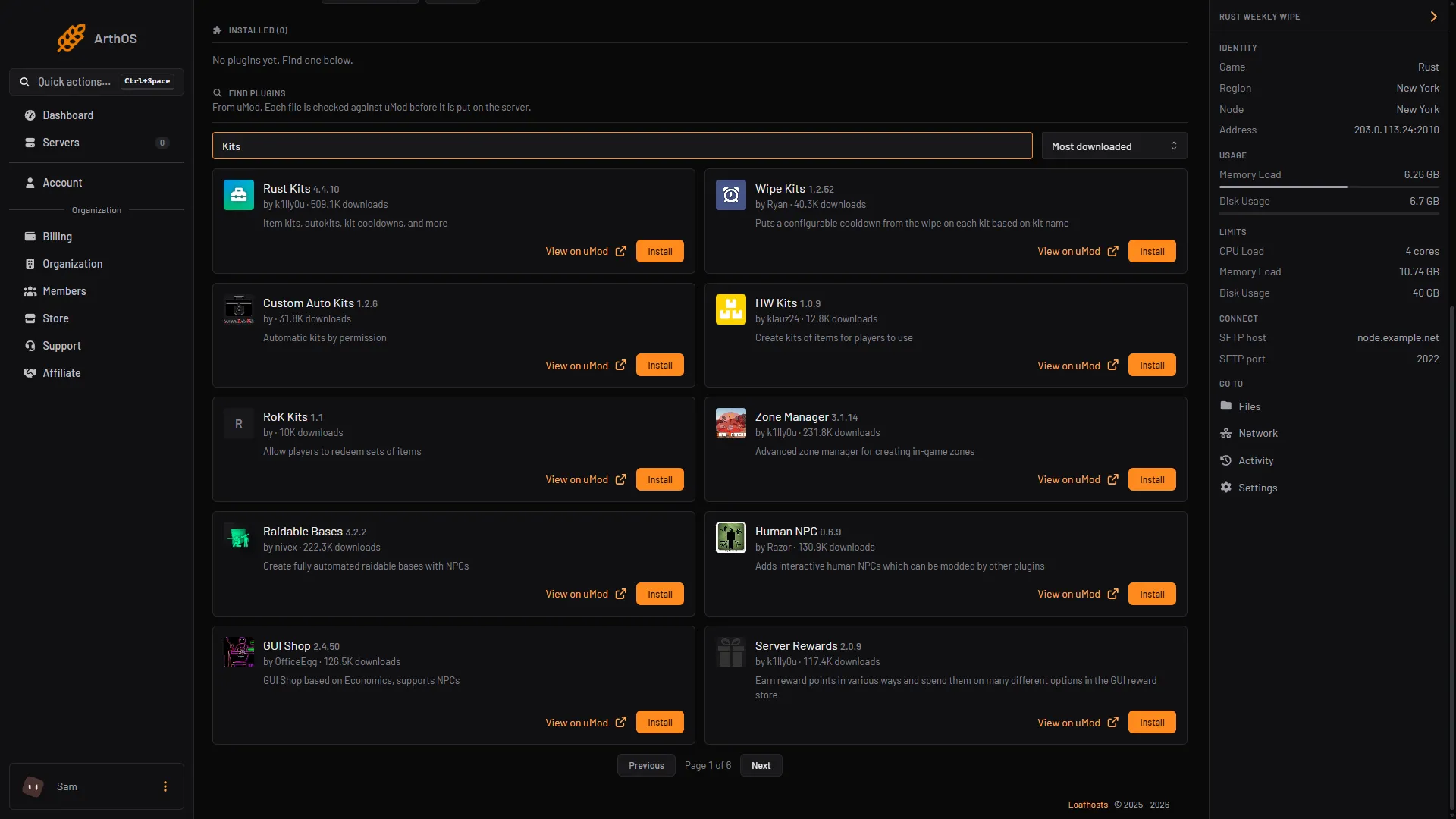
- Search uMod
- Rust Kits
- Install
- Look at its row under Installed. It should say LOADED. If it says NOT LOADED, see plugins not loading. On a running server the plugin loads by itself. The message “It loads when the server starts” shows whenever the panel has not yet seen the plugin load.
- Its uMod page says Rust Kits depends on the Image Library plugin. Check Installed for Image Library. If it is not listed, install it from the same search.
- Give yourself the admin permission. Your framework is the card marked running now on the Plugins page. Open the Console tab and type, with no slash and your own name:
| Framework | Command |
|---|---|
| Oxide | oxide.grant user YourName kits.admin |
| Carbon | c.grant user YourName kits.admin |
If your name has a space in it, use your Steam ID instead of the name. More about permissions and groups is in grant plugin permissions.
Create a kit in game
Join your server. These commands are typed in game chat, with the slash.
- Clear your inventory, then put in exactly the items the kit should hold.
- Type
/kit new. The kit editor opens. (The Create New button in the top right of the kit menu does the same.) - Press Copy From Inventory (bottom right) to add your items.
- Fill in the left side:
| Field | What it does |
|---|---|
| Name | The name players type: /kit starter |
| Description, Icon URL | Optional. The description and picture in the kit menu. |
| Permission | Only players with this permission can claim the kit. It must start with kits., for example kits.vip. |
| Auth Level | 0 is any player, 1 is moderators and up, 2 is admins. |
| Is Hidden | Hides the kit from regular players in the menu. |
| Maximum Uses | How many times one player can claim the kit in a wipe cycle. |
| Cooldown | Seconds a player must wait before claiming it again. |
| Purchase Cost | A price. The currency is set in the plugin’s config (Scrap by default). |
- Press Save Kit (bottom left).
Players type /kit to open the menu or /kit starter to claim one directly. To change a kit later, type /kit edit starter. To delete it, /kit remove starter.
Give a kit to a group
A kit with a permission is claimed only by players who hold it. In the Console tab, grant it to a group:
| Framework | Command |
|---|---|
| Oxide | oxide.grant group vip kits.vip |
| Carbon | c.grant group vip kits.vip |
Give a kit when players respawn (autokits)
Autokits are kits a player gets after dying.
- Open the plugin’s settings: on the Plugins page, press Config on Rust Kits. Config appears once the plugin has loaded and written its settings file.
- Edit the existing list and keep its commas. Put the kit names in the list, in the order you want them tried:
"Autokits ordered by priority": [
  "starter",
  "vip"
],- To let players switch autokits off for themselves, set
"Allow players to toggle auto-kits on spawn"totrue. They then type/kit autokit. - Save the file and press Reload on the plugin.
The plugin tries each kit in the list until it can give one. Autokits obey the same Maximum Uses and Cooldown as a normal claim.
Useful admin commands
| Command | What it does |
|---|---|
/kit list | Lists every kit. |
/kit give <player> <kit> | Gives a kit to a player. |
/kit resetuses <player> <kit> | Resets one player’s uses of a kit. |
/kit reset | Resets all players’ kit usage data. |
The same kit list, kit give, kit resetuses and kit reset work in the server console without a slash. The config option Wipe player data when the server is wiped is off by default, so run /kit reset after a wipe if you want everyone to start fresh.
By hand
Download Kits.cs from its uMod page and upload it, and Image Library if the plugin needs it, to oxide/plugins (Oxide) or carbon/plugins (Carbon). The settings file is Kits.json in oxide/config or carbon/configs. After editing it, reload in the console with oxide.reload Kits or c.reload Kits.
If it does not work
/kit newdoes nothing or says no permission. You do not holdkits.admin. Grant it again and check withoxide.show user YourName(Oxide).- A player cannot claim a kit. The kit’s Permission is set and the player does not hold it, or the kit’s Maximum Uses or Cooldown stops them.
- The plugin says NOT LOADED. Read the Console from the start of the server for the reason, and check that Image Library is installed. See plugins not loading after a Rust update.
- You want skins in kits filtered. The plugin’s page says the automatic skin filtering, which keeps kits within Facepunch’s terms, needs the Player DLC API plugin. Install that plugin too.
Hosting Rust? See the Rust page.
Sources: umod.org: Rust kits, umod.org: Permissions, umod.org: Configuration, carbonmod.gg: Oxide porting