






Remover Tool lets a player take down their own building parts and deployables with a chat command, and get part of the cost back. Install it from the Plugins page, give players removertool.normal, and they type /remove. Your server needs Oxide or Carbon first (see install Oxide or Carbon).
It is for servers where players should be able to undo a mistake or tidy a base, and for admins who need to clear one fast. The plugin’s uMod page describes it as a “Building and entity removal tool”.
In the ArthOS panel
- Open your server and choose Plugins. Under Find plugins, type
remover toolin Search uMod. Search uMod (1) lists the Remover Tool card (2). Choose Install (3). The panel offered version 4.3.48 by Tryhard on 11 October 2026.
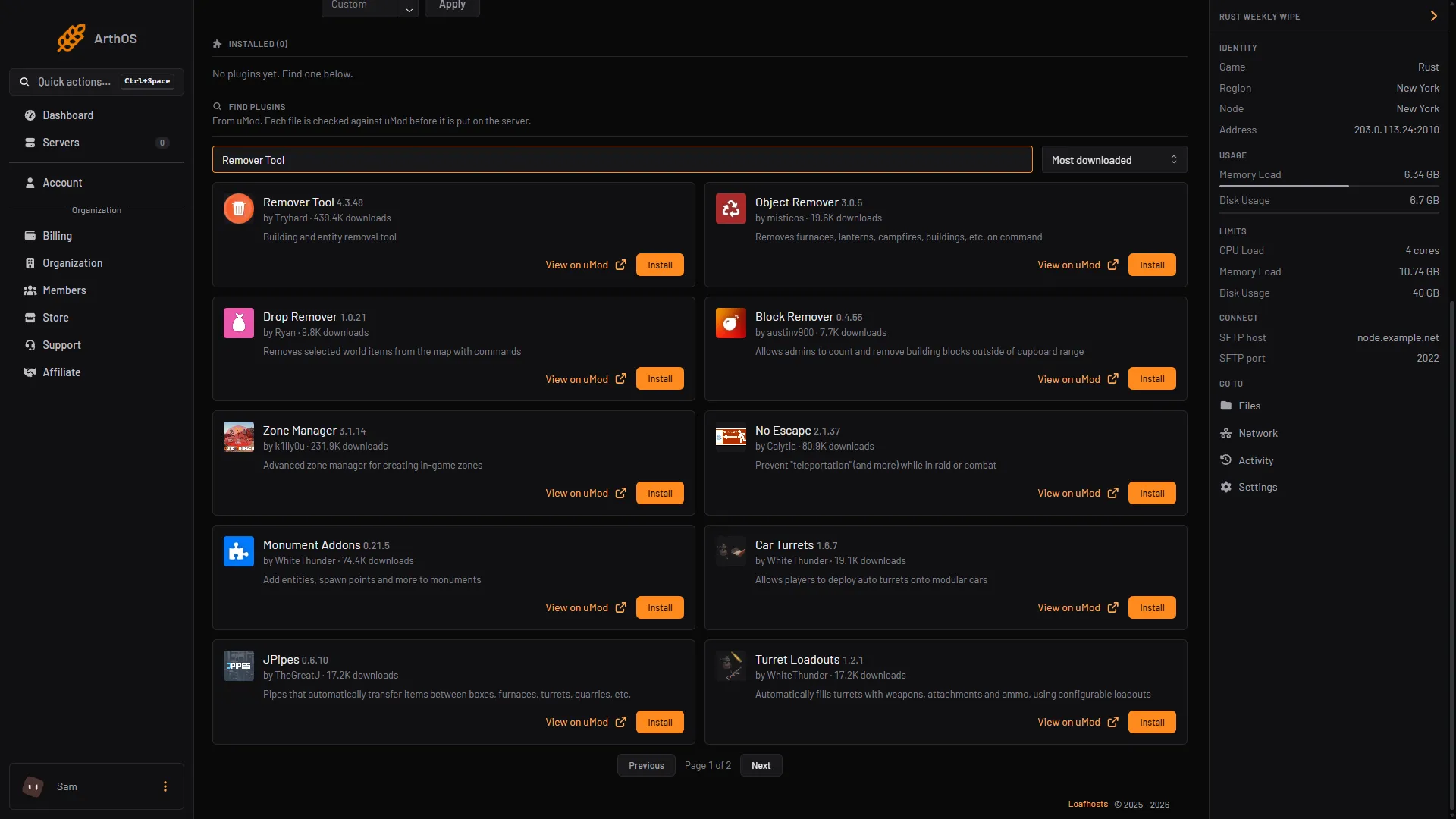
- Search uMod
- Remover Tool card
- Install
- Look at its row under Installed. It should say LOADED. If it says NOT LOADED, read the Console for the reason. Remover Tool can also work with other plugins (Economics, ServerRewards, Clans, Friends, NoEscape, BuildingOwners, Image Library). Install one only if you want that feature.
- Open the Console tab and give the permission. Type with no slash:
| Framework | Everyone | One player |
|---|---|---|
| Oxide | oxide.grant group default removertool.normal | oxide.grant user YourName removertool.normal |
| Carbon | c.grant group default removertool.normal | c.grant user YourName removertool.normal |
More about groups is in grant plugin permissions.
How a player removes something
These are typed in game chat, with the slash.
- Type
/remove. The chat says the tool is on, for how many seconds, and how many objects can be removed. - With empty hands, aim at one of your own building parts or deployables, within the tool’s distance, and press the Remove Button. The plugin’s default is the primary fire button, which is left click. The plugin turns itself off if you hold an item in your hand while in this mode.
- Type
/removeagain to turn it off early. It also turns off when its time runs out.
| Command | What it does |
|---|---|
/remove | Turns the tool on or off (normal mode). |
/remove 120 | Turns it on for 120 seconds, up to the maximum time. |
/remove help | Lists the modes. |
What a normal player gets by default
These are the defaults of Permission Settings (Just for normal type) for removertool.normal:
| Setting | Default |
|---|---|
Distance | 3 |
Cooldown | 60 |
Max Time | 300 |
Max Removable Objects (0 = Unlimited) | 50 |
Pay and Refund | both true |
The plugin’s messages count Cooldown and the tool time in seconds.
Refund and price
Open the settings: press Config on the plugin row. It opens RemoverTool.json. Config appears once the plugin has loaded and written its file. The section Remove Info (Refund & Price) lists every building part and deployable the plugin knows.
When the plugin first writes the file, it fills the building-part lists as a share of the part’s build cost, rounded (from the plugin’s source file):
| List | What it is | Default share of build cost |
|---|---|---|
price | What the player pays to remove the part | 60% |
refund | What the player gets back | 40% |
You can edit both lists per part and grade.
- For each building part and each grade, there is a
refundlist and apricelist. A player must be able to pay theprice, or the plugin says “Can’t remove: You don’t have enough resources.” - For deployables, the default
refundis one of the item itself. - To stop a deployable being removed, set its
enabledtofalse. - To turn payment or refund off for normal players, set
PayorRefundtofalsein the permission block.
Keep the file valid JSON, save it, then press Reload on the plugin.
Different limits for VIPs
Add a second entry to that block with a name that starts with removertool., for example removertool.vip, and a higher Priority. Reload the plugin, then grant it like the one above. A player who holds several uses the highest Priority.
Who can remove what
By default Use Entity Owners, Use Clans and Use Friends are true, and Use Teams, Use Building Locks and Use Tool Cupboards are false. In plain words, a player can remove things they own, and things owned by clan members or friends when the plugin that manages them is installed. A refusal reads “Can’t remove: You don’t have any rights to remove this.”
During a raid
Removing can be blocked while a player is in a raid or in combat, but only with the NoEscape plugin installed. The settings Use Raid Blocker and Use Combat Blocker (section for NoEscape) are off by default in the plugin’s source. Without NoEscape, removing is not blocked during a raid.
Admin remove
Admin modes need their own permission each. Each mode has its own distance and time settings under Remove Type Settings.
| Command | Permission | Removes |
|---|---|---|
/remove admin | removertool.admin | What you aim at, from further away (20 by default). |
/remove structure | removertool.structure | A whole building (100 by default). |
/remove all | removertool.all | Everything in reach, of any owner (50 by default). |
/remove external | removertool.external | External walls and gates (20 by default). |
You can add a time: /remove admin 600. The default is 300 seconds and the maximum is 600.
From the console
Other commands work in the F1 console, RCON or the server console:
| Command | What it does |
|---|---|
remove.target n <player> [seconds] [max] | Turns the normal tool on for a player (needs removertool.target from a player). Use d to turn it off. |
remove.allow false | Stops normal players from using the tool until you type remove.allow true. Needs removertool.override from a player. |
By hand
Download RemoverTool.cs from its uMod page and upload it to oxide/plugins (Oxide) or carbon/plugins (Carbon). The settings file is RemoverTool.json in oxide/config or carbon/configs. After editing it, reload with oxide.reload RemoverTool or c.reload RemoverTool.
If it does not work
- “You don’t have ‘removertool.normal’ permission to use this command.” Grant it again and check with
oxide.show user YourName. - “Remover Tool is currently disabled.” An admin ran
remove.allow false. Typeremove.allow true. - “Can’t remove: You don’t have any rights to remove this.” The part belongs to someone else, or the clan or friend settings do not cover it.
- “Can’t remove: Server has disabled the entity from being removed.” That item is set to
enabled: falseunderRemove Info (Refund & Price). - “Can’t remove: Server has disabled damaged objects from being removed.”
Remove Damaged Entitiesis off and the part is damaged. - Left click does nothing. The tool is off, or you hold an item. Empty your hands and type
/remove.
Not checked as of 11 October 2026: how much load the plugin adds to a busy server. No figure for its cost was found.
Hosting Rust? See the Rust page.
Sources: umod.org: Remover tool, umod.org: RemoverTool.cs, umod.org: Permissions, umod.org: Configuration