






Skip Night Vote (by k1lly0u) opens a vote every night. Players type /voteday, and if enough of them vote, the clock jumps to morning. Install it from the Plugins page. Players need no permission to vote. Your server needs Oxide or Carbon first (see install Oxide or Carbon).
In the ArthOS panel
- Open your server and choose Plugins. Under Find plugins, type
skip nightin Search uMod (1). Find the Skip Night Vote card (2) by k1lly0u and choose Install (3). The panel offered version 0.1.4 on 11 October 2026. (The other result, Skip Night UI, version 0.1.2 on the same day, is a different plugin. See below.)
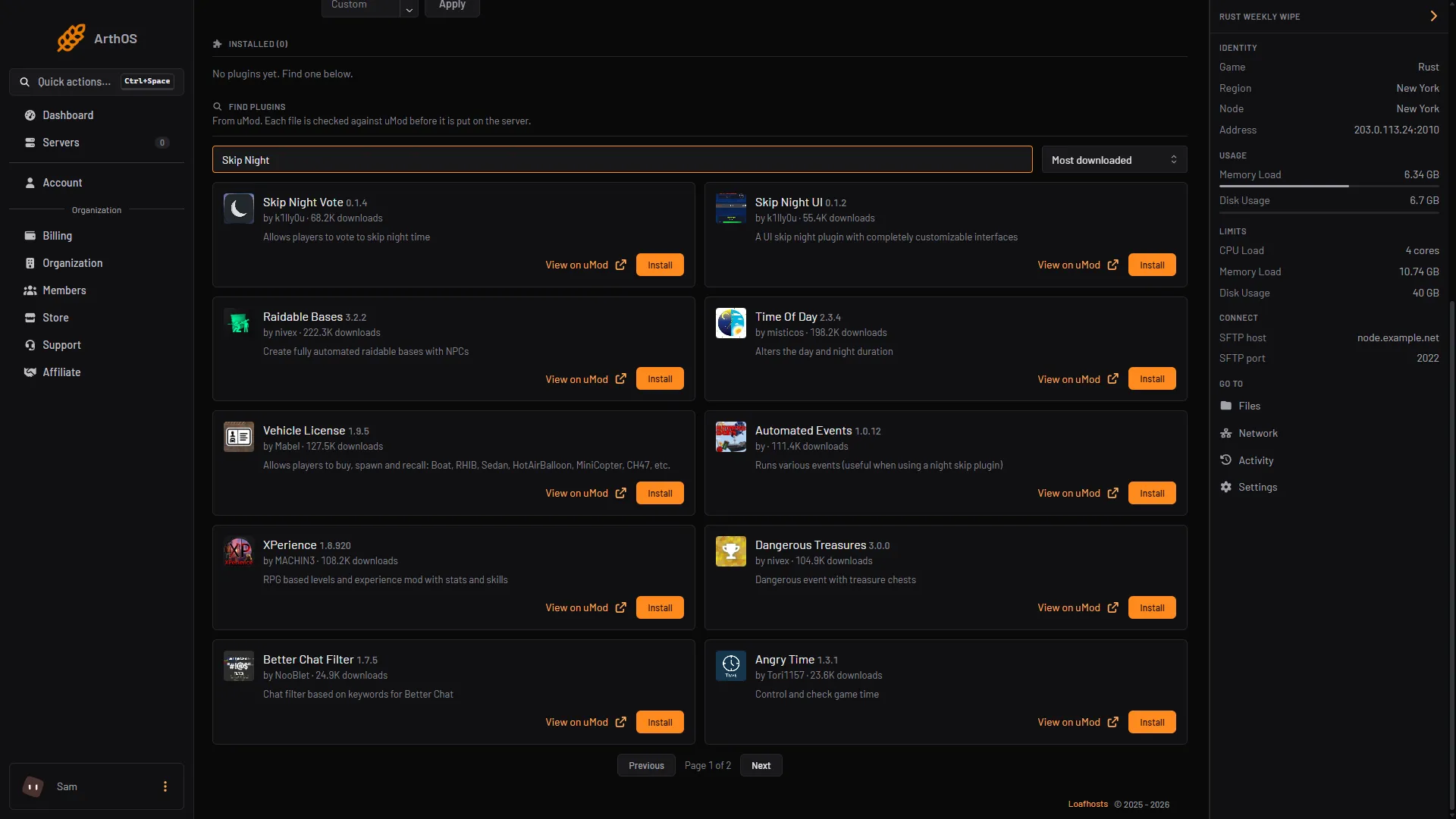
- Search uMod
- Skip Night Vote card
- Install
- Look at its row under Installed. It should say LOADED. If it says NOT LOADED, read the Console for the reason.
- Press Config on the row to open
SkipNightVote.json. Config appears once the plugin has loaded and written its file. The settings are in the next section. - To let a moderator open and close votes, grant the permission in the Console tab, with no slash:
| Framework | Command |
|---|---|
| Oxide | oxide.grant user YourName skipnightvote.admin |
| Carbon | c.grant user YourName skipnightvote.admin |
How the vote works
The plugin checks the in-game clock about every 20 seconds. When the time is between TimeToOpen and TimeToSet, it opens a vote and tells everyone in chat. A vote lasts a few minutes. If enough players have voted by then, the clock is set to TimeToSet and the plugin says so. If not, it says the vote was unsuccessful and waits before it can open another.
| Command | Who | What it does |
|---|---|---|
/voteday | Any player | Casts one vote while a vote is open. |
/nightvote open | skipnightvote.admin | Opens a vote now. |
/nightvote close | skipnightvote.admin | Cancels the open vote. |
/nightvote | skipnightvote.admin | Shows these two options. |
These are typed in game chat, with the slash. A vote ends early as soon as enough players have voted.
Settings
The file SkipNightVote.json has three groups. These are its defaults:
{
  "Messaging": {
    "DisplayCountEvery": 30,
    "MainColor": "<color=orange>",
    "MSGColor": "<color=#939393>"
  },
  "Options": {
    "RequiredVotePercentage": 0.4,
    "TimeToOpen": "18:00:00",
    "TimeToSet": "07:00:00"
  },
  "VoteTimers": {
    "VoteOpenTimer": 4,
    "TimeBetweenVotes": 5
  }
}| Setting | What it does |
|---|---|
RequiredVotePercentage | The share of players who must vote, as a fraction. 0.4 means 40%. It is applied to the players online when the vote opens, with a minimum of one vote. With 10 players online, 4 votes are needed. |
TimeToOpen | The in-game time the nightly vote may start. |
TimeToSet | The in-game time the clock is set to when the vote passes. It also ends the voting window. |
VoteOpenTimer | How many minutes a vote stays open. |
TimeBetweenVotes | How many minutes to wait before another vote can open. |
DisplayCountEvery | How often, in seconds, the vote count is broadcast. -1 broadcasts it after every vote. |
Keep the file valid JSON, save it, then press Reload on the plugin row. Settings are read when the plugin loads.
Check that it works
- In game chat, type
/nightvote open. This needsskipnightvote.admin, or use the server console. - Everyone should see the vote message. Type
/voteday. You should see “You have voted to skip night”. - If enough players voted, the plugin says the vote was successful and the sky turns to morning.
What it costs your server
The plugin’s page gives no figure for its cost. Its source file checks the clock about every 20 seconds; no setting changes that. Not checked as of 11 October 2026: the load that adds.
Skip Night UI
Skip Night UI is a second plugin by the same author. It adds a vote window on screen, and it also uses /voteday. Its admin permission is skipnightui.admin, and its admin commands are /voteday open and /voteday close. Its newest uMod release is also from August 2018. Do not run both at once, because they share the /voteday command.
By hand
Download SkipNightVote.cs from its uMod page and upload it to oxide/plugins (Oxide) or carbon/plugins (Carbon). The settings file is SkipNightVote.json in oxide/config or carbon/configs. After editing it, reload with oxide.reload SkipNightVote or c.reload SkipNightVote in the console.
If it does not work
/votedaysays there is no vote open. It is not betweenTimeToOpenandTimeToSet, or a vote just ended andTimeBetweenVoteshas not passed. Open one with/nightvote open./votedaysays nothing. You have already voted in this vote. The plugin does not reply a second time.- The vote never passes.
RequiredVotePercentageis a fraction, so a value of40is far too high. Use0.4. - The plugin says NOT LOADED, or errors on load. It is an old plugin. Read the Console from the start of the server for the reason. See plugins not loading after a Rust update.
- Night does not end after a successful vote. Another plugin may be setting the time. Check your other time plugins.
Settings and commands come from the plugin’s source file on uMod. Not checked in game as of 11 October 2026. Hosting Rust? See the Rust page.
Sources: umod.org: Skip night vote, umod.org: SkipNightVote.cs, umod.org: Skip night ui, umod.org: SkipNightUI.cs, umod.org: Permissions, umod.org: Configuration