






Stack Size Controller is a free plugin that changes how many of an item fit in one slot. When this guide was checked in October 2026, version 4.1.3 installed on a Carbon server but did not load: its row said NOT LOADED, and the Console held the reason. Check that first, because the settings below only matter once the plugin loads.
Your server needs Oxide or Carbon first (see install Oxide or Carbon).
In the ArthOS panel
- Open your server and choose Plugins. Under Find plugins, type
stack sizein Search uMod (1). On the Stack Size Controller card (2), choose Install (3). It installs at once, with no question.
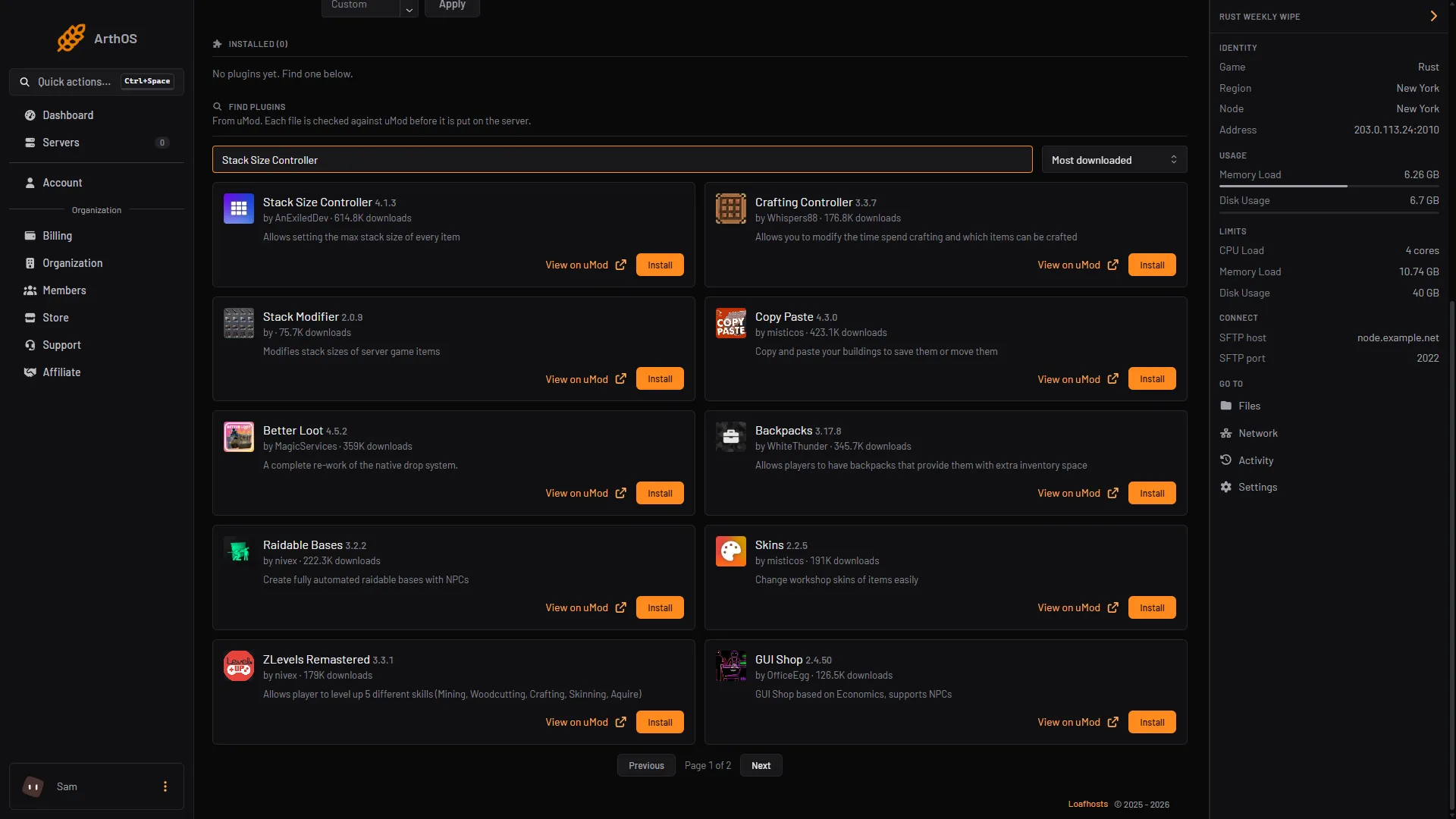
- Search uMod
- Stack Size Controller
- Install
- The panel says the plugin’s name and version are installed. On a running server Carbon and Oxide load a new plugin file by themselves, so the row may say LOADED within moments. The message “It loads when the server starts” shows whenever the panel has not yet seen the plugin load. Restart the server, then look at the plugin’s row under Installed. It shows a state: LOADED or NOT LOADED.
- If it says NOT LOADED and shows no reason, open the Console and read the lines from the start. In the October 2026 check they said “Threading compilation failed for” the plugin’s file. The framework’s plugin list reported no failure, which is why the Plugins page showed nothing under the row. The same steps are in plugins not loading after a Rust update.
The rest of this guide is for when the plugin does load.
How the settings work
The plugin writes a settings file the first time it loads. Every item it finds is listed in IndividualItemStackSize with its vanilla stack size. These are the settings you change:
| Setting | What it does |
|---|---|
GlobalStackMultiplier | Multiplies every item’s stack size by this number. |
CategoryStackMultipliers | One number per category (Resources, Ammunition, Food, Medical and others). Multiplies the stack sizes of the items in that category. |
IndividualItemStackMultipliers | A multiplier for one item, written as the item’s ID or shortname, for example "ammo.pistol": 20. It wins over the category multiplier. |
IndividualItemStackSize | The stack size of each item. The multipliers multiply these numbers, not the vanilla ones. |
AllowStackingItemsWithDurability | When on, items with durability, such as weapons, stack while at full durability. |
RevertStackSizesToVanillaOnUnload | When on, unloading the plugin puts the vanilla stack sizes back. |
A stack cannot go above 2,147,483,647. That is a limit of the game itself.
Change the numbers
Config appears once the plugin has loaded and written its settings file.
- On the Plugins page, press Config on the plugin. It opens the settings file in the file editor.
- Change the numbers. This example makes building items five times bigger and pistol ammo twenty times:
"CategoryStackMultipliers": {
  "Construction": 5.0,
  "Resources": 1.0
},
"IndividualItemStackMultipliers": {
  "ammo.pistol": 20
}
Only change the numbers. Keep the file valid JSON, with every comma and bracket in place, or the plugin will not load its settings.
- Save the file, then press Reload on the plugin.
Change a stack from the console
The plugin has console commands that edit the same settings file. Type them in the Console tab of the panel, with no slash:
| Command | What it does |
|---|---|
stacksizecontroller.itemsearch pic | Finds items by name and shows the vanilla and the current stack size. |
stacksizecontroller.listcategories | Lists the category names. |
stacksizecontroller.setstackcat resources 20 | Sets the multiplier of one category. |
stacksizecontroller.setstack wood 20x | Sets an item’s multiplier (20x) or its fixed stack size (2000). Write 20x without a space. |
stacksizecontroller.setallstacks 10 | Sets every category to the same multiplier. |
Players need the permission with the same name as the command to type it in game. Reload the plugin afterwards to be sure it uses the new numbers.
By hand
- Download
StackSizeController.csfrom its uMod page and upload it tooxide/plugins(Oxide) orcarbon/plugins(Carbon). In the ArthOS panel that is the Files tab. - Start the server and wait for the plugin to load. The settings file appears in
oxide/config(Oxide) orcarbon/configs(Carbon). - Edit
StackSizeController.json, then reload in the server console:oxide.reload StackSizeControlleron Oxide,c.reload StackSizeControlleron Carbon.
If it does not work
- The row says NOT LOADED with no reason. Read the Console from the start of the server. See plugins not loading after a Rust update.
- The plugin loads but nothing changed. Check that you changed the right category, then reload the plugin after every edit.
- Stack sizes went back to vanilla.
RevertStackSizesToVanillaOnUnloadreturns them whenever the plugin is unloaded. Reload it and check its state. - An item is not in the file. The plugin adds items it has not seen before and prints a note in the console. Check the console after a game update.
- A gather rate is wrong, not a stack. Stack size and gather rate are separate; see Rust gather rates.
Hosting Rust? See the Rust page.
Sources: raw.githubusercontent.com: README.md, umod.org: Stack size controller, umod.org: Configuration, carbonmod.gg: Oxide porting, api.carbonmod.gg: Commands.json