






The first layer a Squad server loads depends on how it picks layers. With player voting, set First layer in the vote settings. With a fixed rotation, the server starts at the top of the list only when Shuffle the rotation on start is off. A new server has it on. A layer is one map and game mode, such as Al Basrah AAS.
This only affects the first layer after a start. Every layer after it is chosen the usual way.
In the ArthOS panel
When players vote
A new server uses voting: the Layers page shows Players vote in use.
- Open the Layers page and check How the next layer is chosen says Players vote.
- Open Config Editor and choose the
VoteConfig.cfgtab. - In the Modes group, find First layer. It is described as the layer the server starts on: a layer name from the Players page’s layer list, or empty. Type the layer ID, for example
Narva_RAAS_v1. Find IDs in the Layers browser. - Save, then restart the server. The first layer is read when the server starts.
Leave First layer empty to use Squad’s own choice.
When the server follows a rotation
The rotation is the list on the Layers page, played in order (In order) or shuffled (Shuffled). It starts at the top only when Shuffle the rotation on start is off. Two settings decide where it starts:
- Shuffle the rotation on start in the Map rotation group of the Config Editor (
Server.cfg). A new server has it on, so the rotation shuffles at start and does not begin at the top. Offworld describes it as: should the map and layer rotation be randomised at start? - First layer on the Startup page (box 1 in the picture below). It has three values:
NONE: start at the top of the rotation. This is the default.FIRST: pick a random first layer.ALWAYS: pick randomly at every layer change.
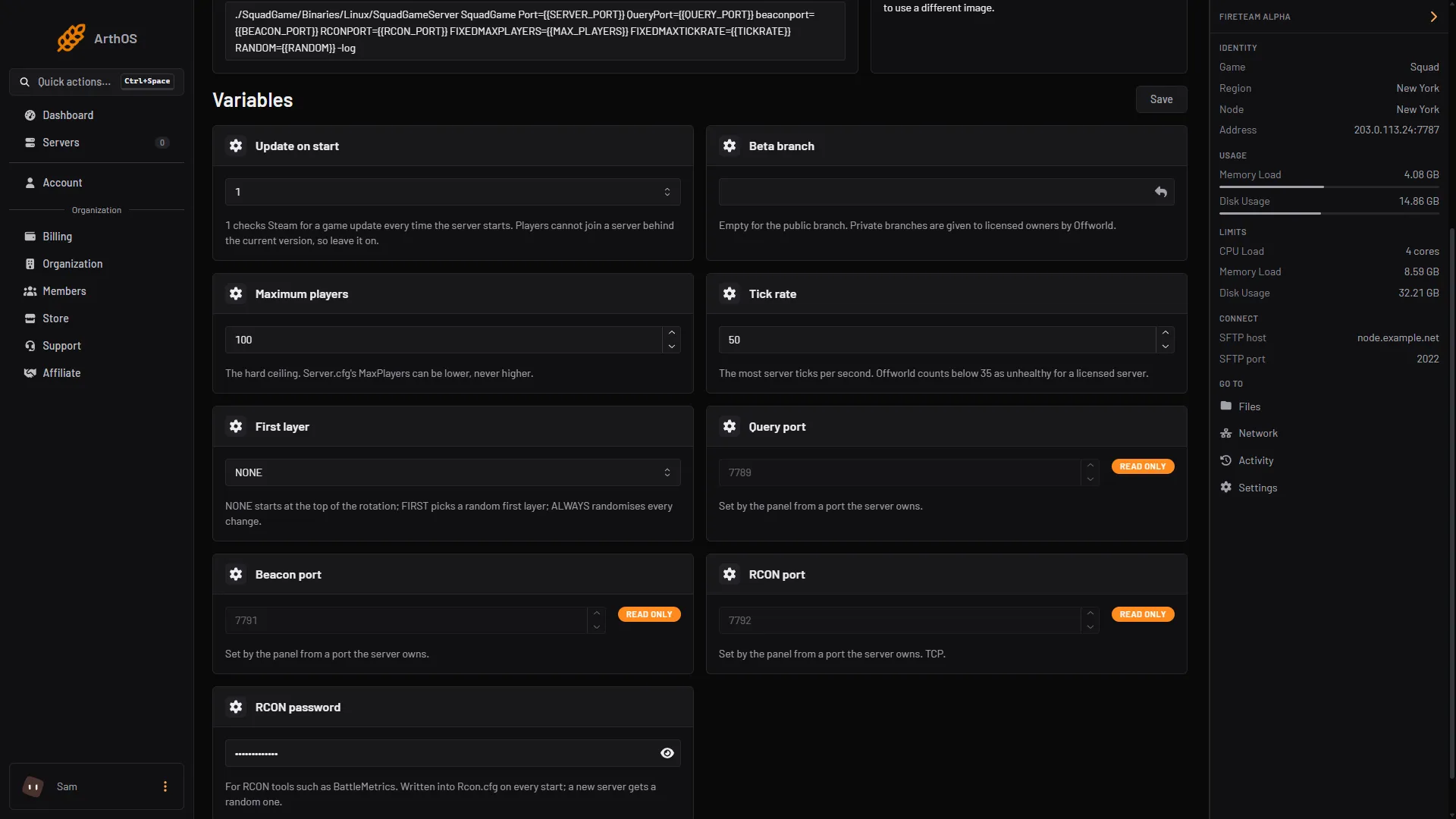
- First layer, set to NONE
Change a Startup value, then restart the server. This value is passed to the game when it starts.
By hand
- Voting: set
FirstLayer=inSquadGame/ServerConfig/VoteConfig.cfg. Offworld says this layer is loaded each time the server starts. - Rotation: set
RandomizeAtStart=trueinServer.cfg, or start the server withRANDOM=NONE,RANDOM=FIRSTorRANDOM=ALWAYSon the command line.
Restart the server after a change. See Offworld’s Server Configuration page.
If it does not work
- The server still starts on the same layer. You changed a setting but did not restart. Restart the server.
- First layer is ignored. Check the layer ID is spelled exactly as in the browser, and that the layer is in the list the server offers.
- You are using a rotation, and the Config Editor row does nothing.
VoteConfig.cfgbelongs to voting. For a rotation, use Shuffle the rotation on start or the Startup value. - You want a layer from a mod. The layer must appear in the Layers browser. Start the server to see it.
More about the game: Squad servers.
Sources: squad.fandom.com: Server Configuration, store.steampowered.com: 393380