






Squad config files use layer IDs, such as AlBasrah_AAS_v1. The name players see in game, “Al Basrah AAS v1”, will not work there. The Layers page lists every layer your server offers and shows the ID of each one you add.
Layer, level and ID
Offworld uses these words:
- A level is a map, such as Al Basrah. Its ID has no spaces:
AlBasrah. - A layer is one way to play a level: the game mode, the flags, the time of day. “Al Basrah AAS v1” and “Al Basrah Insurgency v1” are two layers of one level.
- A layer ID is the name the files use. It reads as map, mode and version, joined by underscores, for example
Narva_RAAS_v1. Some end in an extra part, such as_CL.
Offworld’s own files say it: lists “use Layer ID names, which is different from UI display names”.
In the ArthOS panel
The server must be running. The server itself reports the layers it has, so mod layers appear too. On 10.6.1 a stock server offers 233 layers on 24 maps.
- Open Layers.
- In Layers on this server, type in Search maps and layers (box 1 in the picture below). Layers are grouped by map.
- To see only one game mode, choose its chip (box 2): All modes, AAS, RAAS, Invasion, Territory Control, Insurgency, Destruction, Skirmish, Seed or Fireteam. Choose All modes to clear it.
- Choose Add beside a layer. It lands in the list you are editing, and that row shows the layer’s ID under its name.
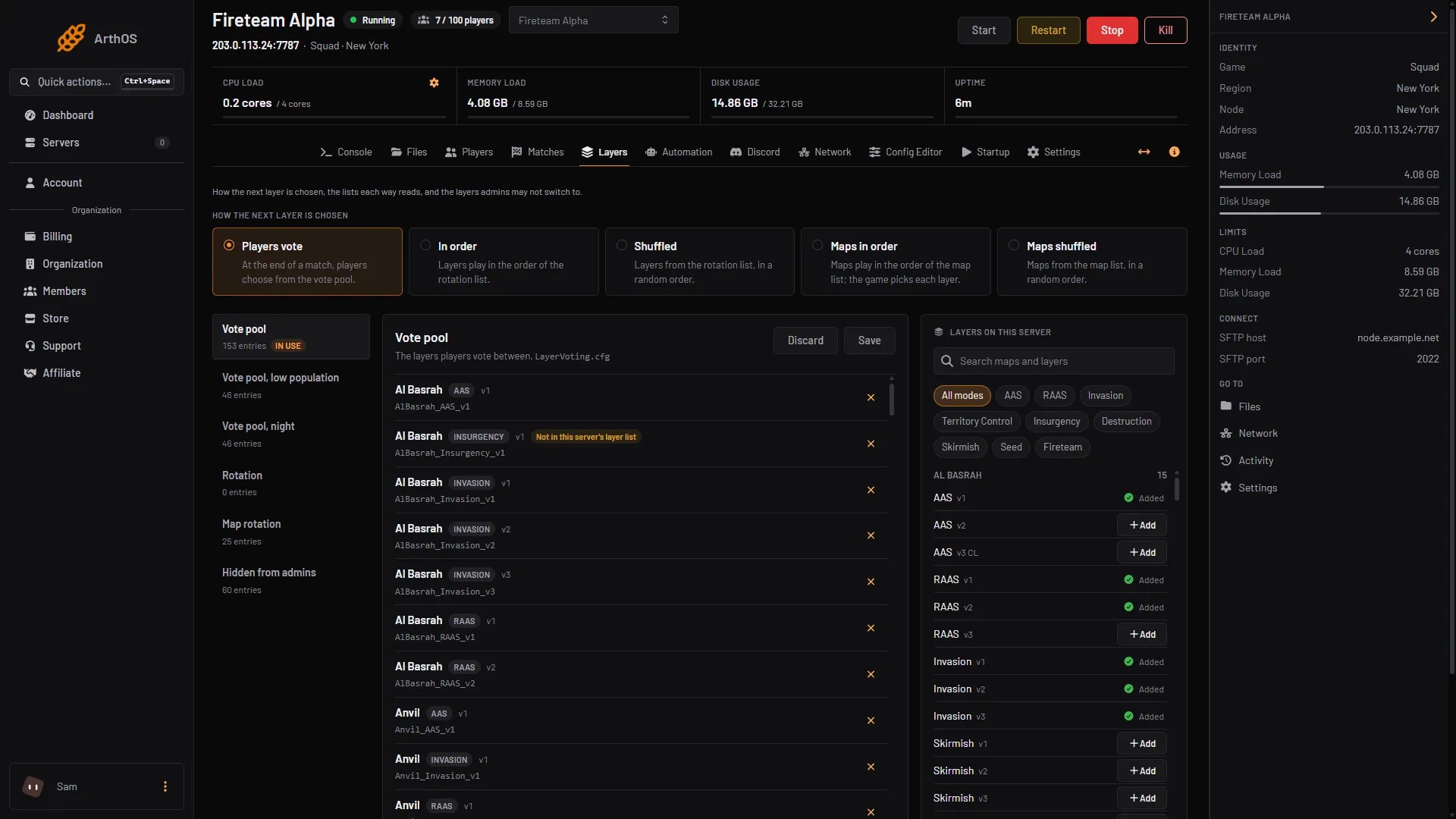
- Search maps and layers
- Game mode chips
To add a layer when you already have its ID, type it in Add by ID under a list, for example AlBasrah_AAS_v1. A row that the server does not list is marked Not in this server’s layer list. Some stock entries show this, because Offworld’s own lists still name layers that were removed.
The Players page has its own picker for Choose a layer, with a search. It uses the same list.
By hand
Send ListLayers to the game from an RCON tool (see Squad RCON). The panel asks the game this way to fill its browser. Maps have their own command, ListLevels. The Console Type a command… box on the server does not answer these commands, so do not use it.
You can also read IDs in the stock lists in SquadGame/ServerConfig/: LayerVoting.cfg, LayerRotation.cfg and ExcludedLayers.cfg.
If it does not work
- The browser is empty. It says to start the server. Start it and open the page again. The list is kept for about ten minutes, so a new mod layer can take a little while to show.
- A layer is refused as “not a layer this server offers”. The ID is misspelled, or you typed a display name. Copy the ID from the browser.
- A name with spaces saved wrongly. In a rotation, the first word is read as the ID and the rest as factions. Use the ID.
More about the game: Squad servers.
Sources: squad.fandom.com: Server Configuration, squad.fandom.com: Server Administration, store.steampowered.com: 393380