






A layer is one map in one game mode, for example Gorodok_RAAS_v1. You can load a new one two ways: Set as next plays it after the current match, and Change now ends the match and loads it straight away. Both work from the Players page while the server is running.
A faction is one of the armies that fight in a match, such as CAF or RGF. A layer is the map and game mode a match is played on. The layer list shows what your server offers.
In the ArthOS panel
- Open your server and choose Players.
- Open Choose a layer (1) and search by map or mode. The list is what the running server offers, so start the server first.
- Pick a layer, then choose one of:
- Set as next (2). The current match carries on. When it ends, the server loads your layer. The panel then shows “Next: ” and the layer name. When none is set it says “Next layer: not set”.
- Change now (3). The panel asks “Change to” the layer “now?” and explains that the match ends at once and everyone loads the new layer. Confirm only when nobody minds losing the round.
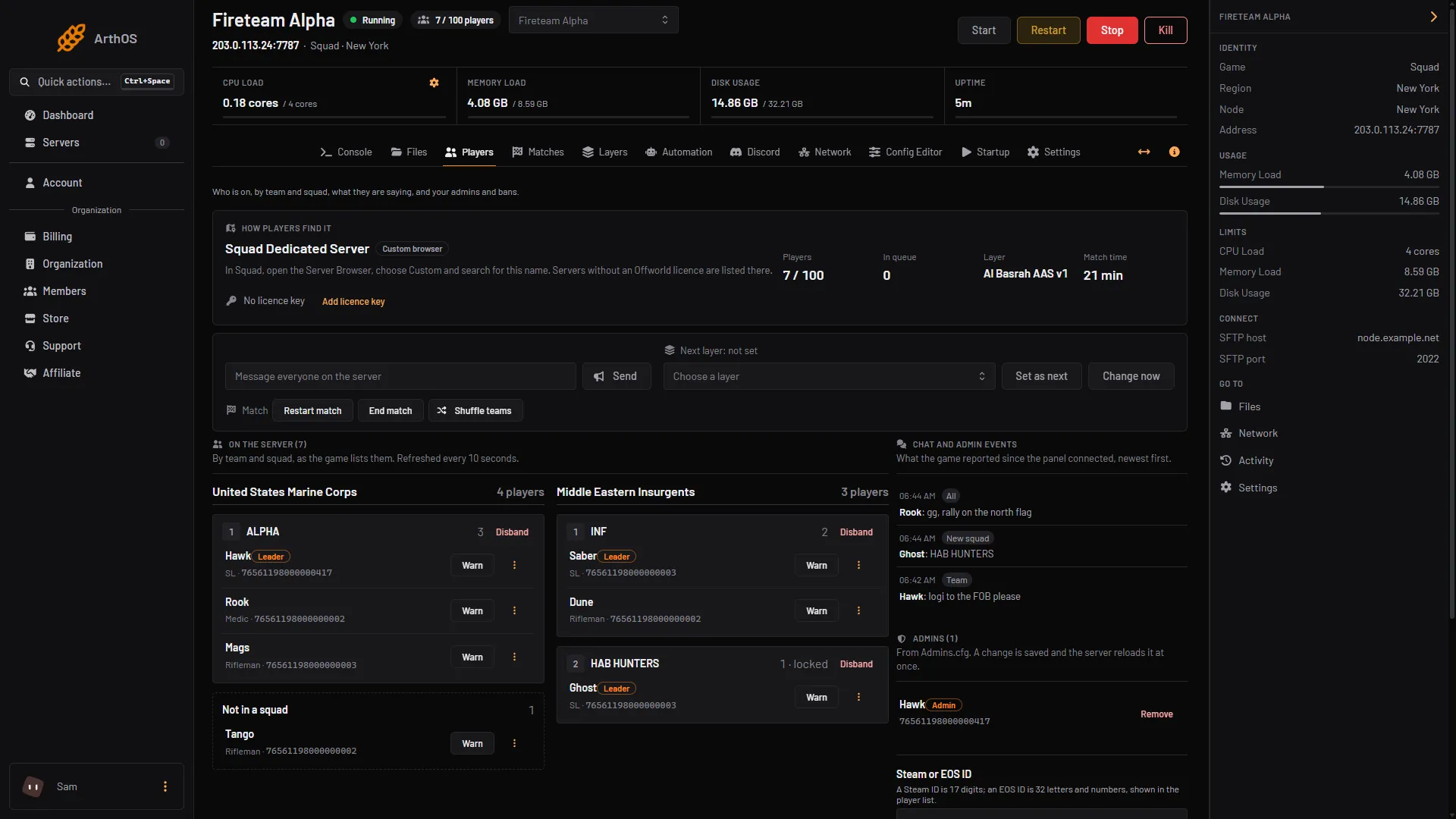
- Choose a layer
- Set as next
- Change now
You need the game control permission on the server. Without it the panel says “Changing the match needs the game control permission.”
Setting a next layer cancels the vote
If your server uses Players vote, setting a next layer skips the end-of-match vote. Offworld’s wiki says the voting stage will not start and the server moves to the layer you set. To bring the vote back, clear the next layer with AdminClearNextLayer. The panel has no button for that, so send it over RCON.
By hand
Send these commands over RCON. They need admin rights.
AdminChangeLayer <layer>changes to the layer now. No vote happens.AdminSetNextLayer <layer>sets the layer that loads after this match.AdminSetNextLevel <map>sets the next map and lets the game pick the layer.AdminClearNextLayerremoves a next layer, when layer voting is on.
To choose factions, add their short names after the layer. Team 1 is first:
AdminSetNextLayer AlBasrah_AAS_v1 CAF RGF
AdminSetNextLayer AlBasrah_AAS_v1 CAF+Mechanized RGF
The first line plays CAF against RGF. The second gives CAF its Mechanized unit. Faction IDs are listed in ExcludedFactions.cfg. Offworld’s wiki says a layer cannot have the same faction on both sides, or two factions from the same alliance, except independents. A setup that breaks this is changed to a valid second team.
If it does not work
- The layer list is empty. The server is stopped, so the panel cannot ask it what it offers. Start the server.
- Your layer is missing from the list. It may be hidden from admins. See hidden layers and factions.
- The buttons are grey. Your role lacks the game control permission.
- The vote still starts. The next layer was cleared, or it was never set. Set it again.
More about the game: Squad servers.
Sources: squad.fandom.com: Server Configuration, store.steampowered.com: 393380