






If a licence key does not take, the fix is usually one of three things: restart the server, check License.cfg holds only the key, or bring the server in line with Offworld’s rules. The game, not the panel, decides whether a key is accepted. The panel only writes the file.
Start with the basics in Squad server licence if you have not added a key yet.
What the panel shows
On the Players page, the licence key card reads Licence key added when License.cfg holds anything other than blank lines and comments. That means a key is in the file. It does not mean Offworld accepted it.
To see what the game thinks, look at How players find it on the same page. It shows Licensed when the running game reports a licence, and Custom browser when it does not. This only shows while the server is running.
Check these, in order
1. Restart the server
The key is read at start. After Save key the panel says: “Licence key saved. Restart the server to use it.” Restart, wait until the server is running again, and look at How players find it.
2. Look at License.cfg
- Open Files and open
SquadGame/ServerConfig/License.cfg. - It should hold your key and nothing odd. Lines that start with
//are comments and do not count. - The key should be exactly as Offworld sent it. No extra characters at the start or end.
Saving through the licence key card writes the file for you and replaces what was there. If you edited it by hand and are unsure, paste the key again on the Players page with Replace.
If the panel refuses a key, it says either “that is longer than a licence key” or “a licence key has no control characters”. Copy the key again from the email as plain text.
3. Check the rules Offworld sets
A key can be in place while the server breaks a rule. In the Config Editor, open Server.cfg and look at these:
- Show in the server browser must be on. A licensed server must stay visible.
- Join password must be empty. A licensed server may not have a password.
- The Required for licensed servers group must keep Offworld’s values: Kick for teamkills on, No kit needed for vehicles off, and Community admin access, Developer profiling and QA access all on. The editor locks these while a key is present, so a locked row is normal. If you edited
Server.cfgby hand, check them in the file. - Server name must not contain “Official”.
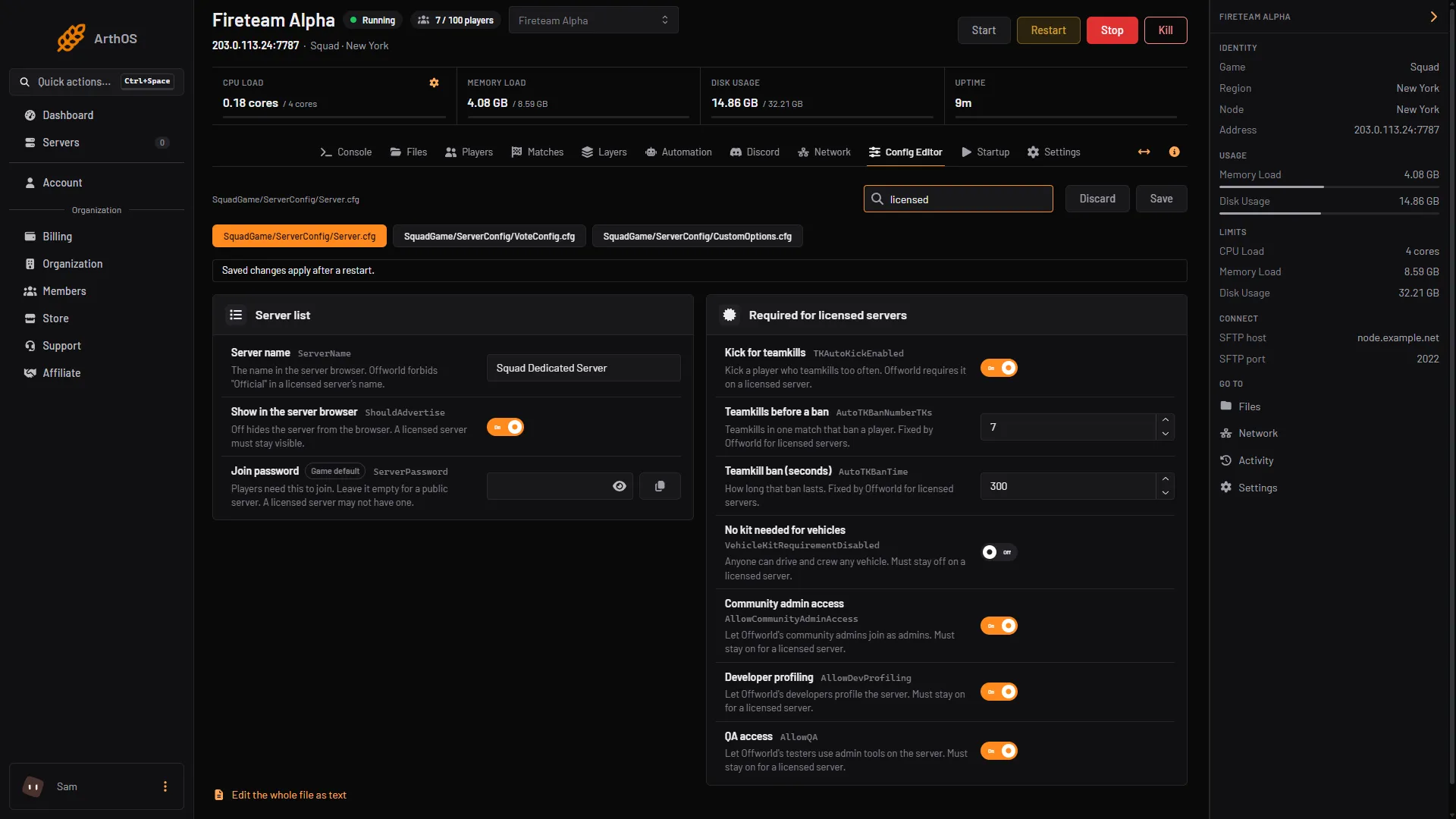
- Required for licensed servers
4. Check the licence itself
Offworld may have asked you to reapply. The policy says to reapply when you change hardware, hosting provider or server ownership, or when Offworld asks. A revoked or changed licence needs a new key from the licence portal. Offworld also contacts you by the email on your application. Questions go to [email protected], or ask in the Offworld Hosting Discord.
5. Check the server is healthy
Offworld watches tick rate. Above 35 is green, and below 15 puts the licence at risk. The Matches page shows tick rate. If it is low, see the Squad performance guides.
If you want to start over
On the licence key card choose Remove, confirm, restart, and add the key again. Removing the key makes the server run unlicensed after the next start, and it is listed under Custom until a valid key is back.
Still under Custom?
Search for the name under the Custom tab, not the main tab. An unlicensed server always shows there. If the card says Licence key added and the game still reports no licence after a restart, contact Offworld with your server name and licence ID. They can see what they issued, and the panel cannot.
More about the game: Squad servers.
Sources: squad.fandom.com: Server licensing, squad.fandom.com: Server Configuration, joinsquad.com: Server licensing and administration policies