






A Squad licence is a key from Offworld Industries, the makers of Squad. A server with a licence is listed on the main tab of the in-game server browser. A server without one is listed under Custom. Both kinds are real servers and both can be joined. Offworld decides who gets a licence, and it is not guaranteed. Offworld and the panel spell it licence.
Licensed or unlicensed
| Licensed | Unlicensed | |
|---|---|---|
| Where players find it | Primary tab of the Server Browser | Custom tab |
| Needs a key | Yes, from Offworld | No |
| Mods and custom rules | Offworld wants vanilla Squad files | Allowed |
| Join password | Not allowed | Allowed |
| Debug commands | Disabled | Available |
An unlicensed server still runs fully. RCON, admins, layers and mods all work.
What Offworld asks for
Read the Offworld hosting policies before you apply. The main points:
- At least 10 admins per server.
- Offworld developers and testers keep admin and debug access.
- The server stays public. No password and no hiding it from the browser.
- No “official” in the server name, and no name that copies another licensed server.
- Hardware that meets Offworld’s list: 8 GB of RAM at least, and no virtual machines, VPS or cloud hosting unless the hardware is dedicated or self-hosted.
- Squad’s wiki also says servers of fewer than 60 slots are not licensed. The policy page does not repeat this, so ask Offworld if you are unsure.
- The server keeps a healthy tick rate. Offworld counts above 35 as green and below 15 as at risk of losing the licence.
Say which Loafhosts plan you have when you apply; Offworld decides.
How to apply
- Go to the Offworld server licence portal.
- If you rent through one of Offworld’s hosting partners, choose that partner in the form. If you rent a dedicated server or own the hardware, do not pick a partner.
- Wait for Offworld’s answer. If you are approved, they email you a licence key.
In the ArthOS panel
- Open Players.
- Find the licence key card. It reads No licence key until you add one.
- Choose Add licence key.
- Paste the key into Licence key. The card says: “Paste the key Offworld sent you. It is saved to License.cfg and never shown again. The server uses it from its next start.”
- Choose Save key.
- Restart the server. The panel confirms with “Licence key saved. Restart the server to use it.”
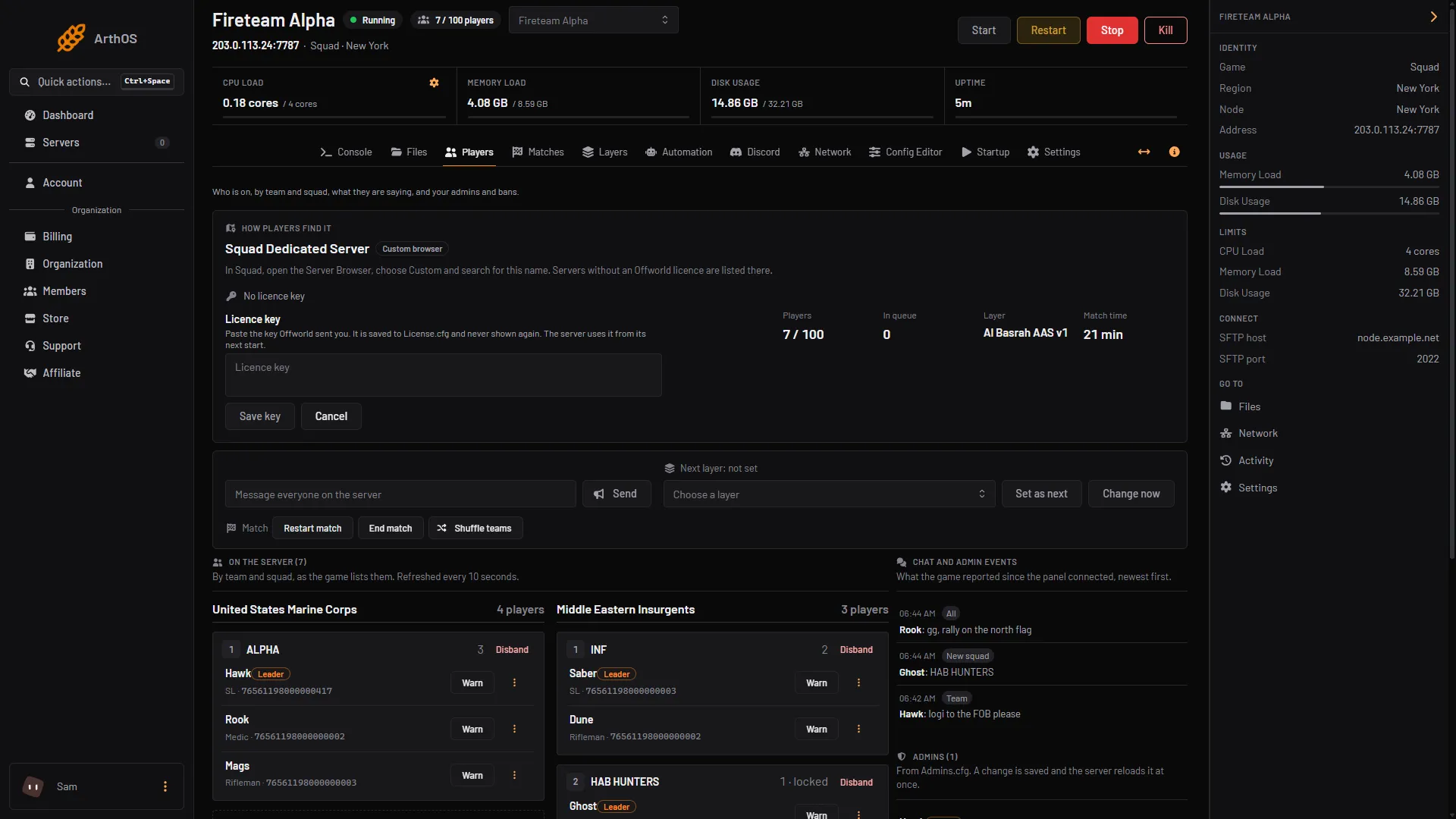
- Paste the key
- Save key
In the picture, box 1 is the key field and box 2 Save key.
Afterwards the card reads Licence key added. Choose Replace to paste a new key, or Remove to take the key out. Removing a key asks you to confirm. The server then runs unlicensed after its next start and is listed under Custom.
What changes in the Config Editor
While a key is in License.cfg, the Config Editor locks the settings Offworld fixes. They show “Fixed by Offworld while this server has a licence key.” They are:
- In the Required for licensed servers group: Kick for teamkills, Teamkills before a ban, Teamkill ban (seconds), No kit needed for vehicles, Community admin access, Developer profiling and QA access.
- Join password.
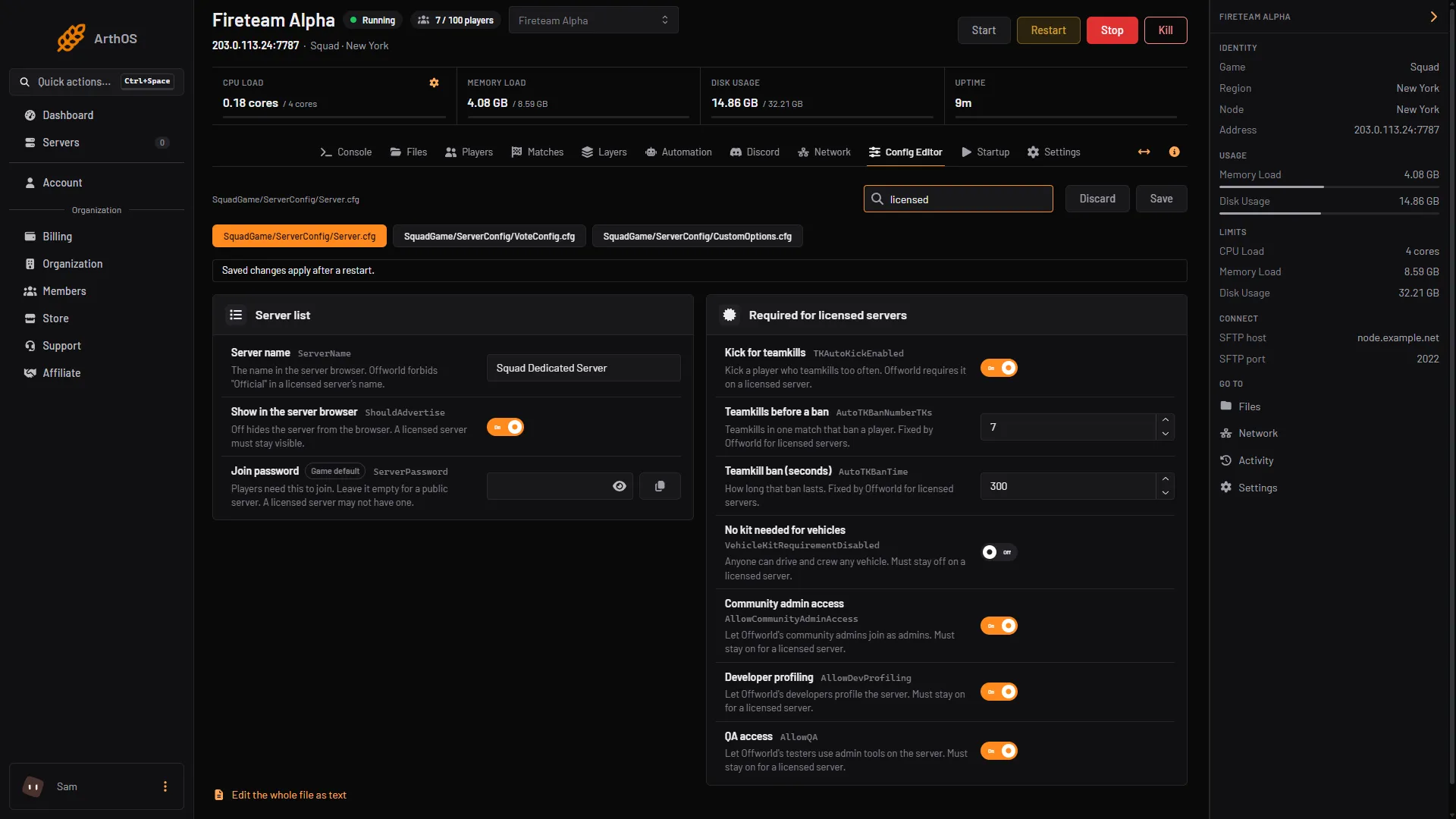
- Required for licensed servers
Other Server list rows have hints too. Server name warns that Offworld forbids “Official” in a licensed server’s name. Show in the server browser warns that a licensed server must stay visible.
Check that it worked
On Players, How players find it shows Licensed once the running game reports a licence, and Custom browser if it does not. In game, search for the server name in the main Server Browser tab.
By hand
- Edit
SquadGame/ServerConfig/License.cfgin Files. - Paste the key from Offworld’s email. Lines that start with
//are comments. - Restart the server.
Squad’s wiki says the licence “comes in the form of a key which needs to be listed in the server’s config files.” It does not describe the file’s format beyond that.
If it does not work
See Squad licence key not working.
More about the game: Squad servers.
Sources: squad.fandom.com: Server licensing, squad.fandom.com: Server Configuration, joinsquad.com: Server licensing and administration policies, license.offworldindustries.com