






The Config Editor shows three of your Squad server’s settings files as a form: Server.cfg, VoteConfig.cfg and CustomOptions.cfg. Change a value, choose Save, then restart. Saved changes apply after a restart.
Where to find it
Open your server and choose Config Editor. Pick one of the three file tabs (1) at the top. The editor writes only the lines you changed. Your comments and the order of the file stay as they were.
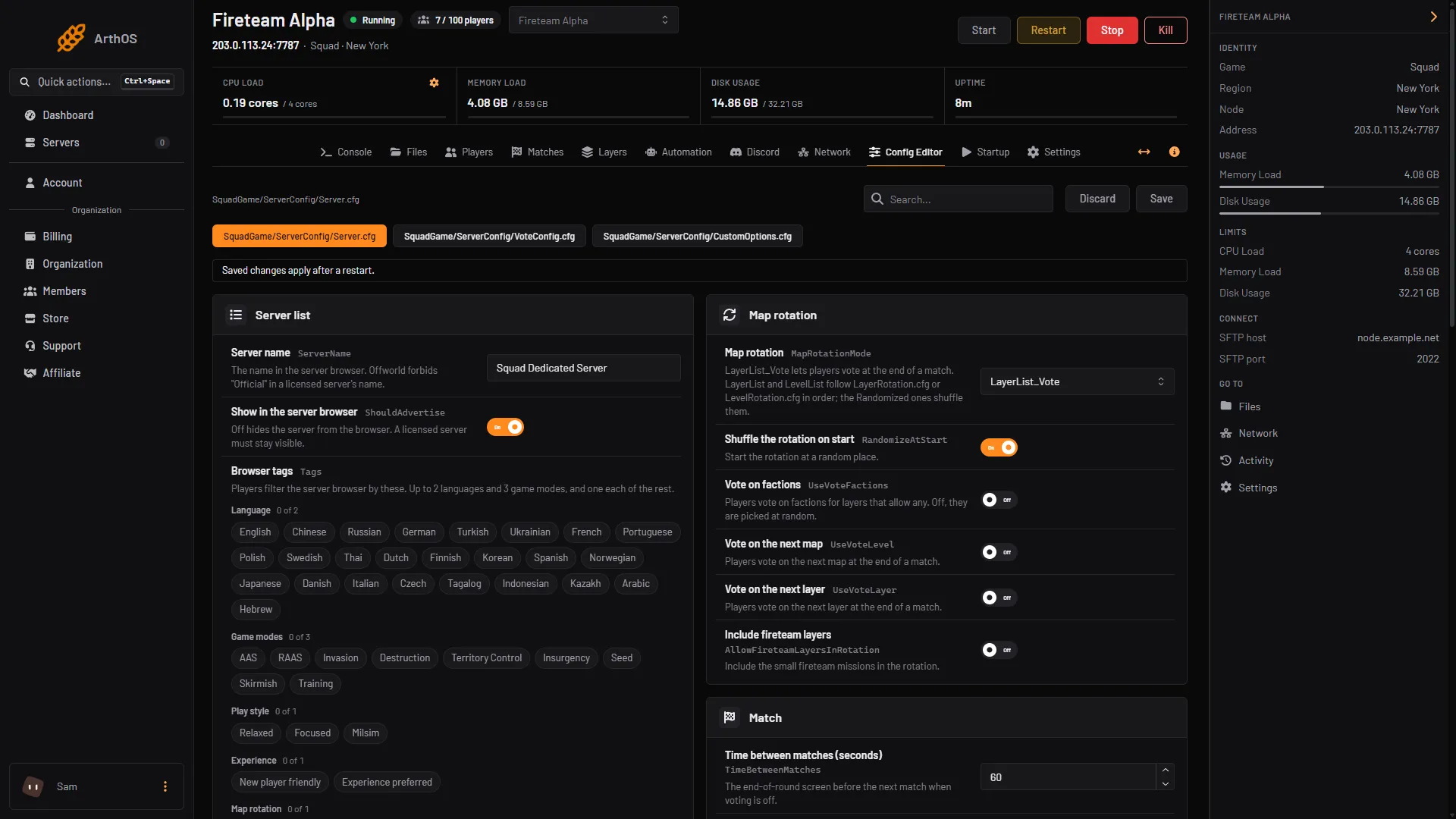
- Server.cfg, VoteConfig.cfg, CustomOptions.cfg
What each file holds
Server.cfg is the main file. Its rows are in groups:
- Server list: Server name, Show in the server browser, Browser tags, Rules and Join password.
- Players: Maximum players, Reserved slots, Queue size and Time to finish joining (seconds).
- Teams: Allow team changes, Keep teams balanced, Most players between teams, Rejoin a squad after a kick (seconds) and Alliance rules.
- Map rotation: Map rotation (how the next layer is chosen), Shuffle the rotation on start and the three votes: Vote on factions, Vote on the next map and Vote on the next layer. Offworld’s wiki does not tie these three older rows to
LayerList_Vote, so do not count on them to turn the end-of-match vote on. - Match: the times between matches and for staging, and Turn off vehicle claiming.
- Messages: Server messages every (seconds).
- Recording: Record demos and Players may record.
- Required for licensed servers: the teamkill rules, and the access Offworld needs on a licensed server.
- Advanced: LAN only.
VoteConfig.cfg holds the end-of-match vote: how many layers and factions players choose from, how long the vote lasts, how many rounds before a map or layer repeats, First layer and Night time. It only matters when Map rotation is LayerList_Vote.
CustomOptions.cfg holds the seeding rules, such as Seeding until and Go live at. Squad ships these commented out. The editor offers each at its default and writes the line when you set it.
Rows that cannot be changed
- Set on Startup. A row set from Startup is greyed out and says “Set on the Startup page, which writes it on every start.” with an Open Startup link. Maximum players on Startup is a ceiling. The Maximum players row here can be lower, never higher. Tick rate and First layer are also on Startup, not in these files.
- Locked by a licence. Once you add a licence key, the Required for licensed servers rows and Join password are locked. They read “Fixed by Offworld while this server has a licence key.” Offworld’s rules do not allow a password on a licensed server. See Squad server licence.
- Game default. A row tagged Game default is not in your file yet. The game uses its own value until you save one.
Rows that are not in the editor’s list appear under Other settings. Rows most servers never change are under Advanced, with Show them.
What the editor does not edit
Rcon.cfg. The panel owns it and writes the RCON port and password on every start. Change the password with RCON password on Startup.- Admins and bans. Use the Players page, which edits
Admins.cfgandBans.cfg. - The rotation and vote lists, and exclusions. Use the Layers page. See Squad layer voting.
- The licence key. Add it on the Players page. It is saved to
License.cfgand never shown again. - Anything else. Files such as
MOTD.cfgandServerMessages.cfgare edited in Files, inSquadGame/ServerConfig.
Saving
Discard and Save are at the top right. Discard drops your changes. Save writes them. A banner reminds you: “Saved changes apply after a restart.” At the bottom, Edit the whole file as text opens the file itself.
If it does not work
- Save is not available. Your role may allow you to see the settings but not change them.
- A row is greyed out. It is locked. The text under it says why.
- Your tags are refused. Choose only from the list. Squad drops tags it does not know.
- A new setting from an update is missing. Offworld does not add new keys to files you already have. Add the line in Files.
More about the game: Squad servers.
Sources: squad.fandom.com: Server Configuration, squad.fandom.com: Server licensing, joinsquad.com: Server licensing and administration policies