






Open the Matches page on your Squad server. It lists the matches the panel has seen, newest first, and shows a killfeed of the current match. You do not set anything up. The panel reads the server’s log file as the match is played.
In the ArthOS panel
- Open your server.
- Choose Matches.
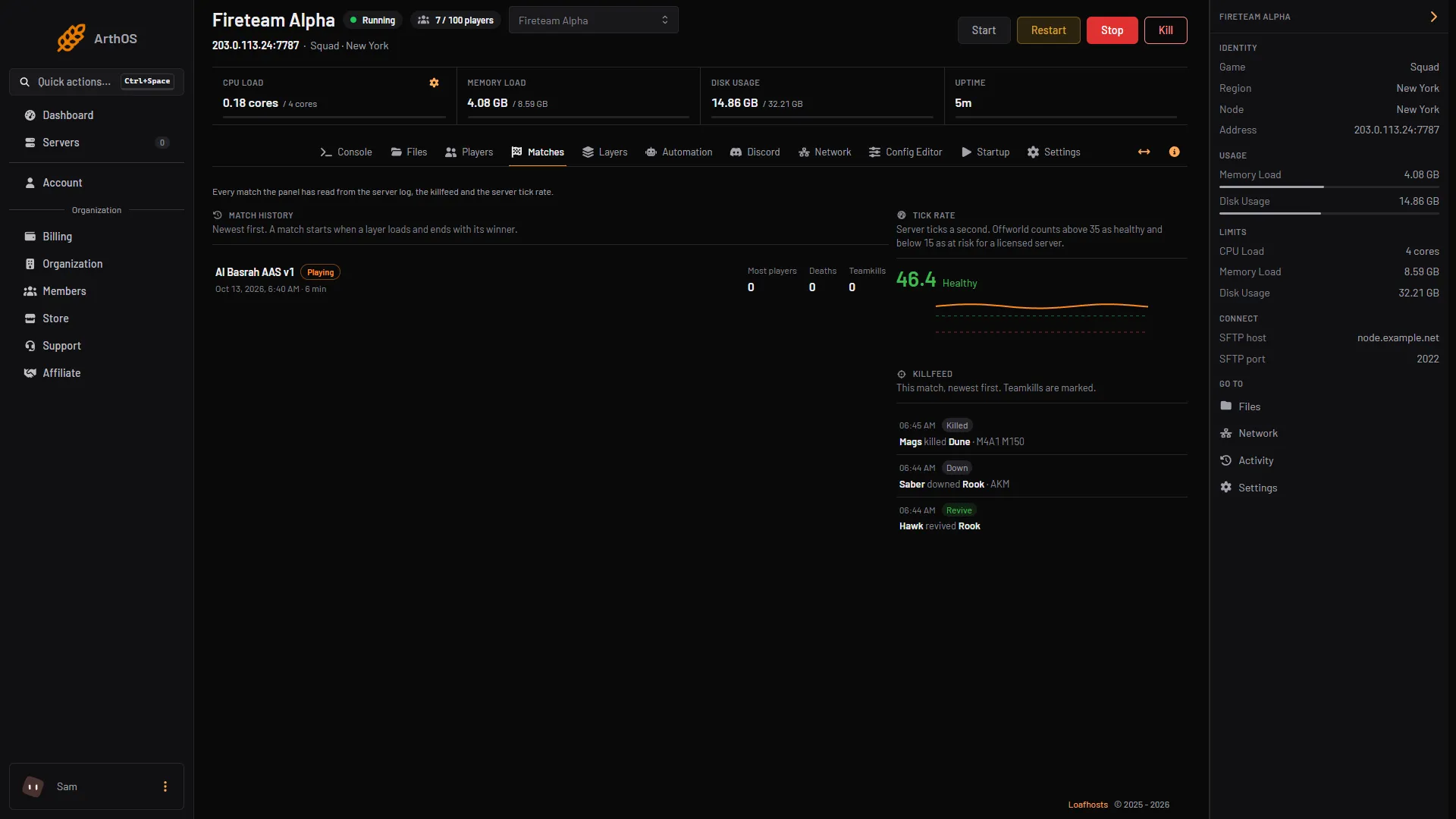
- Match history
- Tick rate
- Killfeed
The page has three parts, numbered in the picture: Match history (box 1), Tick rate (box 2) and Killfeed (box 3).
Match history
A match starts when a layer loads and ends with its winner. Each row shows:
- The layer, the date and time it started, and how long it ran, for example “42 min”.
- Playing beside the match that is still running.
- Who won, for example “USA won”, with the final tickets for the two teams. If the round ended without a result, the row says “Ended without a result”.
- Most players: the highest number of players on the server during the match.
- Deaths: how many players died.
- Teamkills: how many times a player downed a teammate.
The page lists the latest 30 matches. If it says “No matches yet”, the server has not loaded a layer while the panel was watching. Matches appear after the next layer loads.
Killfeed
The Killfeed shows the current match, newest first. Each line has the time, what happened, who did it, to whom, and the weapon when the log names one:
- Down: a player was downed. Squad downs a player first, and they die when they give up or are finished off.
- Killed: a player died.
- Revive: a player was revived.
- Teamkill: a downed player was on the same team as the one who downed them. These lines are marked.
If the log does not say who did it, the line shows “Someone”.
Tick rate
The same page shows the server’s tick rate, which is how many ticks a second the server runs. Offworld counts above 35 as healthy and below 15 as at risk for a licensed server. The server reports it while players are on, so the card says it has not reported yet if the server is empty.
By hand
The panel reads the server’s own log, so you can read it too. Open Files and then SquadGame/Saved/Logs/SquadGame.log. The lines you want are the wounded, died and round-winner lines. There is no match table to read by hand; you have to read the log.
If it does not work
- “No matches yet”. The server must load a layer while the panel is watching. Change the layer or wait for the next match.
- The killfeed is empty. It only shows the current match. Kills from before the page loaded may not be there.
- The Tick rate card is empty. The server has no players. It reports its tick rate while players are on.
- A match shows “Ended without a result”. The panel did not see a winner for it. This happens, for example, when the server is stopped before the round ends.
More about the game: Squad servers.
Sources: store.steampowered.com: 393380