






Squad can use a second vote pool when few players are on. Fill it with Seed and Skirmish layers, which suit a quiet server. When the server has more players than your limit, voting goes back to the normal pool. This works only when players vote for the next layer.
How it works
At the end of a match, the server counts players. If there are fewer than the limit you set, the vote uses the low population pool. Otherwise it uses the normal vote pool. Offworld suggests the low pool for Seed and Skirmish layers.
If the low pool is empty, the server always uses the normal pool.
In the ArthOS panel
- Start the server. The layer browser needs a running server, because the server itself lists the layers it has.
- Open Layers. Check How the next layer is chosen says Players vote. A new server already does.
- In the Layer lists section, open Vote pool, low population. A new server has 46 entries in it.
- In the browser (Layers on this server), choose Seed or Skirmish under Show one game mode. Use Search maps and layers to find a map.
- Choose Add beside each layer you want. Choose Save.
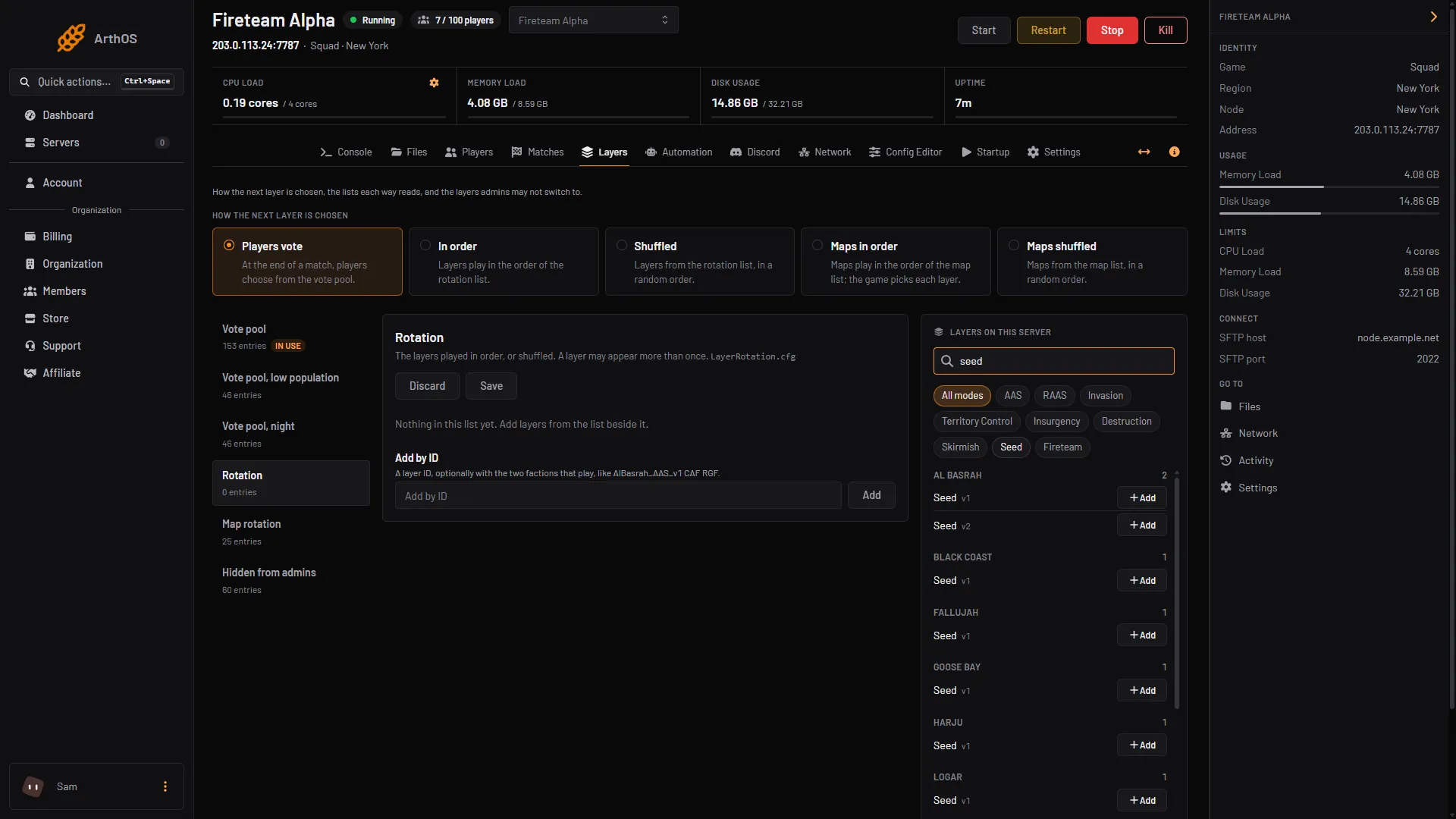
The server offers Seed layers on these maps: Al Basrah, Black Coast, Fallujah, Goose Bay, Harju, Logar, Manicouagan, Mutaha, Pacific Proving Grounds, Sanxian, Sumari and Tallil. Skirmish layers have IDs such as AlBasrah_Skirmish_v1 and Tallil_Skirmish_v3. Layer names come from the server, so you see the layers your version offers.
If you know a layer’s ID, type it in Add by ID. See find layer IDs.
Then set the limit:
- Open Config Editor and choose the
VoteConfig.cfgtab. - Set Low population below. With fewer players than this, the vote uses the low population pool. Offworld’s default file ships with 30.
- Save. The vote reads the files when the next match is chosen.
Seeding has its own rules, for example how many players start a live match. See Squad seeding.
By hand
- The pool is
SquadGame/ServerConfig/LayerVotingLowPlayers.cfg. One layer per line. - The limit is
LowPlayerCountThresholdinVoteConfig.cfg. Server.cfgmust haveMapRotationMode=LayerList_Vote. Offworld’s wiki says this turns the end-of-match layer vote on, and a freshly installed server uses it. A new Loafhosts server does too (the Layers page shows Players vote in use).UseVoteFactions,UseVoteLevelandUseVoteLayerare olderServer.cfgsettings, false in the stock file. The wiki does not tie them toLayerList_Vote, so this guide does not need them. If the vote does not show, they are one more thing to check. No real match end was watched for this guide.
Offworld notes that a server update with the validate option may restore LayerVotingLowPlayers.cfg. See the Server Configuration page.
If it does not work
- The low pool is never used. The mode must be Players vote. The count is taken at the end of a match, so a change shows from the next vote.
- The browser says to start the server. It lists layers only while the server runs. Start it, or use Add by ID.
- The vote shows normal layers while the server is quiet. Check Low population below is higher than the number of players, and that the low pool has layers in it.
- At night the vote uses another pool.
LayerVotingNight.cfgis for night hours. Offworld says the low population pool wins over it when both apply.
Sources: squad.fandom.com: Server Configuration, store.steampowered.com: 393380