






Tags decide which filters in the Squad server browser list your server. Rules are short notes shown on your server’s card. You pick both in the Config Editor, under Server.cfg, in the Server list group.
What players see
- Tags are the filters a player uses in the server browser: language, game mode, play style, experience and map rotation. A player who filters on a tag only sees servers that carry it. A server with no tags still shows up when the player does not filter on that kind of tag, so tag every kind that fits.
- Rules are shown on your server’s preview card, so players know them before they join. They are not used as filters.
Set them in the panel
- Open Config Editor and choose
Server.cfg. - In the Server list group, find Browser tags (the box in the picture below). Pick from each list.
- Find Rules below it and pick the rules you enforce.
- Choose Save, then restart the server so the game reads the file again.
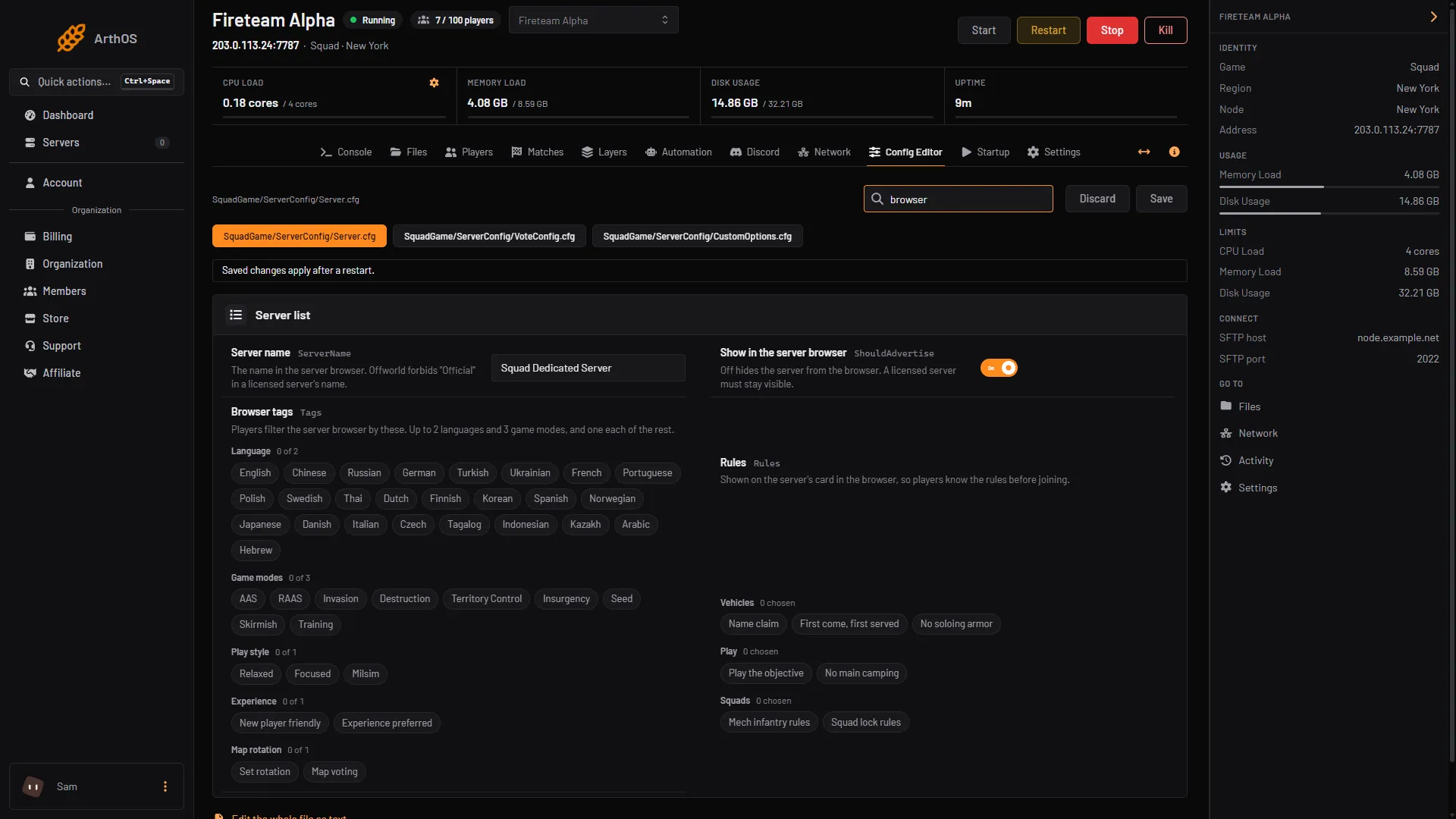
- Browser tags
The limits for tags
The game sets these limits:
| Kind | You can pick |
|---|---|
| Language | Up to 2 |
| Game modes | Up to 3 |
| Play style | 1 |
| Experience | 1 |
| Map rotation | 1 |
The options are:
- Language: 25 languages, from English and Chinese to Hebrew. Pick the ones your players speak.
- Game modes: AAS, RAAS, Invasion, Destruction, Territory Control, Insurgency, Seed, Skirmish and Training.
- Play style: Relaxed, Focused or Milsim.
- Experience: New player friendly or Experience preferred.
- Map rotation: Set rotation or Map voting.
The panel only offers tags the game knows. Anything else in the line is dropped by the game.
The rules you can show
- Vehicles: Name claim, First come, first served, No soloing armor.
- Play: Play the objective, No main camping.
- Squads: Mech infantry rules, Squad lock rules.
A rule is only a note. It does not change how the game works, so you still enforce it yourself with your admins.
By hand
Tags and rules are two lines in SquadGame/ServerConfig/Server.cfg, with the words separated by spaces:
Tags=language_en mode_aas mode_raas playstyle_relaxed exp_experience maprot_voting
Rules=rule_vehicle_name_claim rule_play_objective rule_no_main_camping
If it does not work
- Your server is missing from a filter. It does not carry that tag. Add the tag for that kind and restart.
- A tag you typed by hand has no effect. The game only keeps its own tags. Check the spelling against the list above, for example
language_enandmode_raas. - Your server does not show in the browser at all. See Squad server not listed.
Sources: squad.fandom.com: Server Configuration, store.steampowered.com: 672881728134580384