


Open Crashes on your Squad server. It lists every start of the server from the last 30 days (up to 60 starts) and says how each one ended. If the machine ended the server for memory, the page says so and tells you what to change.
The page is read only. Nothing on it changes the server. You need a role that may read files to see the tab.
Read the list
The list is on the left, newest start first. Each row shows how the start ended and when.
| Outcome | What it means |
|---|---|
| Running now | The server is up and players can join. |
| Starting | The server is still starting. |
| Ran and stopped | The server started, ran and stopped normally. |
| Crashed | The game stopped without being asked to. |
| Stuck, restarted | The game stopped answering, so the panel restarted it. |
| Failed to start | The server never got as far as letting players in. |
| Ended early | The log ends without saying how the server stopped. |
A stop you ask for, from the panel or a schedule, reads Ran and stopped. A row can also show “out of memory” or “exit” and a number beside the time.
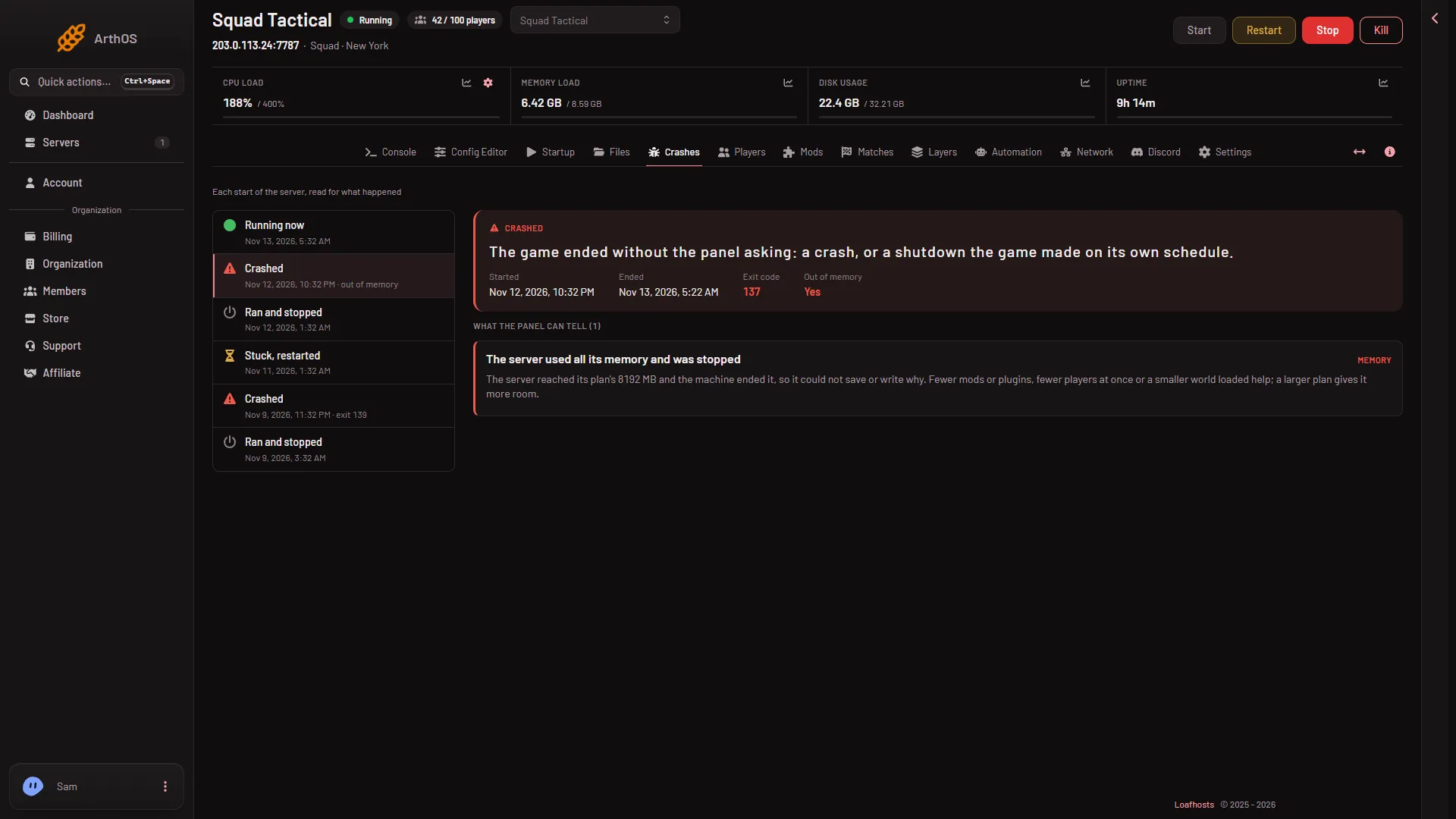
- A crashed start
- Out of memory
- What the panel found
Choose a row (1) to open it. The top shows Started, Ended, Exit code and Out of memory (2), which is Yes or No.
What the panel found
Under What the panel can tell (3) the page lists each cause it found.
- The server used all its memory and was stopped. The server reached its plan’s memory limit and the machine ended it. It could not save or write why. Fewer mods, fewer players at once or a smaller load help. A larger plan gives it more room.
- The game ended on its own with code 137. The machine killed it, for memory or because it would not stop in time.
- The game ended on its own with code 139. The game crashed inside itself. A mod or a damaged file is the usual cause.
- Any other code. The last lines of the console usually say why. The server was started again by itself.
- The server stopped answering. The panel saw it running but no longer answering, and restarted it.
Exit code 137 together with Out of memory: Yes is the usual signature of a memory kill. The game writes no error of its own in that case, so the panel’s note is the only record.
The last lines
Below the findings, the newest start shows the last lines of the console. An older start shows none, because the server’s container is made again at each start. If an older start matters, note its console lines before the next start. Its outcome and findings stay on the list.
What to do next
- Out of memory: Yes. Remove the mods you can do without, then restart. If it still happens, choose a larger plan. A chart icon beside Memory Load on the Console opens Resource History, which shows 30 days of memory against your limit.
- Crashed after a game update. A mod built for the old version is the first suspect. See crashes after an update.
- Crashed with code 139 and no recent change. Take off the last mod you added and start again.
If it does not work
- The list is empty. The panel says “The panel has no starts of this server in the last 30 days.” The server has not started in that time.
- The Crashes tab is missing. Your role cannot read files. Ask the server’s owner.
- A start says nothing more than how it ended. The panel’s records say no more than that. For the newest start, read the last lines of the console.
- The server keeps stopping with no crash listed. Check Ran and stopped rows. Someone, or a schedule, may have stopped it. A server nobody played on for a long while can also stop itself: see the Standby card on Settings.
More about the game: Squad servers.