









Open the World page, change the choices in Difficulty, tick Clear the world’s own modifiers first, choose Save and restart the server. Without the tick, a modifier you left out can still be on. More about the game: Valheim servers.
Why a world holds on to its modifiers
A Valheim world stores the modifiers it was started with. If you start a world with raids off and later leave raids out of the settings, the world does not go back to normal. It keeps raids off. Leaving something out is not the same as choosing Normal.
The game’s own console has the same limit. Its wiki says the only way back to normal is to reset all modifiers together.
In the ArthOS panel
- Open the World page.
- Look at the line “The world remembers: …” in the Difficulty card. It lists the modifiers the world holds now.
- Set Preset (1), or set the rows one by one: Combat, Death penalty, Resources, Raids and Portals. Use the switches for the rest. Each list starts with As the preset sets it.
- Tick Clear the world’s own modifiers first (2). The server then clears what the world held and applies exactly what is on this page, at every start.
- Choose Save (3).
- Choose Restart at the top of the server page. The game reads the difficulty only when it starts.
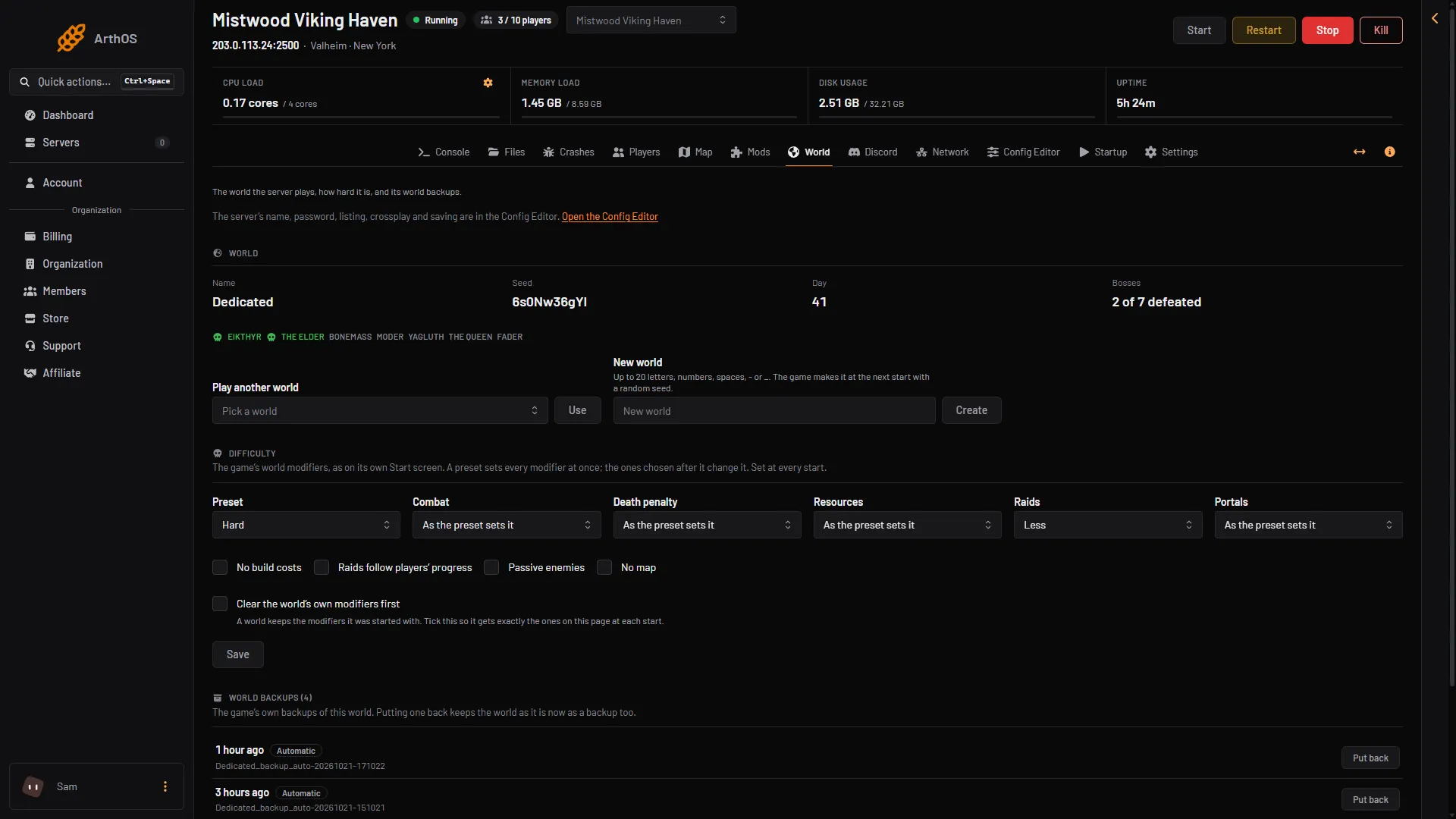
- Preset
- Tick this box
- Save
After the restart, open the page again. “The world remembers” now shows the new list.
What a preset does
A preset sets many modifiers at once, and anything you choose after it changes the result. A preset replaces earlier modifiers. The list holds None, Normal, Casual, Easy, Hard, Hardcore, Immersive and Hammer (no build costs). What each one sets is not listed anywhere we read, so read “The world remembers” after the next start.
Before you change a world with progress
See world backups. Tell your players before the restart.
By hand
The game’s start options do the same. -preset hard sets a preset, and -modifier raids none sets one modifier after it. The values for each modifier are in the game’s own manual in the server folder. The panel puts -resetmodifiers first when you tick the box. That option is not in the game’s manual, so on your own server use the wiki’s in-game reset instead: setworldpreset default resets every key set by setworldmodifier. Not checked on 1.0.20 as of 21 October 2026: that command.
If it does not work
- Nothing changed. The server has not restarted since you saved.
- A setting you did not choose is still on. Tick Clear the world’s own modifiers first, save, restart.
- The page says the start line holds modifiers it does not show. Saving on this page replaces them.
Sources: valheim.fandom.com: World Modifiers